Rock, Paper, Scissors is an excellent beginner project for learning C++ programming fundamentals. This classic hand game teaches essential programming concepts including user input validation, random number generation, conditional logic, and function design.
In this comprehensive tutorial, you’ll learn how to build a fully functional Rock, Paper, Scissors game in C++ that plays against the computer. Whether you’re a student working on your first C++ project or a developer brushing up on fundamentals, this guide provides everything you need to create, understand, and enhance the game.
What You’ll Learn:
- How to implement game logic using conditional statements
- Modern C++ random number generation techniques
- Input validation and error handling
- Function decomposition and code organization
- Best practices for beginner-friendly C++ projects
How the Rock, Paper, Scissors Game Works
Before diving into the code, let’s understand the game rules:
Game Rules:
- Rock beats Scissors – Rock smashes scissors
- Scissors beats Paper – Scissors cut paper
- Paper beats Rock – Paper wraps rock
- Same choice – Results in a tie
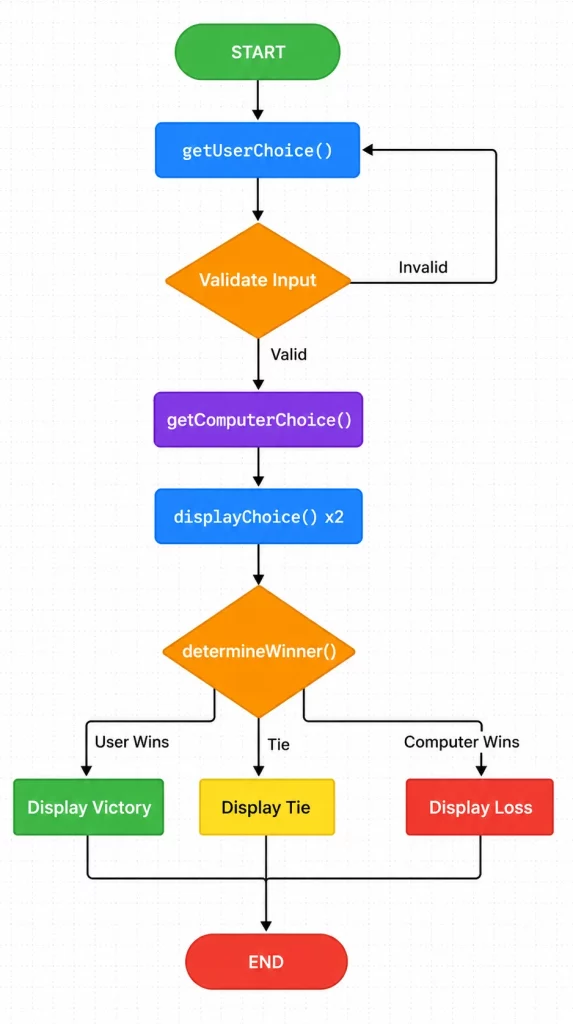
Game Flow:
- Player chooses rock, paper, or scissors
- Computer randomly selects its choice
- Compare both choices to determine the winner
- Display the result
Project Overview
This C++ program implements a single-round Rock, Paper, Scissors game with the following features:
Core Features:
- Interactive menu system for player input
- Input validation to ensure valid choices
- Random computer opponent using modern C++ random generation
- Clear win/loss/tie determination
- User-friendly console output
Technical Components:
- Constants for game options
- Separate functions for different responsibilities
- Clean, readable code structure
- Proper random number seeding
Complete C++ Source Code
Here’s the complete, modernized C++ source code for the Rock, Paper, Scissors game. This version uses modern C++11 random number generation instead of the deprecated rand() function.
#include <iostream>
#include <random>
#include <string>

using namespace std;

// Constants for game options
const char ROCK = 'r';
const char PAPER = 'p';
const char SCISSORS = 's';

/**
 * Generates a random computer choice using modern C++ random engine
 * @return char representing computer's choice (r, p, or s)
 */
char getComputerChoice() {
    // Modern C++ random number generation
    random_device rd;
    mt19937 gen(rd());
    uniform_int_distribution<> distrib(1, 3);

    int choice = distrib(gen);

    if (choice == 1) return ROCK;
    if (choice == 2) return PAPER;
    return SCISSORS;
}

/**
 * Gets and validates user input
 * @return char representing user's valid choice (r, p, or s)
 */
char getUserChoice() {
    char choice;

    cout << "\n╔════════════════════════════════════╗" << endl;
    cout << "║   Rock, Paper, Scissors Game!   ║" << endl;
    cout << "╚════════════════════════════════════╝" << endl;
    cout << "\nChoose your weapon:" << endl;
    cout << "  (r) Rock" << endl;
    cout << "  (p) Paper" << endl;
    cout << "  (s) Scissors" << endl;
    cout << "\nYour choice: ";
    cin >> choice;

    // Convert to lowercase for case-insensitive input
    choice = tolower(choice);

    // Input validation loop
    while (choice != ROCK && choice != PAPER && choice != SCISSORS) {
        cout << "\n❌ Invalid choice! Please enter r, p, or s: ";
        cin >> choice;
        choice = tolower(choice);
    }

    return choice;
}

/**
 * Displays the choice in readable format
 * @param option The choice character to display
 */
void displayChoice(char option) {
    switch(option) {
        case ROCK:
            cout << "🪨 Rock";
            break;
        case PAPER:
            cout << "📄 Paper";
            break;
        case SCISSORS:
            cout << "✂️  Scissors";
            break;
    }
}

/**
 * Determines and announces the winner based on game rules
 * @param userChoice Player's choice
 * @param computerChoice Computer's choice
 */
void determineWinner(char userChoice, char computerChoice) {
    cout << "\n━━━━━━━━━━━━━━━━━━━━━━━━━━━━━━━━━━━━" << endl;
    cout << "           RESULT" << endl;
    cout << "━━━━━━━━━━━━━━━━━━━━━━━━━━━━━━━━━━━━" << endl;

    // Check for tie first
    if (userChoice == computerChoice) {
        cout << "🤝 It's a tie! Both chose ";
        displayChoice(userChoice);
        cout << endl;
        return;
    }

    // Determine winner based on game rules
    bool userWins = false;
    string reason;

    if (userChoice == ROCK && computerChoice == SCISSORS) {
        userWins = true;
        reason = "Rock smashes Scissors";
    }
    else if (userChoice == SCISSORS && computerChoice == PAPER) {
        userWins = true;
        reason = "Scissors cut Paper";
    }
    else if (userChoice == PAPER && computerChoice == ROCK) {
        userWins = true;
        reason = "Paper wraps Rock";
    }
    else if (computerChoice == ROCK && userChoice == SCISSORS) {
        reason = "Rock smashes Scissors";
    }
    else if (computerChoice == SCISSORS && userChoice == PAPER) {
        reason = "Scissors cut Paper";
    }
    else if (computerChoice == PAPER && userChoice == ROCK) {
        reason = "Paper wraps Rock";
    }

    if (userWins) {
        cout << "🎉 YOU WIN! " << reason << "!" << endl;
    } else {
        cout << "💻 COMPUTER WINS! " << reason << "!" << endl;
    }
}

/**
 * Main game function
 */
int main() {
    char userChoice, computerChoice;

    // Get player choice
    userChoice = getUserChoice();

    // Display player choice
    cout << "\nYou chose: ";
    displayChoice(userChoice);
    cout << endl;

    // Get and display computer choice
    computerChoice = getComputerChoice();
    cout << "Computer chose: ";
    displayChoice(computerChoice);
    cout << endl;

    // Determine and display winner
    determineWinner(userChoice, computerChoice);

    cout << "\nThanks for playing! 🎮" << endl;

    return 0;
}
Sample Output:
╔════════════════════════════════════╗
║   Rock, Paper, Scissors Game!      ║
╚════════════════════════════════════╝

Choose your weapon:
  (r) Rock
  (p) Paper
  (s) Scissors

Your choice: r

You chose: 🪨 Rock
Computer chose: ✂️  Scissors

━━━━━━━━━━━━━━━━━━━━━━━━━━━━━━━━━━━━
           RESULT
━━━━━━━━━━━━━━━━━━━━━━━━━━━━━━━━━━━━
🎉 YOU WIN! Rock smashes Scissors!

Thanks for playing! 🎮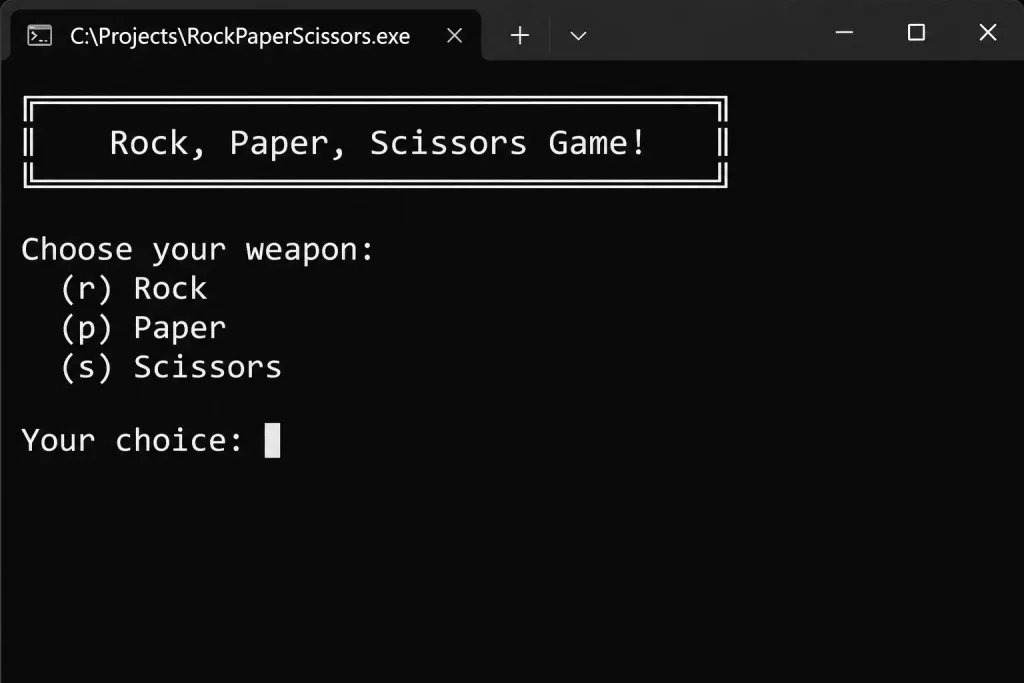
Code Explanation
Let’s break down each component of the program to understand how it works.
Constants Definition
const char ROCK = 'r';
const char PAPER = 'p';
const char SCISSORS = 's';
Using named constants instead of magic characters makes the code more readable and maintainable. If you ever need to change the choice characters, you only modify them in one place.
Modern Random Number Generation
random_device rd;
mt19937 gen(rd());
uniform_int_distribution<> distrib(1, 3);
int choice = distrib(gen);
This code uses C++11’s <random> library, which is significantly better than the old rand() function:
random_deviceprovides true random seedingmt19937is the Mersenne Twister engine (high-quality random numbers)uniform_int_distributionensures uniform distribution between 1 and 3
Why this matters: The old rand() function with srand(time(0)) has poor randomness quality and is predictable. Modern C++ random is cryptographically stronger and produces better random sequences.
Input Validation
while (choice != ROCK && choice != PAPER && choice != SCISSORS) {
    cout << "\n❌ Invalid choice! Please enter r, p, or s: ";
    cin >> choice;
    choice = tolower(choice);
}
The validation loop ensures the program only accepts valid inputs. The tolower() function makes input case-insensitive, improving user experience.
Winner Determination Logic
The determineWinner() function implements the game rules systematically:
- Check for tie first – Most efficient approach
- Use boolean flag – Cleaner than nested if-else statements
- Store reason string – Reusable for both outcomes
- Clear win/loss messaging – Better user experience
Step-by-Step Implementation Guide
Follow these steps to build your own Rock, Paper, Scissors game:
Step 1: Set Up Your Project
- Create a new C++ file (e.g.,
rock_paper_scissors.cpp) - Add the necessary include statements
- Define constants for game choices
Step 2: Implement Computer Choice Generator
Create a function that generates random choices:
- Use modern C++ random library
- Return one of three choices uniformly
- Ensure true randomness with proper seeding
Step 3: Create User Input Function
Build a function that:
- Displays menu options clearly
- Accepts user input
- Validates input in a loop
- Handles case-insensitive input
Step 4: Add Display Function
Create a helper function to:
- Convert choice characters to readable strings
- Make output user-friendly
- Optional: Add emojis for visual appeal
Step 5: Implement Game Logic
Write the winner determination function:
- Handle tie case first
- Implement all winning combinations
- Provide clear feedback messages
Step 6: Build Main Function
Connect all components:
- Get user choice
- Generate computer choice
- Display both choices
- Determine and announce winner
Step 7: Test Thoroughly
Test all scenarios:
- ✅ User wins (all 3 combinations)
- ✅ Computer wins (all 3 combinations)
- ✅ Tie (all 3 combinations)
- ✅ Invalid input handling
- ✅ Case-insensitive input
Modern C++ Best Practices
This implementation follows several important C++ best practices:
1. Use Modern Random Number Generation
Bad (Deprecated):
srand(time(0));
int num = rand() % 3 + 1;
Good (Modern C++):
random_device rd;
mt19937 gen(rd());
uniform_int_distribution<> distrib(1, 3);
int choice = distrib(gen);
2. Use Named Constants
Instead of using ‘r’, ‘p’, ‘s’ throughout code, define constants once and reference them.
3. Function Documentation
Add comments explaining what each function does, its parameters, and return values.
4. Input Validation
Always validate user input to prevent crashes or unexpected behavior.
5. Meaningful Function Names
Use descriptive names like determineWinner() instead of compare().
6. Separate Concerns
Each function has one clear responsibility:
- Getting input
- Generating choices
- Displaying output
- Determining winner
7. Use Switch Statements
For multiple conditional checks on the same variable, switch is cleaner than multiple if statements.
Common Mistakes to Avoid
Mistake 1: Missing Header Files
Problem: Using rand() without #include <cstdlib> and time() without #include <ctime>
Solution: Include all necessary headers or use modern <random> library.
Mistake 2: Incorrect Win Logic
Problem: Original code had this bug:
else if (uChoice == ROCK && cChoice == SCISSORS) {
    cout << "You Win! Paper wraps Rock."<< endl; // WRONG!
}
Solution: Ensure each winning message matches the actual scenario.
Mistake 3: Poor Random Seeding
Problem: Calling srand(time(0)) inside a function that’s called multiple times.
Solution: Either seed once in main() or use modern <random> library.
Mistake 4: No Input Validation
Problem: Accepting any input without validation crashes or causes unexpected behavior.
Solution: Implement validation loops as shown in the tutorial.
Mistake 5: No Return Statement
Problem: getComputerOption() in original code has no return for edge cases.
Solution: Always ensure functions return appropriate values for all code paths.
Game Enhancements and Variations
Once you’ve mastered the basic version, try these enhancements:
1. Best-of-N Rounds
Add a scoring system and play multiple rounds:
int userScore = 0, computerScore = 0;
const int ROUNDS = 5;

for (int i = 0; i < ROUNDS; i++) {
    // Play one round
    // Update scores
}
// Announce overall winner
2. Rock, Paper, Scissors, Lizard, Spock
Expand to the 5-choice variant made famous by “The Big Bang Theory”:
- Rock crushes Scissors and Lizard
- Paper covers Rock and disproves Spock
- Scissors cuts Paper and decapitates Lizard
- Lizard eats Paper and poisons Spock
- Spock vaporizes Rock and smashes Scissors
3. Play Again Feature
Add a loop to allow multiple games:
char playAgain;
do {
    // Game code here
    cout << "Play again? (y/n): ";
    cin >> playAgain;
} while (tolower(playAgain) == 'y');
4. Statistics Tracking
Track and display game statistics:
- Win percentage
- Most chosen option
- Longest winning streak
5. AI Opponent
Implement a smarter AI that:
- Tracks player patterns
- Adjusts strategy based on player history
- Uses probability-based selection
6. Graphical Interface
Upgrade to GUI using libraries like:
- SFML – Simple and Fast Multimedia Library
- Qt – Cross-platform GUI framework
- SDL – Simple DirectMedia Layer
Frequently Asked Questions
How do I compile and run this C++ program?
Using g++ compiler:
g++ -std=c++11 rock_paper_scissors.cpp -o rps
./rps
Using Visual Studio:
- Create a new C++ Console Application
- Copy the code into the main .cpp file
- Press F5 to build and run
Using online compilers:
Why use C++11 random instead of rand()?
The old rand() function has several problems:
- Poor randomness quality – Predictable patterns
- Not thread-safe – Issues in concurrent programs
- Platform-dependent – Different results on different systems
- Deprecated in modern C++ – Replaced by
<random>library
Modern C++11 random provides:
- Better randomness distribution
- Thread-safe random generation
- Configurable random engines
- Industry-standard algorithms (Mersenne Twister)
Can I use this code for my assignment?
Yes! This code is designed for educational purposes. Feel free to:
- Use it in coursework and assignments
- Modify and extend it
- Learn from the implementation
- Add your own enhancements
Academic integrity note: Understand the code before submitting. Be able to explain how it works.
How can I make the computer harder to beat?
Implement pattern recognition:
// Track user's last choice
static char lastUserChoice = ' ';

char getSmartComputerChoice() {
    if (lastUserChoice == ROCK) {
        return PAPER; // Counter user's pattern
    }
    // More sophisticated logic here
}
What’s the difference between this and the original code?
Key improvements:
- ✅ Modern C++11 random number generation
- ✅ Fixed bug in winner determination
- ✅ Added proper input validation with case-insensitive handling
- ✅ Improved code structure and readability
- ✅ Added comprehensive comments and documentation
- ✅ Better user interface with emojis and formatting
- ✅ Used switch statements where appropriate
- ✅ Included all necessary header files
Does this work on all operating systems?
Yes! This standard C++ code works on:
- ✅ Windows (Visual Studio, MinGW, Cygwin)
- ✅ macOS (Xcode, g++, clang++)
- ✅ Linux (g++, clang++)
The only platform-specific aspect is emoji rendering, which works on most modern terminals.
How do I add color to the console output?
Windows (using Windows.h):
#include <windows.h>

void setColor(int color) {
    SetConsoleTextAttribute(GetStdHandle(STD_OUTPUT_HANDLE), color);
}
Linux/macOS (using ANSI codes):
cout << "\033[1;31m" << "Red text" << "\033[0m" << endl;
Cross-platform: Consider using libraries like termcolor.
Key Takeaways
🎯 What You’ve Learned:
- Game Logic Implementation – Understanding conditional logic for game rules
- Modern C++ Random – Using
<random>library instead of deprecatedrand() - Input Validation – Building robust user input handling
- Function Design – Creating modular, single-responsibility functions
- Code Organization – Structuring programs for readability and maintenance
🚀 Next Steps:
- Implement the suggested enhancements (multiple rounds, scoring)
- Try building other simple games (Tic-Tac-Toe, Hangman)
- Learn about classes and objects to create a Game class
- Explore game development libraries (SFML, SDL)
- Study more advanced C++ features (templates, STL containers)
📚 Related Topics to Explore:
Historical Context: The Rock, Paper, Scissors Game
Rock, Paper, Scissors has a rich history spanning thousands of years. Understanding its origins adds cultural context to this programming exercise.
Ancient Origins:
- 206 BCE – 220 CE: Earliest known version (“shoushiling”) emerged in China’s Han Dynasty
- 17th-19th Century: Evolved into “jan-ken” during Japan’s Edo period
- 20th Century: Gained international popularity in Western countries
Modern Applications:
- Decision-making tool in everyday situations
- Competitive gaming tournaments with cash prizes
- Game theory research and probability studies
- Programming education (like this tutorial!)
- Machine learning pattern recognition experiments
Fun Fact: The game is called different names worldwide:
- Japan: Jan-ken (じゃんけん)
- Korea: Gawi-bawi-bo (가위바위보)
- Indonesia: Suit
- France: Pierre-papier-ciseaux
- Brazil: Jokenpô
The game’s simplicity and universal appeal make it perfect for programming tutorials, as it demonstrates core programming concepts in an engaging, relatable context.
Conclusion
You’ve now built a complete Rock, Paper, Scissors game in C++ using modern programming practices. This project demonstrates fundamental programming concepts that apply to more complex software development.
The skills you’ve learned—random number generation, input validation, conditional logic, and function design—form the foundation for more advanced C++ programming projects.
Remember: The best way to learn programming is by doing. Experiment with the code, break things, fix them, and add your own creative enhancements.
Happy coding! 🎮