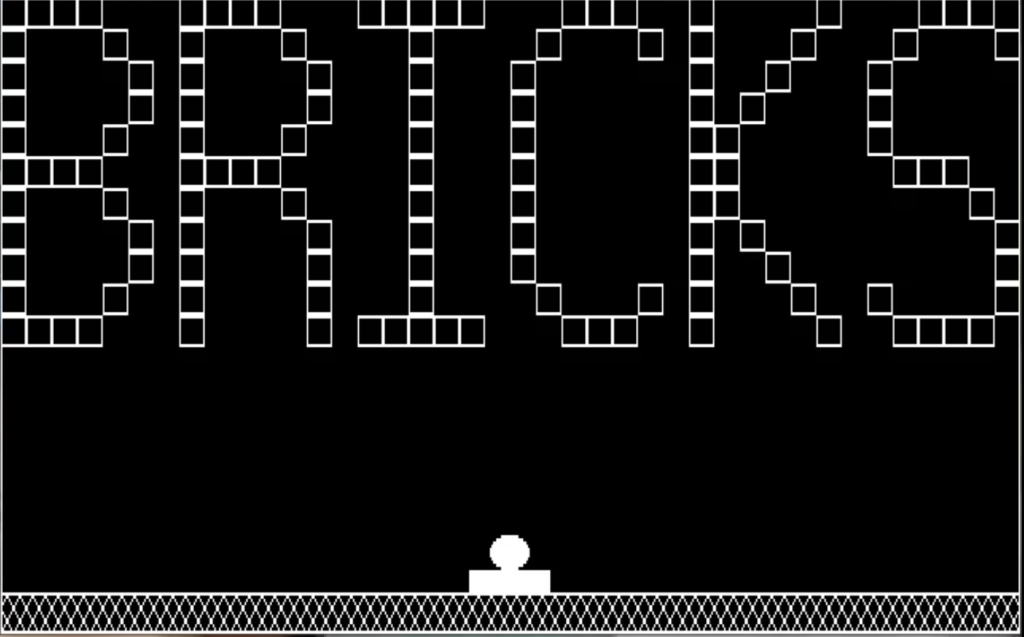
This is the complete C source code of the most favorite flash game ‘Web Breaker’. The source code is written completely in C/C++ programming language. The game using 256 VGA graphics (which runs in DOS/Console graphics mode).
You can use any C++ compiler to build and run this code, however this source code is tested on Dev C++ compiler.
Brick Game Description
The game includes a paddle, a ball, and a set of bricks arranged in different layers. The paddle and ball are displayed using graphical shapes and images.
The game logic involves moving the ball, deflecting it off boundaries, and checking for collisions with the bricks. Bricks are represented in a 2D array, and their positions are updated as the ball hits them.
The code checks for collisions between the ball and the bricks and then updates the game state accordingly. It also handles paddle movement using arrow keys and updates the paddle’s position.
Source Code of Brick Game
#include <stdio.h>
#include <conio.h>
#include <process.h>
#include <dos.h>
#include <stdlib.h>
#include <graphics.h>
#include <ctype.h>

#define NULL 0
#define YES 1
#define NO 0

int maxx, maxy, midx, midy;
int bri[5][20];

void music(int);
char mainscreen();
void drawbrick(int, int);
void erasebrick(int, int);
void bricks(void);


int main() {
	union REGS ii, oo;
	int ballx, bally, paddlex;
	int paddley, dx = 1, dy = -1, oldx, oldy;
	int gm = CGAHI, gd = CGA, playerlevel;
	int i, flag = 0, speed = 25;
	int welldone = NO, score = 0, chance = 4, area;
	int layer[5] = {
	   10,
	   20,
	   30,
	   40,
	   50
	}, limit = 50, currentlayer = 4;
	char* p1, *p2;

	// initialise the graphics system
	initgraph(&gd, &gm, "C:\\TURBOC3\\BGI");

	// get the maximum x and y screen coordinates
	maxx = getmaxx();
	maxy = getmaxy();

	// calculate center of screen
	midx = maxx / 2;
	midy = maxy / 2;

	// display opening screen and receive player's level
	playerlevel = mainscreen();

	// set speed of ball as per the level chosen
	switch (playerlevel) {
	case 'A':
	case 'a':
		speed = 15;
		break;

	case 'E':
	case 'e':
		speed = 10;
	}

	// draw the bricks, the paddle and the ball
	rectangle(0, 0, maxx, maxy - 12);
	bricks();
	rectangle(midx - 25, maxy - 7 - 12, midx + 25, maxy - 12);
	floodfill(midx, maxy - 1 - 12, 1);
	circle(midx, maxy - 13 - 12, 12);
	floodfill(midx, maxy - 10 - 12, 1);

	// allocate memory for storing the image of the paddle
	area = imagesize(midx - 12, maxy - 18, midx + 12, maxy - 8);
	p1 = (char*)malloc(area);

	// allocate memory for storing the image of the ball
	area = imagesize(midx - 25, maxy - 7, midx + 25, maxy - 1);
	p2 = (char*)malloc(area);

	// if memory allocation unsuccessful
	if (p1 == NULL || p2 == NULL) {
		puts("Insufficient memory!!");
		exit(1);
	}

	// store the image of the paddle
	// and the ball into allocated memory
	getimage(midx - 12, maxy - 7 - 12 - 12 + 1, midx + 12, maxy - 8 - 12, p1);
	getimage(midx - 25, maxy - 7 - 12, midx + 25, maxy - 1 - 12, p2);

	// store current position of the paddle and ball
	paddlex = midx - 25;
	paddley = maxy - 7 - 12;
	ballx = midx - 12;
	bally = maxy - 7 - 12 + 1 - 12;

	// display balls in hand ( initially 3 )
	gotoxy(45, 25);
	printf("Balls Remaining: ");
	for (i = 0; i < 3; i++) {
		circle(515 + i * 35, maxy - 5, 12);
		floodfill(515 + i * 35, maxy - 5, 1);
	} // display initial score
	gotoxy(1, 25);
	// select font and alignment for displaying text
	printf("Your Score: %4d", score);
	settextjustify(CENTER_TEXT, CENTER_TEXT);
	settextstyle(SANS_SERIF_FONT, HORIZ_DIR, 4);
	while (1) {
		// save the current x and y coordinates of the ball
		flag = 0;
		oldx = ballx;
		// update ballx and bally to move the ball in appropriate direction
		oldy = bally;
		ballx = ballx + dx;
		// as per the position of ball determine the layer of bricks to check
		bally = bally + dy;
		if (bally > 40) {
			limit = 50;
			currentlayer = 4;
		}
		else {
			if (bally > 30) {
				limit = 40;
				currentlayer = 3;
			}
			else {
				if (bally > 20) {
					limit = 30;
					currentlayer = 2;
				}
				else {
					if (bally > 10) {
						limit = 20;
						currentlayer = 1;
					}
					else {
						limit = 10;
						currentlayer = 0;
					}
				}
			}
		}

		// if the ball hits the left boundary, deflect it to the right
		if (ballx < 1) {
			music(5);
			ballx = 1;
			dx = -dx;
		} // if the ball hits the right boundary, deflect it to the left
		if (ballx > (maxx - 24 - 1)) {
			music(5);
			ballx = maxx - 24 - 1;
			dx = -dx;
		}

		// if the ball hits the top boundary, deflect it down
		if (bally < 1) {
			music(5);
			bally = 1;
			dy = -dy;
		} // if the ball is in the area occupied by the bricks
		if (bally < limit) {
			// if there is no brick present exactly at the top of the ball
			if (bri[currentlayer][(ballx + 10) / 32] == 1) {
				// determine if the boundary of the ball touches a brick
				for (i = 1; i <= 6; i++) {
					// check whether there is a brick to the right of the ball
					if (bri[currentlayer][(ballx + i + 10) / 32] == 0) {
						// if there is a brick
						ballx = ballx + i;
						flag = 1;
						break;
					} // check whether there is a brick to the left of the ball
					if (bri[currentlayer][(ballx - i + 10) / 32] == 0) {
						ballx = ballx - i;
						flag = 1;
						break;
					}
				} // if the ball does not touch a brick at the top, left or right
				if (!flag) {
					// check if the ball has moved above the current layer
					if (bally < layer[currentlayer - 1]) {
						// if so, change current layer appropriately
						currentlayer--;
						limit = layer[currentlayer];
					} // put the image of the ball at the old coordinates
					// erase the image at the old coordinates
					putimage(oldx, oldy, p1, OR_PUT);
					// place the image of the ball at the new coordinates
					putimage(oldx, oldy, p1, XOR_PUT);
					// introduce delay
					putimage(ballx, bally, p1, XOR_PUT);
					delay(speed); // carry on with moving the ball
					continue;
				}
			} // control comes to this point only if the ball is touching a brick
			music(4); // play music  // erase the brick hit by the ball
			// if the brick hit happens to be on the extreme right
			erasebrick((ballx + 10) / 32, currentlayer);
			// redraw right boundary  // if the brick hit happens to be on the extreme left
			if ((ballx + 10) / 32 == 19) line(maxx, 0, maxx, 50);
			// redraw left boundary  // if the brick hit happens to be in the topmost layer
			if ((ballx + 10) / 32 == 0) line(0, 0, 0, 50);
			// redraw top boundary set appropriate array
			element to 1 to indicate absence of brick
			if (currentlayer == 0) line(0, 0, maxx, 0);
			bri[currentlayer][(ballx + 10) / 32] = 1;
			bally = bally + 1; // update the y coordinate
			dy = -dy; // change the direction of the ball
			score += 5; // increment score
			gotoxy(16, 25);
			// print latest score
			if the first brick is hit during a throw
			printf("%4d", score);

			if (welldone == NO) welldone = YES;
			else {
				// for the consecutive bricks hit during the same throw
				outtextxy(midx, midy, "Well done!");
				music(1);
			}
		} // clear part of the screen used for displaying Well done message
		if (bally > 50 && welldone == YES) {
			setviewport(midx - 32 * 2.5, midy - 32 / 2, midx + 32 * 2.5, midy + 32 / 2, 1);
			clearviewport();
			setviewport(0, 0, maxx, maxy, 1);
			welldone = NO;
		}

		// if the ball has reached the bottom
		if (bally > 180 - 12) {
			welldone = NO;

			// if the paddle has missed the ball
			if (ballx < paddlex - 20 || ballx > paddlex + 50) {
				// continue the descent of the ball
				while (bally < 177) {
					// erase the image of the ball at the old coordinates
					// put the image of the ball at the updated coordinates
					putimage(oldx, oldy, p1, XOR_PUT);
					putimage(ballx, bally, p1, XOR_PUT); // introduce delay
					delay(speed); // save the current x and y coordinates of the ball
					oldx = ballx;
					// update ballx and bally to move the ball in appropriate direction
					oldy = bally;
					ballx = ballx + dx;
					bally = bally + dy;
				}
				chance--; // decrement the number of chances
				score -= 20; // decrement 20 points for each ball lost
				gotoxy(16, 25);
				printf("%4d", score); // print latest score
				music(2); // erase one out of the available balls
				// if the last ball is being played
				if (chance) putimage(515 + (chance - 1) * 35 - 12, maxy - 10, p1, XOR_PUT);
				if (chance == 1) {
					gotoxy(45, 25);
					printf("Your last ball... Be careful!");
				} // if all the balls are lost
				if (!chance) {
					gotoxy(45, 25);
					printf("Press any key... ");
					outtextxy(midx, midy, "I warned you! Try again");
					music(3);
					closegraph();
					restorecrtmode();
					exit(0);
				}
			} // if ball is collected on paddle
			music(5);
			bally = 180 - 12; // restore the y coordinate of ball
			dy = -dy; // deflect the ball upwards
		}
		// put the image of the ball at the old coordinates

		// erase the image of the ball at the old coordinates
		putimage(oldx, oldy, p1, OR_PUT);
		// put the image of the ball at the upadted coordinates
		putimage(oldx, oldy, p1, XOR_PUT);
		// if all the bricks have been destroyed
		putimage(ballx, bally, p1, XOR_PUT);
		if (score == 500 - ((4 - chance) * 20)) {
			outtextxy(midx, midy, "You win !!!");
			if (score < 500) outtextxy(midx, midy + 30, "Try scoring 500");
			else outtextxy(midx, midy + 30, "You are simply GREAT!");
			music(3);
			closegraph();
			restorecrtmode();
			exit(0);
		} // introduce delay
		delay(speed); // if the user has pressed a key to move the paddle
		if (kbhit()) {
			// issue interrupt to obtain the ascii and scan codes of key hit
			ii.h.ah = 0;
			// put the image of the paddle at the old coordinates
			int86(22, &ii, &oo);
			// erase the image of the paddle at the old coordinates
			putimage(paddlex, paddley, p2, OR_PUT);
			// if Esc key has been pressed
			putimage(paddlex, paddley, p2, XOR_PUT);
			if (oo.h.ah == 1) exit(0); // right arrow key
			// left arrow key
			if (oo.h.ah == 75) paddlex = paddlex - 20;
			// if paddle goes beyond left boundary
			if (oo.h.ah == 77) paddlex = paddlex + 20;
			// if paddle goes beyond right boundary
			if (paddlex < 0) paddlex = 0;
			if (paddlex > 589)
				paddlex = 589;

			// put the image of the paddle at the proper position
			putimage(paddlex, paddley, p2, XOR_PUT);
		}
	}
}

// creates opening screen
char mainscreen() {
	// array showing the positions where
	// a brick is needed to form the figure BRICKS
	int ff[12][40] = {
	1,1,1,1,0,0,0,1,1,1,1,0,0,0,1,1,1,1,1,0,
	0,0,1,1,1,0,0,1,0,0,0,0,1,0,0,0,1,1,1,0,
	1,0,0,0,1,0,0,1,0,0,0,1,0,0,0,0,1,0,0,0,
	0,1,0,0,0,1,0,1,0,0,0,1,0,0,0,1,0,0,0,1,
	1,0,0,0,0,1,0,1,0,0,0,0,1,0,0,0,1,0,0,0,
	1,0,0,0,0,0,0,1,0,0,1,0,0,0,1,0,0,0,0,0,
	1,0,0,0,0,1,0,1,0,0,0,0,1,0,0,0,1,0,0,0,
	1,0,0,0,0,0,0,1,0,1,0,0,0,0,1,0,0,0,0,0,
	1,0,0,0,1,0,0,1,0,0,0,1,0,0,0,0,1,0,0,0,
	1,0,0,0,0,0,0,1,1,0,0,0,0,0,1,0,0,0,0,0,
	1,1,1,1,0,0,0,1,1,1,1,0,0,0,0,0,1,0,0,0,
	1,0,0,0,0,0,0,1,1,0,0,0,0,0,0,1,1,1,0,0,
	1,0,0,0,1,0,0,1,0,0,0,1,0,0,0,0,1,0,0,0,
	1,0,0,0,0,0,0,1,1,0,0,0,0,0,0,0,0,0,1,0,
	1,0,0,0,0,1,0,1,0,0,0,0,1,0,0,0,1,0,0,0,
	1,0,0,0,0,0,0,1,0,1,0,0,0,0,0,0,0,0,0,1,
	1,0,0,0,0,1,0,1,0,0,0,0,1,0,0,0,1,0,0,0,
	1,0,0,0,0,0,0,1,0,0,1,0,0,0,0,0,0,0,0,1,
	1,0,0,0,1,0,0,1,0,0,0,0,1,0,0,0,1,0,0,0,
	0,1,0,0,0,1,0,1,0,0,0,1,0,0,1,0,0,0,0,1,
	1,1,1,1,0,0,0,1,0,0,0,0,1,0,1,1,1,1,1,0,
	0,0,1,1,1,0,0,1,0,0,0,0,1,0,0,1,1,1,1,0,
	0,0,0,0,0,0,0,0,0,0,0,0,0,0,0,0,0,0,0,0,
	0,0,0,0,0,0,0,0,0,0,0,0,0,0,0,0,0,0,0,0,
	};
	int i, j, lx = 0, ly = 0, ch;

	// draw boundary
	rectangle(0, 0, maxx, maxy);

	// form the word BRICKS
	for (i = 0; i < 12; i++) {
		for (j = 0; j < 40; j++) {
			if (ff[i][j]) rectangle(lx, ly, lx + 15, ly + 9);
			lx = lx + 16;
		}
		lx = 0;
		ly = ly + 10;
	} // draw pattern at the bottom of the screen
	line(0, maxy - 12, maxx, maxy - 12);
	setfillstyle(XHATCH_FILL, WHITE);
	// draw the paddle and the ball
	floodfill(2, maxy - 2, WHITE);
	setfillstyle(SOLID_FILL, WHITE);
	rectangle(midx - 25, maxy - 7 - 12, midx + 25, maxy - 12);
	floodfill(midx, maxy - 1 - 12, 1);
	circle(midx, maxy - 13 - 12, 12);
	floodfill(midx, maxy - 10 - 12, 1);
	music(3); // play music
	// display menu
	while (1) {
		// clear the region below the word BRICKS
		setviewport(1, 125 - 12, maxx - 1, maxy - 1, 1);
		clearviewport();
		setviewport(0, 0, maxx, maxy, 1);
		outtextxy(20, 135, "Select any of the following:");
		outtextxy(20, 155, "Play ( P )");
		outtextxy(20, 165, "Instructions ( I )");
		outtextxy(20, 175, "Exit ( E )");
		ch = 0; // continue till the correct choice is made
		while (!(ch == 'E' || ch == 'I' || ch == 'P')) {
			// if a special key is hit, flush the keyboard buffer
			fflush(stdin);
			if ((ch = getch()) == 0) getch();
			else ch = toupper(ch);
		}
		if (ch == 'P') break;
		switch (ch) {
		case 'I':
			setviewport(1, 125 - 12, maxx - 1, maxy - 1, 1);
			clearviewport();
			setviewport(0, 0, maxx, maxy, 1);
			settextstyle(DEFAULT_FONT, HORIZ_DIR, 1);
			outtextxy(20, 125, " Instructions ");
			settextstyle(DEFAULT_FONT, HORIZ_DIR, 0);
			outtextxy(20, 140, "Use left and right arrow keys to move paddle.");
			outtextxy(20, 150, "If you don't collect the ball on the paddle, you lose the ball.");
			outtextxy(20, 160, "On loosing a ball you loose 20 points.");
			outtextxy(20, 170, "On taking a brick you gain 5 points.");
			outtextxy(20, 185, "Press any key...");
			fflush(stdin);
			if (getch() == 0) getch();
			break;
		case 'E':
			closegraph();
			restorecrtmode();
			exit(0);
		}
	}
	setviewport(1, 125 - 12, maxx - 1, maxy - 1, 1);
	clearviewport(); // prompt the user for the level desired
	setviewport(0, 0, maxx, maxy, 1);
	outtextxy(20, 135, "Select any of the following levels:");
	outtextxy(20, 155, "Novice ( N )");
	outtextxy(20, 165, "Advanced ( A )");
	outtextxy(20, 175, "Expert ( E )"); // get user's choice
	fflush(stdin);
	if ((ch = getch()) == 0) getch();
	clearviewport(); // return the choice made by the user
	return (ch);
}

// draws bricks at the start of the game
void bricks() {
	int i, j, lx = 0, ly = 0;
	for (i = 0; i < 5; i++) // 5 rows  {
		for (j = 0; j < 20; j++) // 20 columns  {
			// draw a brick at appropriate coordinates
			drawbrick(lx, ly);
			lx = lx + 32;
		}
		lx = 0;
		ly = ly + 10;
	}
}

// draws a brick at the proper position
void drawbrick(int lx, int ly) {
	rectangle(lx, ly, lx + 31, ly + 9);
	rectangle(lx + 2, ly - 2, lx + 31 - 2, ly + 9 - 2);
	floodfill(lx + 1, ly + 1, 2);
}

// erases the specified brick
void erasebrick(int b, int l) {
	// b - brick number, l - layer
	setcolor(BLACK);
	rectangle(b * 32, l * 10, (b * 32) + 31, (l * 10) + 9);
	rectangle(b * 32 + 1, l * 10, (b * 32) + 31 - 1, (l * 10) + 9 - 1);
	rectangle(b * 32 + 2, l * 10, (b * 32) + 31 - 2, (l * 10) + 9 - 2);
	setcolor(WHITE);
}

// plays different types of music
void music(int type) {
	// natural frequencies of 7 notes
	float octave[7] = {
	   130.81,
	   146.83,
	   164.81,
	   174.61,
	   196,
	   220,
	   246.94
	};
	int n, i;
	switch (type) {
	case 1:
		for (i = 0; i < 7; i++) {
			sound(octave[i] * 8);
			delay(30);
		}
		nosound();
		break;
	case 2:
		for (i = 0; i < 15; i++) {
			n = random(7);
			sound(octave[n] * 4);
			delay(100);
		}
		nosound();
		break;
	case 3:
		while (!kbhit()) {
			n = random(7);
			sound(octave[n] * 4);
			delay(100);
		}
		nosound(); // flush the keyboard buffer
		if (getch() == 0) getch();
		break;
	case 4:
		for (i = 4; i >= 0; i--) {
			sound(octave[i] * 4);
			delay(15);
		}
		nosound();
		break;

	case 5:
		sound(octave[6] * 2);
		delay(50);
		nosound();
	}
}