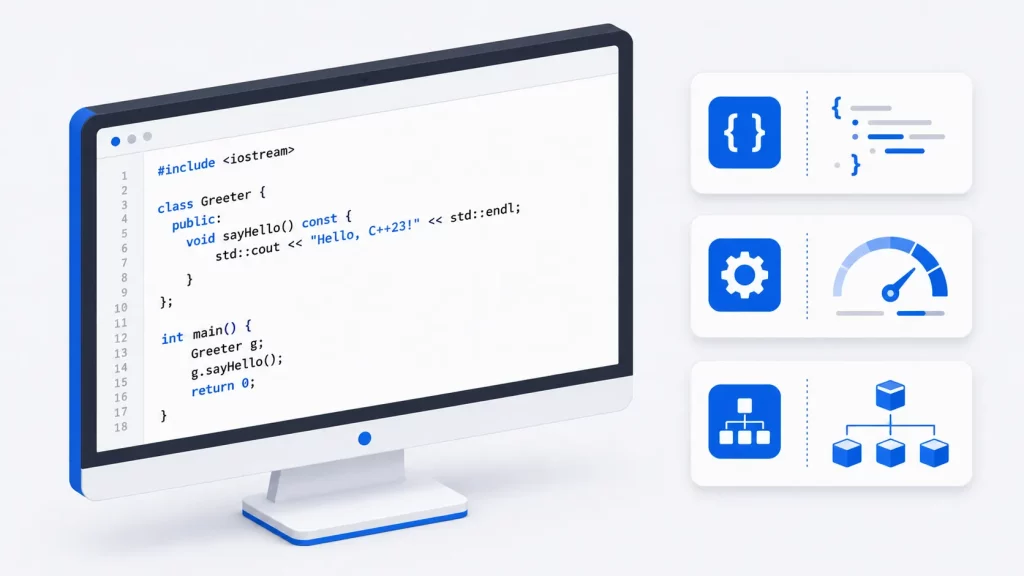
C++ is one of the most powerful and performance-driven programming languages in the world. From operating systems and financial trading platforms to AAA game engines like Unreal Engine, C++ powers the software where speed, efficiency, and control matter most.
In this beginner-friendly guide, you’ll learn the fundamentals of modern C++ programming. If you’re looking for additional lessons and examples, explore our complete C++ Programming Tutorials collection. You’ll also discover how modern C++ has evolved through C++11, C++14, C++17, C++20, C++23 and C++26 to become safer, more expressive, and easier to develop with.
Whether you’re new to programming or transitioning from Python or Java, this guide will help you understand not just how C++ works, but why it remains essential in systems programming, game development, embedded systems, and high-performance computing.
What You Will Learn in This Guide:
- Core C++ syntax — variables, data types, operators and control flow
- Functions, arrays and pointers — the building blocks of every C++ program
- Object-oriented programming — classes, objects, inheritance and polymorphism
- The Standard Template Library — vectors, maps, sets and algorithms
- Modern C++ features — from C++11 smart pointers to C++26 improvements
- Real-world applications and career paths where C++ skills are in demand
What is C++?
C++ is a general-purpose, compiled programming language created by Bjarne Stroustrup in the early 1980s as an extension of C, adding object-oriented and generic programming while preserving C’s speed.
Today, C++ supports multiple programming paradigms including:
- Procedural Programming
- Object-Oriented Programming (OOP)
- Generic Programming
- Functional Programming
- Concurrent Programming
This flexibility allows developers to build everything from small command-line utilities to large enterprise systems and high-performance applications.
What Can You Build with C++?
C++ is used in a wide variety of software applications, including:
Operating Systems
Many operating system components are written in C++ because of its efficiency and low-level capabilities.
Examples include:
- Microsoft Windows components
- macOS frameworks
- Linux system tools
Game Development
C++ is the dominant language for professional game development.
Popular game technologies include:
- Unreal Engine
- CryEngine
- Source Engine
Many AAA games are developed primarily in C++.
Financial Systems
Banks and trading firms rely on C++ because microseconds matter in financial transactions.
Applications include:
- High-frequency trading systems
- Risk analysis software
- Market data processing
Embedded Systems
C++ is widely used in:
- Automotive software
- Medical devices
- Robotics
- IoT systems
- Aerospace systems
High-Performance Computing
Many scientific and engineering applications use C++ for:
- Simulations
- Machine learning frameworks
- Scientific research
- Data processing systems

Who Uses C++?
Many of the world’s largest technology companies depend on C++.
- Microsoft: Microsoft develops major operating system components, development tools, and performance-sensitive applications using C++.
- Google: Google uses C++ extensively throughout its infrastructure, backend systems, browsers, and large-scale distributed services.
- Meta: Meta uses C++ in backend infrastructure and performance-critical services.
- Adobe: Applications such as Photoshop and Illustrator contain large amounts of C++ code.
- Epic Games: The Unreal Engine is primarily built using C++ and remains one of the most popular game engines in the world.
The History and Significance of C++ Programming Language
Developed by Bjarne Stroustrup in the early 1980s, C++ was designed as an extension of the C programming language, adding object-oriented programming capabilities and other advanced features.
The original goal was simple:
Combine the efficiency of C with the organizational benefits of object-oriented programming.
The language quickly gained popularity because it allowed developers to create complex software while maintaining excellent performance.
Over the years, C++ has become one of the most important programming languages in computer science. It powers everything from operating systems and game engines to embedded devices and scientific computing platforms.
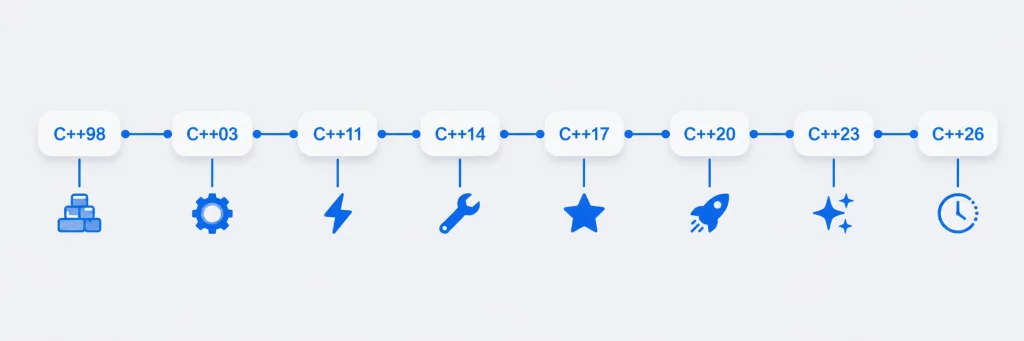
Major milestones include:
| Version | Release |
|---|---|
| C++98 | First ISO Standard |
| C++03 | Stability Improvements |
| C++11 | Major Modernization |
| C++14 | Refinements |
| C++17 | Productivity Enhancements |
| C++20 | Concepts, Ranges, Modules |
| C++23 | Language Improvements |
| C++26 | Upcoming Features |
Today, modern C++ remains a cornerstone technology in software engineering.
Key Features and Advantages of C++ Programming
C++ is a powerful and versatile language that offers a wide range of key features and advantages.
High Performance
Programs written in C++ compile directly into native machine code, resulting in exceptional speed.
Object-Oriented Programming
C++ supports:
- Classes
- Objects
- Inheritance
- Polymorphism
- Encapsulation
These features help developers create maintainable software systems.
Memory Management
C++ provides direct control over memory allocation and deallocation, enabling highly optimized applications.
Portability
C++ applications can run on:
- Windows
- Linux
- macOS
- Embedded Platforms
with minimal modifications.
Rich Standard Library
The Standard Template Library (STL) provides powerful containers and algorithms that significantly reduce development time.
Setting Up a C++ Development Environment
Setting up a C++ development environment is a fundamental step in starting your journey as a C++ programmer. A well-configured environment ensures that you have the necessary tools and resources to write, compile, and run your C++ code efficiently. This includes installing a C++ compiler that suits your preferences.
Before writing C++ code, you’ll need:
A Compiler
Popular options include:
- GCC (GNU Compiler Collection)
- Clang
- Microsoft Visual C++ (MSVC)
If you’re unsure which compiler to use, see our detailed guide to the best C++ compilers for Windows, Linux, and macOS.
An IDE or Code Editor
Popular choices include:
- Visual Studio
- Visual Studio Code
- CLion
- Code::Blocks
- Eclipse CDT
Once installed, create a new C++ project and verify your setup by compiling a simple program.
Your First C++ Program
Once your development environment is configured, it’s time to write your first C++ program.
#include <iostream>

int main()
{
    std::cout << "Hello, World!" << std::endl;
    return 0;
}
Understanding the Code
Let’s break down the program:
#include <iostream>includes the input/output library.int main()is the program’s entry point.std::coutoutputs text to the console.return 0indicates successful program execution.
In practice, the first error most beginners hit isn’t in the code — it’s the compiler setup. If std::cout is flagged as undefined, you’ve almost certainly forgotten #include <iostream> or are compiling with the wrong standard flag (-std=c++17).
After compiling and running the program, the output will be:
Hello, World!A quick note on style: std::endl flushes the output buffer every time, so in loops that print repeatedly, prefer '\n' for better performance.
Although simple, this example demonstrates the fundamental structure of every C++ application.
Basic Syntax and Structure of C++
Understanding the basic syntax and structure of C++ programming is essential for anyone looking to dive into software development. C++ is a powerful programming language that offers a wide range of features and capabilities. It follows a structured and organized approach, with each program consisting of a series of statements and expressions.
A typical C++ program consists of:
- Header files
- A main function
- Variables
- Statements
- Functions
- Classes
Example:
#include <iostream>

int main()
{
    int age = 25;

    std::cout << "Age: " << age << std::endl;

    return 0;
}
C++ uses semicolons (;) to terminate statements and braces ({}) to define blocks of code.
Good formatting and indentation improve readability and maintainability, especially in large projects.
Data Types and Variables in C++
Data types and variables are fundamental concepts in C++ programming.
In C++, data types determine the type of value that a variable can hold, such as integers, floating-point numbers, characters, and booleans. Understanding the different data types is crucial for efficient memory usage and accurate calculations.
| Data Type | Description | Example |
|---|---|---|
| int | Integer numbers | 10 |
| float | Decimal values | 3.14 |
| double | High-precision decimals | 3.141592 |
| char | Single character | ‘A’ |
| bool | True/False value | true |
| string | Text data | “Hello” |
Variables, on the other hand, are used to store and manipulate data within a program. They allow programmers to assign values, perform operations, and store results for future use.
Example:
#include <iostream>
#include <string>

int main()
{
    int age = 20;
    double salary = 5000.50;
    char grade = 'A';
    bool employed = true;
    std::string name = "John";

    return 0;
}
Choosing the correct data type improves memory efficiency and application performance.
Operators in C++
Operators perform calculations and comparisons.
Arithmetic Operators
int a = 10;
int b = 5;

std::cout << a + b;
std::cout << a - b;
std::cout << a * b;
std::cout << a / b;
Comparison Operators
a == b
a != b
a > b
a < b
a >= b
a <= b
Logical Operators
&&   // AND
||   // OR
!    // NOT
Operators form the basis of decision-making and calculations in C++ applications.
Control Flow Statements
Control flow statements allow programs to make intelligent decisions and process repetitive tasks efficiently.
These statements allow you to make decisions, repeat code, and create complex logic in your programs. The most common control flow statements in C++ include if-else statements, switch statements, and loops such as for, while, and do-while loops.
// if-else
int score = 85;
if (score >= 90) {
    std::cout << "Grade A";
} else if (score >= 75) {
    std::cout << "Grade B";
} else {
    std::cout << "Grade C";
}

// for loop
for (int i = 0; i < 5; i++) {
    std::cout << i << " ";
}

// while loop
int count = 0;
while (count < 3) {
    std::cout << count;
    count++;
}
Functions in C++ Programming
Functions are reusable blocks of code that perform specific tasks.
Example:
#include <iostream>

int add(int a, int b)
{
    return a + b;
}

int main()
{
    std::cout << add(5, 10);

    return 0;
}
Advantages of Functions
- Code reusability
- Easier maintenance
- Improved readability
- Modular program design
Functions are among the most important building blocks in software development.
Arrays and Pointers
Arrays
Arrays store multiple values of the same data type.
int numbers[5] = {10, 20, 30, 40, 50};

std::cout << numbers[0];
Arrays are useful when working with collections of data.
Pointers
Pointers store memory addresses.
int number = 10;

int* ptr = &number;

std::cout << *ptr;
While pointers can initially seem difficult, they are one of the features that make C++ extremely powerful.
In production code, raw pointers like this are increasingly replaced by smart pointers (std::unique_ptr, std::shared_ptr) — see the Modern C++ section. The classic bug here is dereferencing a pointer after the memory it points to has been freed (a “dangling pointer”), which compiles fine but crashes at runtime.
Pointers enable:
- Dynamic memory allocation
- Efficient data structures
- High-performance applications
- Direct hardware interaction
Understanding pointers is often considered a major milestone in learning C++.
Classes and Objects
One of the most significant features of C++ is Object-Oriented Programming (OOP).
A class acts as a blueprint for creating objects.
Example:
#include <iostream>

class Car
{
public:
    std::string brand;

    void display()
    {
        std::cout << brand;
    }
};

int main()
{
    Car myCar;

    myCar.brand = "Toyota";

    myCar.display();

    return 0;
}// Inheritance example
class ElectricCar : public Car {
public:
int batteryRange;
void displayRange() {
std::cout << brand << " range: " << batteryRange << " km";
}
};Inheritance, polymorphism and encapsulation are explored in depth in our Introduction to Classes in C++ tutorial.
Introduction to the Standard Template Library (STL)
C++ provides a wide range of libraries, such as the Standard Template Library (STL), which offer pre-built functions and data structures that can be easily incorporated into your programs. It provides powerful reusable components for managing data and algorithms.
For the complete, authoritative reference on every container and algorithm, consult the official C++ standard library documentation on cppreference.
Common STL Containers
Vector
#include <vector>

std::vector<int> numbers;

numbers.push_back(10);
numbers.push_back(20);
numbers.push_back(30);
For a deeper understanding of dynamic arrays and vector operations, read our complete STL vector tutorial.
Map
#include <map>

std::map<int, std::string> students;

students[1] = "John";
Set
#include <set>

std::set<int> values;
Benefits of STL
- Faster development
- Better code quality
- Optimized algorithms
- Improved productivity
Learning STL is essential for modern C++ programming.
Modern C++ (C++11–C++26)
Modern C++ is far more than “C with classes.” Since C++11, the language has evolved into a safer, more expressive, and high-performance systems programming language. The ISO C++ standards committee continues to refine the language through C++11, C++14, C++17, C++20, C++23, and upcoming C++26 improvements.
These updates focus on type safety, performance, concurrency, and developer productivity — making modern C++ highly relevant for systems programming, game development, finance, and large-scale infrastructure.
C++11
Major additions included:
- Auto keyword
- Lambda expressions
- Smart pointers
- Move semantics
- Range-based loops
Example:
auto number = 10;Smart pointer:
// Smart pointer — automatic memory management (C++11)
#include <memory>
std::unique_ptr<int> ptr = std::make_unique<int>(42);
// No manual delete needed — memory frees automatically when the pointer goes out of scope
C++14
Focused on language refinement and usability improvements — most notably generic lambdas and function return-type deduction.
Generic lambdas let a lambda accept auto parameters, so one lambda works across types:
// Generic lambdas (C++14)
auto multiply = [](auto x, auto y) { return x * y; };
Return-type deduction lets the compiler infer a function’s return type from its return statement:
// Return type deduction (C++14)
auto getValue() {
    return 42;  // compiler deduces int
}
C++17
Introduced:
- Structured bindings
- std::optional
- Filesystem library
Example:
auto [name, age] = person;C++20
One of the biggest releases in C++ history.
Major additions:
- Concepts
- Ranges
- Coroutines
- Modules
C++23
Continues improving developer productivity with additional language and library enhancements.
// std::print (C++23) — replaces std::cout for formatted output
std::print("Hello, {}!\n", "World");

// std::expected — better error handling without exceptions
std::expected<int, std::string> divide(int a, int b) {
    if (b == 0) return std::unexpected("Division by zero");
    return a / b;
}
Modern C++ significantly improves safety, readability, and maintainability while preserving performance. To explore the newest language improvements, see our detailed overview of C++23 features and enhancements.
C++ vs Other Programming Languages
Understanding how C++ compares to other languages helps developers choose the right tool for each project.
C++ vs C
| Feature | C | C++ |
|---|---|---|
| OOP Support | No | Yes |
| Classes | No | Yes |
| Templates | No | Yes |
| STL | No | Yes |
| Performance | High | High |
C++ extends C while retaining much of its performance and flexibility.
New to C? Start with our C Programming Tutorials before moving to C++.
C++ vs Java
| Feature | C++ | Java |
|---|---|---|
| Memory Management | Manual + Smart Pointers | Automatic |
| Performance | Higher | High |
| Platform Independence | Recompile Required | JVM |
| Hardware Access | Direct | Limited |
Java is often easier for enterprise applications, while C++ excels in performance-critical systems.
C++ vs Python
| Feature | C++ | Python |
|---|---|---|
| Execution Speed | Very High | Moderate |
| Learning Curve | Steeper | Easier |
| Memory Control | Full Control | Automatic |
| Development Speed | Moderate | Fast |
Python is ideal for rapid development, while C++ is preferred when performance matters.
Interested in Python? Explore our Python Programming Tutorials to see how it compares in practice.
Common applications and career opportunities in C++ programming
C++ programming offers numerous career opportunities across industries.
Common application areas include:
- Game development
- Operating systems
- Embedded systems
- Robotics
- Financial software
- Cybersecurity tools
- Scientific computing
- Aerospace systems
- Artificial intelligence frameworks
Popular job titles include:
- C++ Software Engineer
- Systems Programmer
- Game Developer
- Embedded Software Engineer
- Quantitative Developer
- Robotics Engineer
Because of its performance characteristics, C++ remains one of the highest-valued programming skills in the software industry.
Frequently Asked Questions
Next Steps
Congratulations! You now understand the basics of C++ programming and the concepts that form the foundation of modern software development.
Your next step should be learning:
- Object-Oriented Programming in depth
- STL Containers and Algorithms
- Memory Management
- Templates
- Modern C++ Features
- Real-World Project Development (guide coming soon)
As you continue your journey, focus on building practical projects and exploring more advanced topics such as multithreading, networking, and performance optimization.
C++ remains one of the most valuable programming languages to learn, and mastering it can open doors to careers in software engineering, game development, systems programming, finance, robotics, and many other technology fields.