

Horde3D is a small, open-source 3D rendering engine written in C++. It isn’t a complete game engine with physics, audio and an all-in-one editor. It’s a graphics engine: it loads models, animates characters and renders scenes with modern shader-based techniques, and leaves the rest of the game to you. Its design goal has always been to stay lightweight and conceptually clean, with a plain C-style API that can be called from almost any programming language.
This profile covers where Horde3D came from, how it works, games made with it, and where the project stands in 2026, with a C++ example we built and ran against Horde3D 2.1. Facts were checked against the Horde3D repository, its changelog and its official website in November 2026.
What Is Horde3D?
Horde3D is an open-source 3D graphics engine written in C++, founded by Nicolas Schulz and developed by the Horde3D Team, released under the Eclipse Public License (EPL). It has a C-style API and render backends for OpenGL 2, OpenGL 4 and OpenGL ES 3, covering Windows, Linux, macOS, Android, iOS and the web. Its latest release is Horde3D 2.1.0 (September 2026).
Horde3D at a glance
| Type | Open-source 3D graphics (rendering) engine |
|---|---|
| Founder | Nicolas Schulz; developed by the Horde3D Team |
| First public versions | 2006 |
| First stable release | 1.0.0, September 17, 2017 |
| Latest release | 2.1.0, September 8, 2026 |
| Written in | C++ (C++14), with a C-style API |
| Render backends | OpenGL 2, OpenGL 4, OpenGL ES 3 |
| Platforms | Windows, Linux, macOS, Android, iOS, web (Emscripten) |
| Bindings in the repository | C, C++, C# |
| Licence | Eclipse Public License 1.0 (editor: GPL v3) |
A Short History of Horde3D
Most of Horde3D was first written by Nicolas Schulz for pyropix, an independent game group, and development continued at the University of Augsburg in Germany, where Schulz studied and where maintainer Volker Vogelhuber, author of the Horde3D Scene Editor, worked as a research assistant. Public versions appeared from 2006, numbered 0.5 through 0.15 and then 1.0 Beta 1 to Beta 5. From Beta 4 the licence changed from the LGPL to the more permissive EPL.
Horde3D stayed in beta for a long time. Development moved from SourceForge to GitHub in September 2013, and the first stable release, Horde3D 1.0.0, arrived on September 17, 2017. Its announcement credited community contributions and added OpenGL 4 with geometry, tessellation and compute shaders (Horde3D’s website, archived). Since then:
| Version | Released | Highlights |
|---|---|---|
| 1.0.0 | September 2017 | OpenGL 4 backend; geometry, tessellation and compute shaders; new sample framework |
| 2.0.0 | February 2021 | OpenGL ES 3 backend with Android and iOS support; faster frustum culling (up to 2× on busy scenes); KTX and more compressed texture formats |
| 2.0.1 / 2.0.2 | October 2021 / April 2022 | Shadow fixes, newer compilers, MinGW support |
| 2.1.0 | September 8, 2026 | Binary shader caching for OpenGL 4 and ES, official C bindings, web builds of the samples with Emscripten, CI builds for desktop and mobile, and an editor without legacy OpenGL calls |
How Horde3D Works
Horde3D is built around a few simple ideas, documented in its README and changelog (Horde3D on GitHub):
- A C-style API. The whole engine is driven by plain functions such as
h3dAddResourceandh3dRender, using numeric handles instead of C++ objects. That makes it easy to call from other languages; the repository includes C++, C and C# bindings, and the community has written others over the years. - Resources by name. You register resources (pipelines, models, materials, shaders, textures) by name, and the engine loads them from disk or any data stream. Resources can be hot-reloaded while the program runs.
- One scene graph. Models, meshes, joints, lights, cameras and particle emitters are all nodes in a single tree, with frustum culling, hardware occlusion culling and levels of detail.
- XML render pipelines. The rendering technique (forward, deferred or HDR with bloom) is described in a pipeline XML file, not hard-coded. Switching techniques is a matter of loading a different pipeline, and pipelines can also be hot-reloaded.
- Animation. Skeletal animation with up to four bone weights per vertex, layered blending with masks, and morph targets for facial animation. This focus is why Horde3D is often described as suited to rendering large crowds of animated characters.
- A content pipeline. Models and animations are stored in compact binary formats, created from COLLADA files with the included converter, while materials, scenes and pipelines are XML.
Horde3D has no built-in physics, audio or networking. You add libraries such as Bullet for those, and it gives you access to vertex and joint data for collision detection and ragdolls. The optional Horde3D Scene Editor, built with Qt, is licensed separately under the GPL v3.
One API, Three Render Backends
Horde3D 2.1 can be built with three rendering backends, selected when you build the engine. Each reports what it can do on the current hardware:
The OpenGL 2 backend runs on old hardware but supports only the basics. OpenGL 4 is the full-featured desktop choice, and OpenGL ES 3 serves phones, tablets and browsers. Your game code calls the same API whichever backend is in use.
Hello, Horde3D: Rendering a Scene in C++
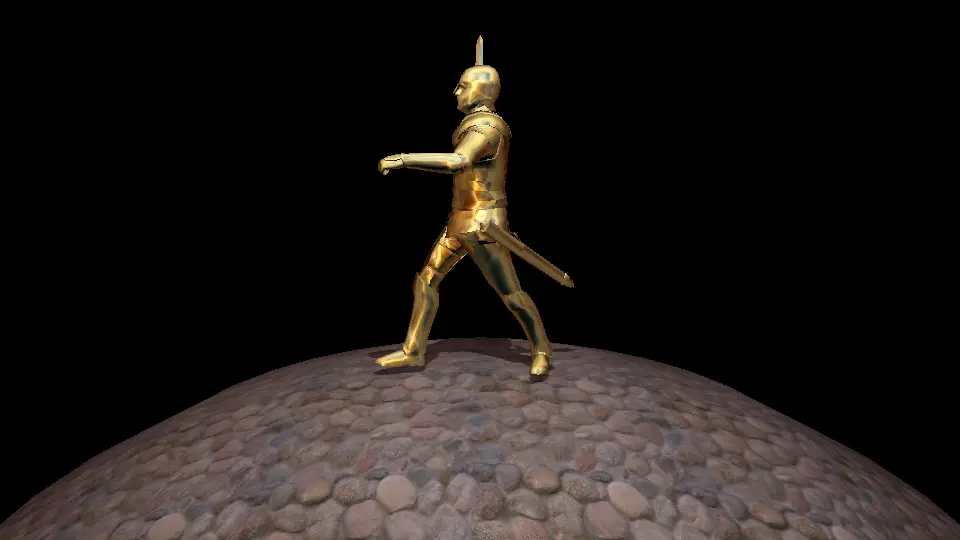
This program loads the knight model from Horde3D’s sample content, places it on a stone floor with a shadow-casting light, renders one frame and saves it as an image. It uses GLFW to create the OpenGL window that Horde3D draws into:
// hello_horde3d.cpp - load a model, light it and save one rendered frame
#include <Horde3D.h>
#include <Horde3DUtils.h>
#include <GLFW/glfw3.h>
#include <cstdio>
#include <vector>

int main()
{
    // Horde3D renders into an OpenGL context you create (here with GLFW)
    glfwInit();
    glfwWindowHint( GLFW_CONTEXT_VERSION_MAJOR, 4 );
    glfwWindowHint( GLFW_CONTEXT_VERSION_MINOR, 3 );
    glfwWindowHint( GLFW_OPENGL_PROFILE, GLFW_OPENGL_CORE_PROFILE );
    GLFWwindow *win = glfwCreateWindow( 960, 540, "Hello Horde3D", nullptr, nullptr );
    glfwMakeContextCurrent( win );

    if( !h3dInit( H3DRenderDevice::OpenGL4 ) ) { h3dutDumpMessages(); return 1; }

    // 1. Register resources by name, then load them all from the content folder
    H3DRes pipe   = h3dAddResource( H3DResTypes::Pipeline, "pipelines/forward.pipeline.xml", 0 );
    H3DRes knight = h3dAddResource( H3DResTypes::SceneGraph, "models/knight/knight.scene.xml", 0 );
    H3DRes ground = h3dAddResource( H3DResTypes::SceneGraph, "models/sphere/sphere.scene.xml", 0 );
    H3DRes lightM = h3dAddResource( H3DResTypes::Material, "materials/light.material.xml", 0 );
    h3dutLoadResourcesFromDisk( "../../Content" );

    // 2. Build the scene graph: everything is a node under the root
    H3DNode model = h3dAddNodes( H3DRootNode, knight );
    h3dSetNodeTransform( model, 0, 0, 0,  0, 160, 0,  0.1f, 0.1f, 0.1f );
    H3DNode env = h3dAddNodes( H3DRootNode, ground );
    h3dSetNodeTransform( env, 0, -20, 0,  0, 0, 0,  20, 20, 20 );

    H3DNode light = h3dAddLightNode( H3DRootNode, "Sun", lightM, "LIGHTING", "SHADOWMAP" );
    h3dSetNodeTransform( light, 0, 15, 10,  -60, 0, 0,  1, 1, 1 );
    h3dSetNodeParamF( light, H3DLight::RadiusF, 0, 30 );
    h3dSetNodeParamI( light, H3DLight::ShadowMapCountI, 1 );

    H3DNode cam = h3dAddCameraNode( H3DRootNode, "Camera", pipe );
    h3dSetNodeTransform( cam, 0, 5, 15,  -10, 0, 0,  1, 1, 1 );
    h3dSetNodeParamI( cam, H3DCamera::ViewportWidthI, 960 );
    h3dSetNodeParamI( cam, H3DCamera::ViewportHeightI, 540 );
    h3dSetupCameraView( cam, 45.0f, 960.0f / 540.0f, 0.5f, 2048.0f );
    h3dResizePipelineBuffers( pipe, 960, 540 );

    // 3. Render one frame and save it
    h3dRender( cam );
    h3dFinalizeFrame();
    int w, h;
    h3dutGetScreenshotParam( &w, &h );
    std::vector<unsigned char> rgb( w * h * 3 );
    bool saved = h3dutScreenshotRaw( rgb.data(), (int)rgb.size() );
    FILE *f = fopen( "hello_horde3d.ppm", "wb" );      // simple PPM image, top row first
    fprintf( f, "P6 %d %d 255\n", w, h );
    for( int y = h - 1; y >= 0; --y ) fwrite( &rgb[y * w * 3], 1, w * 3, f );
    fclose( f );

    float minX, minY, minZ, maxX, maxY, maxZ;
    h3dGetNodeAABB( model, &minX, &minY, &minZ, &maxX, &maxY, &maxZ );
    printf( "Knight height: %.2f units, screenshot saved: %s\n", maxY - minY, saved ? "yes" : "no" );

    h3dutDumpMessages();   // writes Horde3D_Log.html
    h3dRelease();
    glfwTerminate();
    return 0;
}
The three numbered steps are the whole Horde3D workflow: register resources and load them, build a scene graph from nodes, and render through a camera that uses a pipeline. To try the deferred renderer instead, change one string to pipelines/deferred.pipeline.xml.
Tested: we built Horde3D 2.1.0 from source on Ubuntu 24.04 with GCC 13.3 and CMake, then compiled this program against it. We ran it under a virtual display with Mesa’s software renderer, which provides OpenGL 4.5, so Horde3D used its OpenGL 4 backend. It loaded every resource, rendered the frame below, and reported the knight as 8.18 units tall. The program saves the image with h3dutScreenshotRaw(); in our test, the simpler h3dutScreenshot() crashed while reading back the frame, so we avoided it.
Games Made with Horde3D
Horde3D has mostly been used for mobile and independent games, most notably by DogByte Games, whose developer also worked on Horde3D’s early OpenGL ES support. These are the commercial titles listed in Wikipedia’s Horde3D article:
| Game | Year | Developer |
|---|---|---|
| Offroad Legends | 2012 | DogByte Games |
| Redline Rush | 2013 | DogByte Games |
| Timelines: Assault on America | 2013 | 4Flash Interactive |
| Offroad Legends 2 | 2014 | DogByte Games |
| Off The Road | 2018 | DogByte Games |
Horde3D in 2026
Horde3D is a small but active project. The repository has about 1,090 commits since its move to GitHub in 2013, with dozens every year and a handful of regular contributors; most recent work is by the community developer known as Irdis and a few others. Horde3D 2.1.0 in September 2026 was its first release in more than four years, and continuous-integration builds now run for Linux, macOS and Windows.
Today development is led by community contributors on GitHub. The official website, horde3d.org, didn’t load when we checked in November 2026, and archived copies from August 2026 still show the 2017 release as its latest news, so GitHub is the place to follow the project.
Horde3D Alternatives
- OGRE: a larger open-source C++ rendering engine with a long history and a more object-oriented API. See our OGRE 3D profile.
- bgfx: a cross-platform rendering library with many modern backends, including Vulkan, Direct3D and Metal, if you want rendering without a scene graph (bgfx on GitHub).
- Godot: a complete open-source game engine with an editor, physics and audio, if you’d rather not assemble the pieces yourself. See our Godot engine profile.
For more open-source engines, see our directory of open-source C++ game engines.
Key Takeaways
- Horde3D is an open-source C++ graphics engine, not a full game engine: it handles rendering and animation, not physics, audio or networking.
- It’s licensed under the EPL, with a separately GPL-licensed scene editor.
- Its C-style API and XML render pipelines make it light to embed and easy to call from other languages.
- The first stable release came in 2017, after a decade of public betas, and 2.0 (2021) added Android, iOS and OpenGL ES 3.
- Horde3D 2.1.0 (September 2026) is the latest release, with binary shaders, C bindings and web builds.
- A working Horde3D scene takes about 60 lines of C++, including window setup, as the tested example shows.
Conclusion
Horde3D does one job, rendering, and does it with a small, readable codebase and a compact API. It never became a household name, but in 2026 it’s still maintained, still building on every major platform, and newly released. If you want a lightweight graphics engine to build your own game technology on, it remains a solid choice.
For more engines across every genre, browse our game development hub.