

Panda3D is the engine Disney built to run Toontown Online and Pirates of the Caribbean Online, and then gave away. More than two decades later it is still maintained, still free under a BSD licence, and still one of the few complete 3D engines you can install with a single pip install. That combination makes it a favourite for Python developers, universities and anyone who wants a real 3D engine without a launcher, an account or a royalty.
This guide covers where Panda3D came from, how its C++ core and Python layer fit together, a complete example program (tested on the current release), how to package a game for players, which games run on it, and when another engine is a better fit. Versions and dates were checked against the project’s own release pages in October 2026.
What Is Panda3D?
Panda3D is a free, open-source 3D game engine and rendering framework, created by Disney’s VR Studio and released as open source in 2002. Its core is written in C++, and games are usually scripted in Python, though C++ is fully supported. The current release is Panda3D 1.10.16 (December 2025), and the engine is licensed under the modified BSD licence.
Panda3D at a glance
| Created by | Disney VR Studio; open-sourced with Carnegie Mellon’s Entertainment Technology Center |
|---|---|
| Open source since | 2002 (revised BSD licence since May 28, 2008) |
| Latest release | Panda3D SDK 1.10.16, December 25, 2025 |
| Written in | C++ (with some C); Python bindings generated by Interrogate |
| Game code in | Python (the default) or C++ |
| Licence and cost | Modified BSD; free for commercial use, no royalties |
| Runs on | Windows, Linux, macOS, FreeBSD; Android via build_apps |
| Install | pip install panda3d, or SDK installers for Windows, macOS and Ubuntu |
| Best known for | Disney’s Toontown Online and Pirates of the Caribbean Online |
| Official site | panda3d.org |
From Disney Theme Parks to Open Source
Panda3D began inside Disney’s VR Studio, a group set up to build 3D attractions for Disney’s theme parks. Its first project was the Aladdin’s Magic Carpet ride, and the engine behind it became Panda3D. The name was once an acronym for “Platform Agnostic Networked Display Architecture”, though the project rarely uses it that way now.
The engine then moved online. Toontown Online, Disney’s cartoon MMORPG, launched on June 2, 2003, and Pirates of the Caribbean Online followed on October 31, 2007. Both ran on Panda3D until Disney shut them down on September 19, 2013.
Disney released Panda3D as open source in 2002. Carnegie Mellon University’s Entertainment Technology Center joined the effort, polishing the engine for public use, writing documentation and adding features such as shaders, while Disney engineers did most of the core development. The first open-source licence had restrictions that kept it from counting as free software. On May 28, 2008, the project switched to the revised BSD licence it still uses (Wikipedia’s Panda3D article covers the licence history). Since then, Panda3D has been developed in the open by a community team on GitHub.
How Panda3D Works: A C++ Core With a Python Layer
Panda3D’s engine is a C++ library. The rendering pipeline, scene graph, animation system, collision detection, audio and networking all live in compiled code. On top of that sits the Python layer you normally program against: modules such as panda3d.core and direct that are generated from the C++ headers by Panda3D’s own binding tool, Interrogate. Because the bindings are generated rather than hand-written, almost every C++ class is available from Python with the same names and methods. That’s also why the C++ and Python manuals read so similarly.
A few core ideas carry through every Panda3D program:
- The scene graph. Everything visible hangs off a root node called
render. You attach models withreparentTo(), then move, rotate and scale them throughNodePathhandles. A child moves with its parent. - Tasks. Game logic runs in functions the task manager calls once per frame, which return
Task.contto keep running orTask.doneto stop. - Back ends you can swap. Graphics run through OpenGL by default, with OpenGL ES, DirectX 9 (on Windows) and a software renderer also available. Audio uses OpenAL or FMOD, and physics can use Bullet, the Open Dynamics Engine (ODE) or Panda3D’s built-in physics.
- Generated shaders. Panda3D can write shaders for you from the material and lighting settings on your models, including normal maps, gloss maps, glow and HDR, so you get per-pixel lighting without writing GLSL. You can still supply your own shaders when you need them.
Python is the language the manual, samples and community default to. C++ is there for performance-critical games or for teams that want to ship without Python. If you’re deciding between the two languages more generally, our guide to the best programming languages for game development compares them.
Your First Panda3D Program
Install the engine from PyPI:
pip install panda3dThe program below loads one of the sample scenes that ships with Panda3D, adds an animated panda that loops its walk cycle, and adds a task that orbits the camera around it once every 18 seconds:
from math import sin, cos, radians

from direct.showbase.ShowBase import ShowBase
from direct.actor.Actor import Actor
from direct.task import Task


class HelloPanda(ShowBase):
    def __init__(self):
        super().__init__()
        self.disableMouse()  # we move the camera ourselves

        # Static scenery: one of the sample models that ships with Panda3D
        scene = self.loader.loadModel("models/environment")
        scene.reparentTo(self.render)
        scene.setScale(0.25)
        scene.setPos(-8, 42, 0)

        # An animated character: a model plus its walk cycle
        self.panda = Actor("models/panda-model",
                           {"walk": "models/panda-walk4"})
        self.panda.setScale(0.005)
        self.panda.reparentTo(self.render)
        self.panda.loop("walk")

        # Run orbit_camera() once every frame
        self.taskMgr.add(self.orbit_camera, "OrbitCamera")

    def orbit_camera(self, task):
        angle = radians(task.time * 20.0)  # 20 degrees per second
        self.camera.setPos(20 * sin(angle), -20 * cos(angle), 3)
        self.camera.lookAt(self.panda)
        return Task.cont  # keep the task running


if __name__ == "__main__":
    HelloPanda().run()
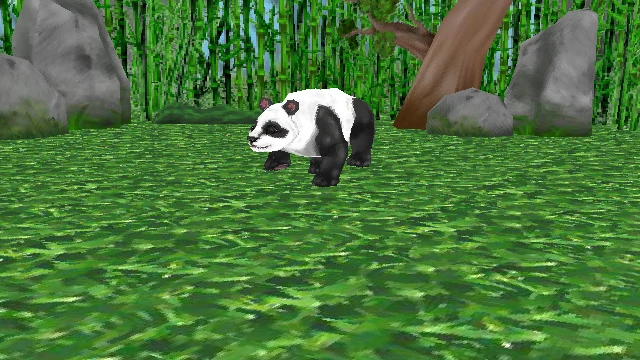
Save it as hello_panda.py and run python hello_panda.py. A window opens showing the panda walking in a bamboo clearing while the camera circles it.
The program shows the pattern almost every Panda3D game follows:
ShowBaseopens the window and sets uprender,camera,loaderandtaskMgr.loadModel()andActorbring in static and animated models.reparentTo(self.render)places them in the scene graph.- A task updates the world every frame.
Packaging a Panda3D Game for Players
Panda3D 1.10 introduced a setuptools-based deployment pipeline. Its build_apps command freezes your Python code and bundles it with the engine libraries into a standalone program, so players don’t need Python installed (Panda3D’s distribution guide). A minimal setup.py looks like this:
from setuptools import setup

setup(
    name="hello-panda",
    options={
        "build_apps": {
            "gui_apps": {"hello-panda": "hello_panda.py"},
            "include_patterns": ["**/*.png", "**/*.egg"],
            "plugins": ["pandagl", "p3openal_audio"],
            "platforms": ["manylinux2014_x86_64"],
        }
    },
)
Add a requirements.txt next to it containing panda3d==1.10.16; build_apps won’t run without one. Then run python setup.py build_apps. The platforms list controls what you build for. Add entries such as win_amd64 or macosx_10_9_x86_64 to produce Windows and macOS builds from the same machine.
Two practical notes:
- Only files matching
include_patternsare packed. The sample models used above live inside the Panda3D package, not your project, so a real game should keep its own models and textures in its project folder and list them in the patterns. - The browser plug-in is gone. Older Panda3D versions could run games in a web browser through a plug-in, but browsers removed support for that kind of plug-in years ago. Standalone builds through
build_appsare now the way to ship.
Features at a Glance
- Rendering: a scene graph with automatic shader generation, normal and gloss mapping, HDR, cartoon shading and render-to-texture, plus full support for custom GLSL shaders.
- Animation: skeletal animation and blending through the
Actorclass. - Physics and collisions: a built-in collision system, plus Bullet and ODE integrations.
- Audio: 3D positional sound through OpenAL or FMOD.
- Assets: Panda3D’s own
.egg(text) and.bam(binary) formats. Thepanda3d-gltfadd-on loads glTF, the format Blender exports natively. - Tools: the PStats performance profiler, which the developers have been modernising (panda3d.org posts project news), plus memory and scene-graph debugging tools.
- GUI and networking: the DirectGUI widget set and a built-in networking layer, the same foundations Disney’s MMOs used.
Is Panda3D a Python Engine or a C++ Engine?
It’s a C++ engine that is usually programmed in Python. Many engine lists and tutorials describe Panda3D as “a Python game engine”, and some credit it to “Disney Interactive in 2002”. Both blur what actually happened.
- The engine is C++. Python is a generated binding layer on top. That’s why Panda3D performs well for a Python-scripted engine: the heavy lifting, from culling and animation to rendering, runs in compiled code.
- You can skip Python entirely. Panda3D supports writing a whole game in C++ against the same API, and the manual has a C++ edition alongside the Python one.
- 2002 is the open-source date, not the start. The engine was built earlier at Disney’s VR Studio for theme-park attractions, then used for Disney’s online games. Making it open source in 2002 is what opened it to everyone else.
Games Made with Panda3D
Every title below is confirmed as a Panda3D game by its developer, its credits, or a sourced reference.
| Year | Game | Developer | Notes |
|---|---|---|---|
| 2003 | Toontown Online | Disney’s VR Studio, with Schell Games | Disney’s family MMORPG; closed September 19, 2013 |
| 2007 | Pirates of the Caribbean Online | Disney Online, with SilverTree Media | The second MMORPG built on Panda3D; closed September 19, 2013 |
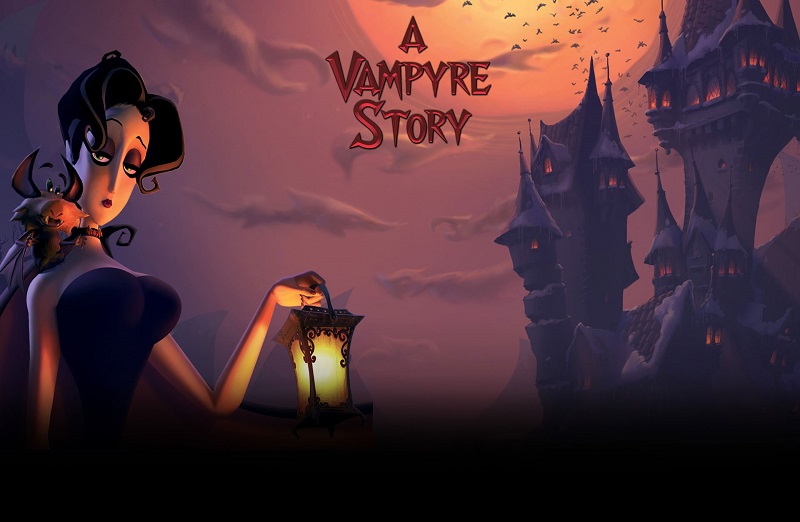
| 2008 | A Vampyre Story | Autumn Moon Entertainment | Point-and-click adventure; re-released on Steam in July 2023 |
| 2009 | Ghost Pirates of Vooju Island | Autumn Moon Entertainment | Adventure game; US release August 2010 |
| 2013– | Toontown Rewritten | Fan team | Fan-run revival of Toontown Online, also on Panda3D |
| 2026 | Time Dilation Lab | Simulan | Special-relativity simulator released on Steam in July 2026 |


Is Panda3D Still Used in 2026?
Yes. It’s a small but steady project rather than a fast-growing one:
- It’s still released. Panda3D SDK 1.10.16 shipped on December 25, 2025, with crash and hang fixes, and with macOS builds moved to OpenAL Soft to fix audio on macOS 26 “Tahoe” (1.10.16 release notes). The next version, 1.11, is in development on the main branch.
- It’s still active on GitHub. The panda3d/panda3d repository has more than 26,000 commits and about 5,200 stars.
- New games still ship on it. Time Dilation Lab reached Steam in July 2026 (announced on the Panda3D forums), and A Vampyre Story returned to Steam in 2023.
- Other engines build on it. Ursina, a popular Python engine, runs on top of Panda3D (see Alternatives below).
Its biggest audience today is people who want a real 3D engine they can drive from Python: students, researchers building simulations and visualisations, and indie developers who prefer code over editors. Panda3D has no visual scene editor like Unity’s or Godot’s, and that is the main reason larger teams look elsewhere.
Panda3D Alternatives
- Ursina: a higher-level Python engine built on Panda3D. Version 8.3 requires Panda3D 1.10.15 or later. It’s MIT-licensed and trades some of Panda3D’s control for much shorter code, which makes it a good starting point for beginners and game jams (ursinaengine.org).
- Godot: a free, MIT-licensed engine with a full visual editor and its own Python-like language, GDScript. Choose it if you want an editor-first workflow and easy export to many platforms. See our Godot game engine profile.
- Unity: the commercial standard for mobile, XR and mid-size 3D games, scripted in C#, with a large asset store and console support on paid plans. Our Unity engine guide covers its 2026 pricing.
- A C++ engine: if you’re drawn to Panda3D for its C++ core rather than its Python layer, our directory of open-source C++ game engines compares more than 100 options.
Key Takeaways
- Panda3D is a C++ engine scripted in Python. It was built at Disney’s VR Studio, open-sourced in 2002, and BSD-licensed since 2008.
- It powered Disney’s MMOs: Toontown Online (2003) and Pirates of the Caribbean Online (2007), both closed in 2013.
- It’s still maintained in 2026. SDK 1.10.16 shipped in December 2025, version 1.11 is in development, and new games such as Time Dilation Lab still reach Steam.
- It installs with
pip install panda3d, andbuild_appspackages games as standalone programs for Windows, macOS and Linux. The old browser plug-in is gone. - It’s free for commercial use with no royalties. It suits code-first developers, education and simulation, but there’s no visual editor.
- Ursina, Godot and Unity are the main alternatives, depending on whether you want simpler Python, an editor, or a commercial ecosystem.
Conclusion
Panda3D is an unusual survivor: a Disney engine built for theme parks and MMOs that became a community-run, BSD-licensed project and kept shipping releases for over twenty years. Its C++ core and generated Python layer still make it one of the most direct ways to write a real 3D game, or a simulation, in Python, and you can drop to C++ when you need to.
We’ll update this guide when Panda3D 1.11 is released. For more engines in the same family, browse our game development hub.