

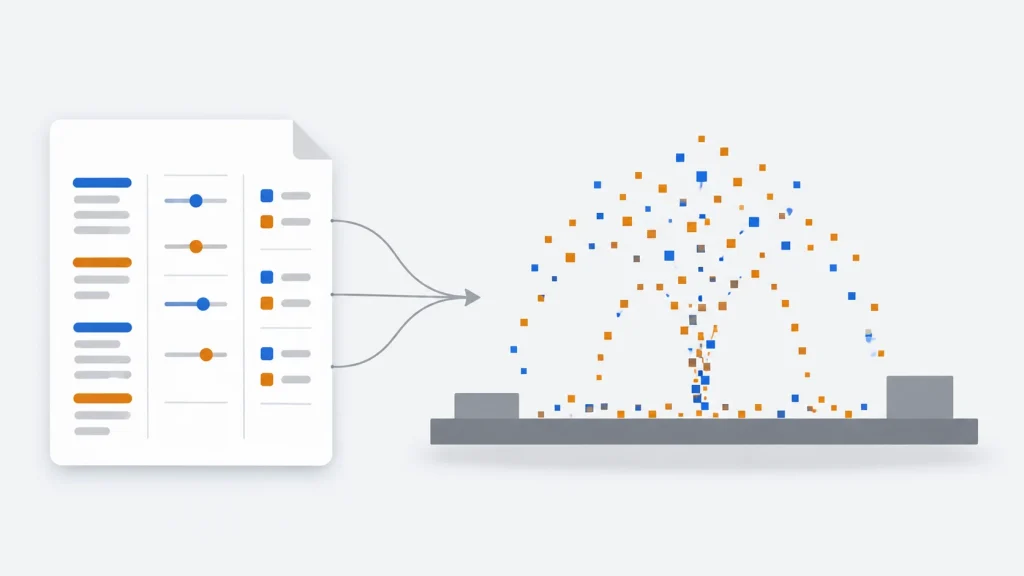
Orx is a free, open-source 2D game engine written in C that takes the idea of being data-driven further than most. Almost everything in an orx game, from the objects and their graphics to physics bodies, particle spawners, animations and even small scripts, is described in plain-text config files that the engine reads at run time. A complete scene can be created with one line of code, and you can change how it looks and behaves without recompiling.
This profile covers where orx came from, how its config system works, a small example we built and ran, the games made with it, and where the engine stands in 2026. Facts were checked against the orx source repository, the official website and its release notes, and the games’ own store pages in November 2026.
What Is Orx?
Orx is a free, open-source, data-driven 2D game engine written in C, with an optional C++ layer. Games are built mostly in config files, which define objects, graphics, physics, sound and behaviour. It runs on Windows, Linux, macOS, Android, iOS and the web (HTML5), is licensed under zlib, and its latest release is 1.17 (April 2026).
Orx at a glance
| Type | Data-driven 2D (“2.5D”) game engine |
|---|---|
| Lead developer | Romain Killian (iarwain) |
| History | Repository from 2004; version 1.0 in September 2009 |
| Written in | C, with an optional C++ layer (Scroll) |
| Game logic | Config files with commands, plus C or C++ |
| Physics and audio | LiquidFun (Box2D-based), miniaudio |
| Platforms | Windows, Linux, macOS, Android, iOS, Web/HTML5 |
| Licence | zlib (since version 1.2, 2010) |
| Latest release | 1.17 (April 27, 2026) |
| Community | Discord, wiki and regular live-coding sessions |
A Short History of Orx
Orx is largely the work of one developer, Romain Killian, known online as iarwain, who wrote the architecture and nearly all of the core features. He has made about 5,900 of the repository’s 7,520 commits. The project’s history goes back to the early 2000s: the repository’s first commits date from December 2004, and after a very quiet 2006, development resumed in 2007 and has continued every year since.
Version 1.0 was released in September 2009, with Windows, Linux and Mac OS X support, a generic input system and fragment shaders. iOS support followed in 1.2 (2010), which also moved orx from the LGPL to the more permissive zlib licence, and Android arrived in 1.3 (2011). Since then orx has kept a steady rhythm of roughly one release a year:
| Version | Released | Highlights |
|---|---|---|
| 1.0 | September 2009 | First stable release: Windows, Linux and Mac OS X |
| 1.2 | July 2010 | iOS and Unicode support, and a licence change from the LGPL to zlib |
| 1.3rc0 | May 2011 | Physics joints, OpenGL 2.0 and the first Android support |
| 1.4 | January 2013 | Interactive console, commands and timelines |
| 1.13 | March 2022 | New sound system based on miniaudio |
| 1.15 | August 2024 | Overhauled FX module, triggers and a headless mode |
| 1.16 | May 2025 | Web/HTML5 platform, and runtime TrueType fonts with SDF rendering |
| 1.17 | April 2026 | Named variables in commands, new triggers, a multi-core task worker pool and a GUI layout extension |
How Orx Works
Config files drive everything
An orx game’s content lives in .ini-style config files. Each section, such as [Player] or [Explosion], describes one thing, and the engine creates objects from those descriptions. A few features make this much more powerful than a plain settings file:
- Inheritance. A section can inherit from another (
[BigEnemy@Enemy]), so you only write what’s different. - Random values. Ranges such as
Speed = (-160, -620) ~ (160, -480)give each new object its own random value. - Commands and timelines. Config can hold short commands that run at set times, or when something happens, for logging, spawning objects or changing properties. That gives orx a scripting-like layer without a separate scripting language.
- Hot-loading. Orx can reload resources automatically when they change on disk, which shortens iteration times.
The engine underneath
The core is written in C, about 98,000 lines across 56 source files, and it’s platform-independent. Everything that depends on the operating system is a plugin, and the standard builds embed these:
- GLFW for windows and input on desktop, with OpenGL ES on mobile.
- miniaudio for sound.
- LiquidFun, a fork of Box2D, for rigid-body physics.
- Orx’s own 2D renderer.
On top of that sit the features you’d expect from a full 2D engine: sprite batching, cameras and multiple viewports, offscreen rendering and shaders, an animation graph, spawners for particles and projectiles, localization, an interactive in-game console and a built-in profiler. If you prefer C++, the Scroll layer adds C++ classes bound to config sections.
Hello, Orx: A Physics Fountain in 25 Lines of C
This example sprays coloured squares out of a fountain. Gravity pulls them down, they bounce on a floor, and the engine logs how many are alive every second. The C program only starts orx and creates the scene:
#include "orx.h"

/* Called once orx is ready: everything else lives in fountain.ini */
orxSTATUS orxFASTCALL Init()
{
  orxViewport_CreateFromConfig("MainViewport");
  orxObject_CreateFromConfig("Scene");
  return orxSTATUS_SUCCESS;
}

/* Called every frame; game logic belongs in config or object updates */
orxSTATUS orxFASTCALL Run()
{
  return orxInput_IsActive("Quit") ? orxSTATUS_FAILURE : orxSTATUS_SUCCESS;
}

void orxFASTCALL Exit()
{
}

int main(int argc, char **argv)
{
  orx_Execute(argc, argv, Init, Run, Exit);
  return EXIT_SUCCESS;
}
Everything else is in fountain.ini, which orx loads automatically because it has the same name as the program. This is the part that defines the fountain, the falling squares and the once-a-second report:
[Scene]
ChildList     = Fountain # Floor
TrackList     = Report

[Fountain]
Position      = (0, 150, 0)
Spawner       = Spray

[Spray]
Object        = Drop
WaveSize      = 2
WaveDelay     = 0.05
ActiveObject  = 80

[Drop]
Graphic       = Square
Color         = (79, 195, 247) ~ (255, 183, 77)
Speed         = (-160, -620) ~ (160, -480)
Scale         = 10
LifeTime      = 4
Body          = DropBody

[Square]
Texture       = pixel
Pivot         = center

[DropBody]
Dynamic       = true
PartList      = DropPart

[Report]
1             = > Object.GetCount Drop, Log "Drops alive: <"
Loop          = true
A few things to notice:
Spawner = Sprayturns the fountain into an emitter.WaveSizeandWaveDelayset the rate, andActiveObject = 80caps how many drops exist at once.Texture = pixelis a built-in 1×1 white texture, scaled and tinted per object, so the example needs no image files.- Each drop gets a random colour and speed from the
~ranges, and a physicsBodyso it falls and bounces. TrackList = Reportattaches a timeline that runs a command every second:Object.GetCount Dropcounts live drops, andLogprints the result.
How we tested it: we built orx from its main branch (commit eefb8b1f, November 6, 2026, which includes version 1.17) with gcc 13 on Ubuntu 24.04, compiled the program against the orx library, and ran it under a virtual display with software OpenGL. The squares sprayed and bounced as described, and the log printed “Drops alive: 36”, then 76, then held between 78 and 80 every second, as the ActiveObject cap kicked in. The full fountain.ini also sets up the window, the camera, gravity, the drops’ physics shape (DropPart) and the floor.
Games Made with Orx
Orx is a hobbyist and indie engine, and most games made with it are small, but a few show its range:
| Game | Year | Developer | Notes |
|---|---|---|---|
| Outpost Bandit | 2019 | Wayne Johnson (Alien Abduction Unit) | A free game for Windows and macOS, written in C++ with orx (Outpost Bandit release notes) |
| Lifetris | 2019 | Fully Bugged and iarwain | A two-player Tetris-style puzzle game made in about 25 hours for Ludum Dare 44 |
| Dstroy 2 | In development | Fully Bugged | A pixel-art, Bomberman-style action game for up to four players, sequel to a 1995 MS-DOS game (Dstroy 2 on itch.io) |
| Ashbane | Announced | Shiverblade Studios | A turn-based tactical RPG for Windows, macOS and Linux, featured on the orx news page in January 2026 (Ashbane on Steam) |
itch.io also has a “Made with orx” tag, which lists many smaller game-jam entries.
Orx in 2026
- It’s actively developed. Version 1.17 came out on April 27, 2026 (orx release news), and the repository had new commits in November 2026.
- It runs on six platforms. Windows, Linux and macOS (including Apple silicon), Android, iOS, and, since version 1.16, the web through Emscripten.
- The community is small but active. Support happens mostly on the orx Discord server, and the project runs regular live-coding sessions; one in September 2025 built a local-multiplayer Asteroids-style game for the web in an hour.
- It’s still essentially one person’s engine. Romain Killian writes most of the code, which keeps the design consistent but means the project depends heavily on him.
Common Misconceptions About Orx
- “Orx is a 3D engine.” It isn’t. The website’s “3D acceleration” means rendering on the GPU with OpenGL. Orx is a 2D engine; it does place objects in 3D space for depth ordering and parallax, which is why its site calls it “2.5D”.
- “Orx is written in C++.” The engine’s core is C. C++ is optional, through the Scroll layer and in your own game code.
- “Orx has a visual editor like Unity or Godot.” It doesn’t come with a visual scene editor. You build scenes in config files, and you can tweak them at run time through the in-game console and hot-loading.
Orx Alternatives
- Godot: a free, open-source engine with a visual editor and strong 2D tools, if you want a full editor and a much bigger community. See our Godot engine profile.
- raylib: a small, free C library for games, if you want to write everything in code rather than config (raylib).
- Panda3D: an open-source C++ engine scripted in Python, if your project needs real 3D. See our Panda3D engine profile.
For more open-source engines, browse our directory of open-source C++ game engines.
Key Takeaways
- Orx is a free, open-source 2D engine written in C, under the zlib licence, led by Romain Killian since the mid-2000s.
- It’s heavily data-driven: objects, physics, spawners, animations and short command scripts all live in config files.
- It runs on Windows, Linux, macOS, Android, iOS and the web, with HTML5 added in version 1.16.
- It’s actively developed: version 1.17 came out in April 2026, about a year after 1.16.
- It’s a 2D (or “2.5D”) engine, not a 3D one, and it has no visual scene editor.
- The games made with it are mostly indie and game-jam projects, with titles such as Dstroy 2 and Ashbane in development.
Conclusion
Orx has quietly kept going for more than twenty years, with a release almost every year and a design that has stayed true to one idea: put the game in the data. For C and C++ programmers who like fast iteration and don’t need a visual editor, it’s a capable, lightweight and permissively licensed choice. Its small community and dependence on one main developer are the trade-offs to weigh.
For more engines across every genre, browse our game development hub.