Vectors in C++ are highly versatile sequence containers that provide dynamic resizing and efficient memory management. This guide covers topics ranging from vector initialization to advanced techniques for vector manipulation and acts as a comprehensive resource for developers who want to deepen their understanding of this essential container. New to the language? Start with our C++ programming basics.
Some examples in this tutorial use C++23’s std::print; others use std::cout for broader compatibility, so compile with -std=c++23 on GCC 14+, Clang 18+, or MSVC 2022 17.6+. On older compilers, replace std::println(...) with std::cout << ....
std::vector Quick Reference
| Method | What it does | Time complexity |
|---|---|---|
push_back(x) | Add element to the end | Amortized O(1) |
emplace_back(args) | Construct element in place at the end | Amortized O(1) |
pop_back() | Remove last element | O(1) |
insert(pos, x) | Insert at position | O(n) |
erase(pos) | Remove at position | O(n) |
at(i) / operator[] | Access element (bounds-checked / not) | O(1) |
front() / back() | First / last element | O(1) |
size() / capacity() | Element count / allocated slots | O(1) |
reserve(n) | Pre-allocate capacity | O(n) |
resize(n) | Change element count | O(n) |
clear() | Remove all elements | O(n) |
shrink_to_fit() | Release unused capacity | O(n) |
The key performance insight: adding to the end is fast (amortized O(1)); inserting or erasing in the middle is O(n) because elements must shift.
What is a Vector in C++?
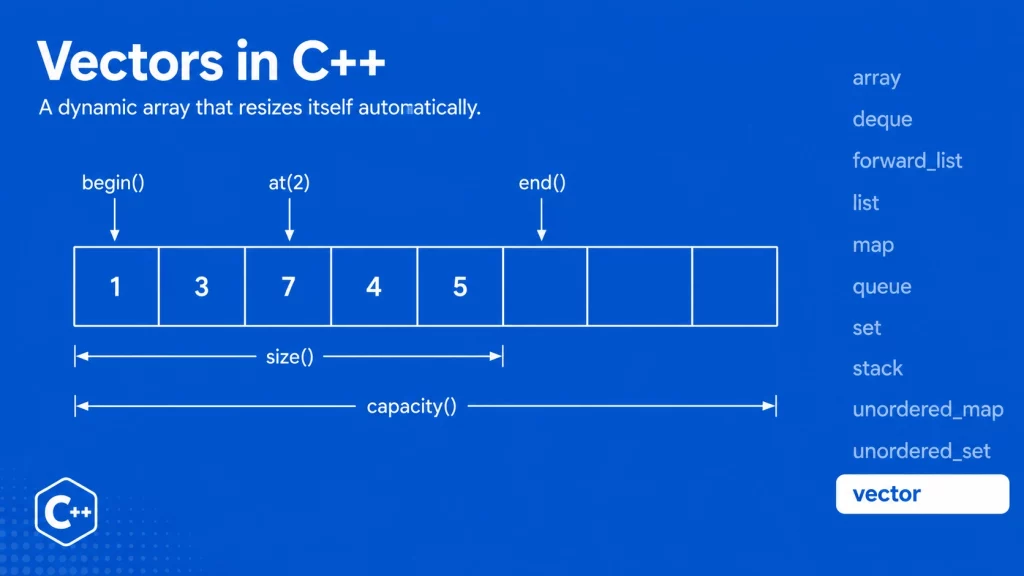
A vector in C++ is a dynamic array that automatically resizes itself when elements are added or removed. Unlike arrays with fixed sizes, the C++ vector container can expand or shrink at runtime, making it highly versatile for handling dynamic data. The underlying storage of vectors is managed by the container itself.
Just like arrays, vector elements are stored in adjacent memory locations, allowing for efficient access using iterators or the subscript operator ([]). You can also access elements by passing a pointer to any C++ function expecting a pointer to an array element.
One key feature of vectors is that data is inserted at the end, which may trigger reallocation to extend the storage. This efficient memory management is what allows vectors to grow and shrink dynamically. While this flexibility comes at the cost of some extra memory usage, C++ vectors are faster in practice for element access due to contiguous storage than other sequence containers, such as deques and lists.
How to Declare a Vector in C++?
To declare a vector, include the <vector> header file. Below is the syntax:
template < class T, class Allocator = std::allocator<T> >
class vector;
Vector Parameters
- T represents the type of elements, which can be any data type (including user-defined types).
- Allocator − Type of allocator object. By default, the allocator class template is used, which defines the memory allocation/de-allocation model.
Initializing a Vector in C++
A vector in C++ can be initialized in multiple ways. For example, initialize the vector as a list.
Method 1:
std::vector<int> my_vector = {1, 2, 3, 4};Another way is to initialize the vector by assigning the value directly to the vector.
std::vector<int> my_vector {1, 2, 3, 4};Method 2:
Another way to initialize the vector to a predefined size with a single value. vector<int> my_vector (3, 4);
Here the vector is defined with the size of 3 elements and all having the value 4, which is equivalent to the following.
std::vector<int> my_vector = {4, 4, 4};Vector Functions
Vector library provides lots of functions to traverse, access and manipulate vectors. There are a lot many helper/utility vector functions to determine the capacity and size of vectors.
Traversing C++ Vectors using Iterators
As vector elements are placed in contiguous storage so that they can be accessed and traversed using iterators. There are four basic functions associated with vectors which are used to traverse vectors i.e.
- begin() – Returns an iterator pointing to the first element in the vector
- end() – Returns an iterator pointing to the theoretical element that follows last element in the vector
- rbegin() – Returns a reverse iterator pointing to the last element in the vector (reverse beginning). It moves from last to first element
- rend() – Returns a reverse iterator pointing to the theoretical element preceding the first element in the vector (considered as reverse end)
C++ Program to demonstrate Vector Iterators
Consider the following program which demonstrate the use of iterators to access and traverse vector elements using the iterator member types discussed above.
#include <vector>
#include <print>   // C++23/26: std::print, std::println

int main()
{
    std::vector<int> scores;

    for (int n = 1; n <= 5; ++n)
        scores.push_back(n);

    std::print("Output of begin() and end():");
    for (auto it = scores.begin(); it != scores.end(); ++it)
        std::print(" {}", *it);
    std::println("\n");

    std::print("Output of rbegin() and rend():");
    for (auto it = scores.rbegin(); it != scores.rend(); ++it)
        std::print(" {}", *it);
    std::println();

    return 0;
}
This C++ program demonstrates how to use both forward and reverse iterators to access and traverse the elements of a vector. It first populates the vector scores with integers from 1 to 5 using the push_back() function.
Output:
Output of begin() and end(): 1 2 3 4 5
Output of rbegin() and rend(): 5 4 3 2 1
Accessing C++ Vector Elements by using Access Functions
Vector elements can be accessed using the following vector functions. Any/combination or all of these functions can be used to access vector elements in different situations.
- front() – Returns a reference to the first element in the container.
- back() – Returns reference to the last element in the container.
- at() – Returns a reference to the element at specific position in the vector by using a reference operator (as mentioned below)
- Reference Operator [r] – Returns a reference to the element at position ‘r’ in the vector
C++ Program to Access Vector Elements
Consider the following program which demonstrate the access and traverse vector elements using the access functions as discussed above.
#include <vector>
#include <print>

int main()
{
    std::vector<int> ints = {1, 2, 3, 4, 5, 6, 7, 8, 9, 10};

    std::println("Using at()    - ints.at(4)   = {}", ints.at(4));
    std::println("Using front() - ints.front() = {}", ints.front());
    std::println("Using back()  - ints.back()  = {}", ints.back());
    std::println("Using []      - ints[2]      = {}", ints[2]);

    return 0;
}
This C++ program demonstrates how to access and traverse elements in a vector using various access functions. It initializes a vector ints with values from 1 to 10 and then uses four different access methods to retrieve specific elements:
at(): Safely accesses an element at a specific index, in this case, the element at index 4.front(): Returns the first element of the vector.back(): Retrieves the last element of the vector.- Subscript operator
[]: Directly accesses the element at a specific index, here at index 2.
Each method prints the corresponding element which shows the different ways to retrieve vector elements in C++.
Output:
Using at()    - ints.at(4)   = 5
Using front() - ints.front() = 1
Using back()  - ints.back()  = 10
Using []      - ints[2]      = 3
Manipulate Vector Elements by using Modifier Functions
The following C++ Vector functions are used to interact with vector elements and manipulate them.
insert(): Inserts elements at a specified position in the vector.assign(): Replaces the vector’s content with new values and resizes it.emplace(): Constructs and inserts an element directly at a given position.push_back(): Adds an element to the end of the vector, increasing its size.emplace_back(): Constructs and adds an element to the end of the vector.pop_back(): Removes the last element, reducing the size of the vector.resize(): Adjusts the size of the vector by adding or removing elements.swap(): Exchanges the contents of two vectors.clear(): Deletes all elements from the vector, leaving it empty.erase(): Removes specific elements or a range of elements from the vector.
C++ Program to Manipulate Vector Elements
Consider the following program which demonstrate the manipulation of vector elements using the modified functions as discussed above.
#include <vector>
#include <print>

void print_vec(const std::vector<int>& vec)
{
    std::println("{}", vec);   // C++23/26: ranges are directly formattable
}

int main()
{
    std::println("Initial Vector:");
    std::vector<int> vec(3, 100);
    print_vec(vec);

    std::println("Insert 200 at the beginning:");
    auto it = vec.begin();
    it = vec.insert(it, 200);
    print_vec(vec);

    std::println("Insert 300 twice at the end:");
    it = vec.end();
    vec.insert(it, 2, 300);
    print_vec(vec);

    return 0;
}
This C++ program demonstrates how to manipulate vector elements using various modifier functions.
Output:
Initial Vector:
[100, 100, 100]
Insert 200 at the beginning:
[200, 100, 100, 100]
Insert 300 twice at the end:
[200, 100, 100, 100, 300, 300]
C++ Vector Capacity and Size Functions
The following C++ Vector functions are used to manipulate vector size and capacity.
- empty() – This function checks whether the container is empty or not.
- size() – Returns the number of elements in the vector
- max_size() – Returns the maximum possible number of elements of vector
- reserve() – Reserves storage i.e. increase the capacity of the vector to a value that’s greater or equal to new_cap by pre-allocatong the memory.
- capacity() – Returns the number of elements that can be held in currently allocated storage
- shrink_to_fit() – Reduces memory usage by freeing unused memory
C++ Program to display number of elements in a Vector
The following C++ program displays the number of elements in vector using size() function.
#include <vector>
#include <print>

int main()
{
    std::vector<int> ids {1, 3, 5, 7};
    std::println("ids contains {} elements.", ids.size());

    return 0;
}
Output:
ids contains 4 elements.
When is the Vector most efficient in C++?
Vector is more efficient when you reserve() the correct amount of storage at the beginning so the vector never has to reallocate.
Vector is more efficient when you only add and remove elements from the back end.
It is possible to insert and erase elements from the middle of a vector using an iterator, however, when an object is inserted into the vector in the middle, it must push other objects down to maintain the linear array.
Zero Sized Vectors
A zero-sized vector is a vector that has been initialized but contains no elements. This is a valid state for a vector in C++. Zero sized vectors are also possible and valid. In that case vector.begin() and vector.end() points to same location. But behavior of calling front() or back() is undefined.
- Empty Vector: A zero-sized vector is essentially an empty vector, meaning its size is
0, but it still has the capacity to grow and add elements later. The vector is valid, and it can still be used with certain operations, like adding or inserting elements. - Iterators in Zero-Sized Vectors:
- In a zero-sized vector, the
begin()andend()iterators point to the same memory location, which represents the position after the last element (or the first, since there are no elements). This is because there is no valid element in the vector to traverse, so both iterators point to a common “null” position. - You can safely check for an empty vector using the condition
if (vector.begin() == vector.end()), which will return true if the vector is empty.
- In a zero-sized vector, the
- Undefined Behavior with
front()andback():- Calling
front()orback()on a zero-sized vector results in undefined behavior because these functions assume that the vector contains at least one element. Since there is no first or last element in a zero-sized vector, attempting to access them can lead to crashes or unpredictable results. - To avoid this, always check if the vector is empty (
vector.empty()) before usingfront()orback()to ensure the vector has elements.
- Calling
While zero-sized vectors are valid and commonly used in dynamic memory scenarios, care must be taken when accessing elements, as functions like front() and back() do not work on empty vectors and can lead to undefined behavior.
push_back vs emplace_back
Both add to the end, but they differ in how. push_back takes an already-constructed object and copies or moves it in. emplace_back (added in C++11) constructs the object in place from its arguments, avoiding a temporary:
#include <vector>
#include <string>

struct Point {
    int x, y;
    Point(int x, int y) : x(x), y(y) {}
};

std::vector<Point> points;

points.push_back(Point(1, 2));   // constructs a temporary, then moves it in
points.emplace_back(3, 4);       // constructs directly inside the vector
For simple types like int the difference is negligible, but for objects that are expensive to copy, emplace_back is the modern default.
Using reserve() to Avoid Reallocations
Each time a vector outgrows its capacity, it allocates a bigger block (typically double) and copies every existing element across. If you know roughly how many elements you’ll add, reserve() pre-allocates once and skips all those intermediate reallocations:
#include <vector>

std::vector<int> data;
data.reserve(1000);          // one allocation up front

for (int i = 0; i < 1000; ++i)
    data.push_back(i);       // no reallocations happen here
Without reserve(), building a 1,000-element vector triggers around 10 reallocations as capacity doubles from 1 → 2 → 4 → … → 1024. For large vectors in performance-sensitive code, reserving is one of the easiest wins available.
Removing Elements: erase and the Erase-Remove Idiom
erase() removes an element at a position or range:
std::vector<int> v = {10, 20, 30, 40, 50};
v.erase(v.begin() + 1);              // removes 20 → {10, 30, 40, 50}
v.erase(v.begin(), v.begin() + 2);   // removes first two → {40, 50}
To remove all elements matching a value, use the erase-remove idiom (or std::erase in C++20, which does it in one call):
#include <algorithm>

std::vector<int> nums = {1, 2, 3, 2, 4, 2};

// C++20 and later — simplest:
std::erase(nums, 2);                 // {1, 3, 4}

// Before C++20 — the classic erase-remove idiom:
nums.erase(std::remove(nums.begin(), nums.end(), 2), nums.end());
This is one of the most useful vector patterns to know, and a frequent source of bugs when written incorrectly — std::remove alone doesn’t shrink the vector; it just moves unwanted elements to the end, which is why erase is still needed before C++20.
Vector vs Array vs List
| Feature | std::vector | C-style array / std::array | std::list |
|---|---|---|---|
| Size | Dynamic | Fixed | Dynamic |
| Memory layout | Contiguous | Contiguous | Node-based (scattered) |
Random access ([i]) | O(1) | O(1) | O(n) |
| Insert/erase at end | Amortized O(1) | N/A | O(1) |
| Insert/erase in middle | O(n) | N/A | O(1) |
| Cache efficiency | Excellent | Excellent | Poor |
| Best for | Most use cases | Fixed-size known at compile time | Frequent middle insert/erase |
In practice, std::vector is the right default container in modern C++. Reach for std::list only when you genuinely insert and remove in the middle constantly, and std::array when the size is fixed and known at compile time.
2D Vectors: Vector of Vectors
A common need is a grid or matrix, which you can build as a vector of vectors:
#include <vector>
#include <iostream>

int main()
{
    int rows = 3, cols = 4;

    // 3x4 grid initialized to 0
    std::vector<std::vector<int>> grid(rows, std::vector<int>(cols, 0));

    grid[0][0] = 1;
    grid[1][2] = 5;

    for (const auto& row : grid) {
        for (int value : row)
            std::cout << value << ' ';
        std::cout << '\n';
    }
}
This creates rows vectors, each of length cols. It’s convenient and readable, though for performance-critical numerical work a single flat std::vector<int> indexed as grid[r * cols + c] is faster because it keeps all data contiguous in memory.
Using Vectors with STL Algorithms
Because vectors provide random-access iterators, they work seamlessly with the <algorithm> library:
#include <vector>
#include <algorithm>
#include <iostream>
#include <numeric>

int main()
{
    std::vector<int> v = {5, 2, 8, 1, 9, 3};

    std::sort(v.begin(), v.end());                     // 1 2 3 5 8 9
    auto it = std::find(v.begin(), v.end(), 8);        // search
    int total = std::accumulate(v.begin(), v.end(), 0); // sum (needs <numeric>)

    std::cout << "Sum: " << total << '\n';
}
Range-based for loops and STL algorithms are the idiomatic way to work with vectors in modern C++ — you rarely need manual index loops.