[et_pb_section fb_built=”1″ admin_label=”section” _builder_version=”3.22″ custom_padding=”0px||30px|||”][et_pb_row admin_label=”row” _builder_version=”3.25″ background_size=”initial” background_position=”top_left” background_repeat=”repeat”][et_pb_column type=”4_4″ _builder_version=”3.25″ custom_padding=”|||” custom_padding__hover=”|||”][et_pb_text admin_label=”Text” _builder_version=”4.0.9″ background_size=”initial” background_position=”top_left” background_repeat=”repeat” hover_enabled=”0″ sticky_enabled=”0″]
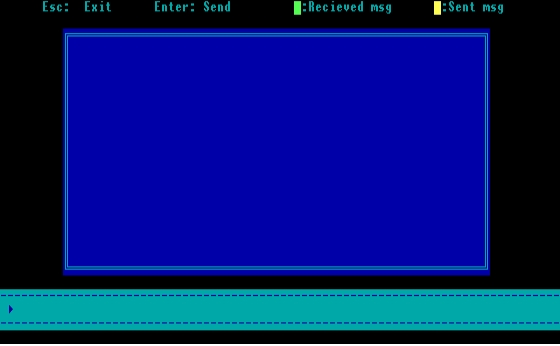
This is a C program to demonstrate PC to PC Communication via RS232 port. Chat with only 3-wire connection.
This program is tested with Turbo C++ editor Version 3.0. How ever, authors are not responsible for any damages that may happen to your computer. Please contact us if any problem exits.
Programmed by:
Shreeharsha Perla & Veena Pai
PC to PC Communication (31.0 KiB, 17,869 hits)
[/et_pb_text][/et_pb_column][/et_pb_row][/et_pb_section][et_pb_section fb_built=”1″ _builder_version=”4.0.9″ custom_padding=”0px||30px|||” global_module=”7034″][et_pb_row _builder_version=”4.0.9″ custom_padding=”0px||0px|||”][et_pb_column type=”4_4″ _builder_version=”4.0.9″][et_pb_text _builder_version=”4.0.9″]
Here’s Must-Read List of C programming books for beginners
[/et_pb_text][/et_pb_column][/et_pb_row][et_pb_row column_structure=”1_4,3_4″ _builder_version=”4.0.9″ background_color=”#f2f2f2″ custom_padding=”|10px|||false|false” border_width_top=”1px” border_color_top=”#d2d2d2″ border_color_bottom=”#d2d2d2″][et_pb_column type=”1_4″ _builder_version=”4.0.9″][et_pb_text _builder_version=”4.8.1″ text_orientation=”center” link_option_url=”https://amzn.to/2vZsfJc”]

C Programming Language, 2nd Edition
With over 600 5-star reviews on Amazon, readers agree that C Programming Language, 2nd Edition by Brian Kernighan and Dennis Ritchie is the best C Programming book for Beginners. The authors present the complete guide to ANSI standard C language programming. Written by the developers of C, this new version helps readers keep up with the finalized ANSI standard for C while showing how to take advantage of C’s rich set of operators, economy of expression, improved control flow, and data structures.
[/et_pb_text][et_pb_button button_url=”https://amzn.to/2UMm2J4″ url_new_window=”on” button_text=”View on Amazon” _builder_version=”4.8.1″ button_bg_use_color_gradient=”on” button_bg_color_gradient_start=”#f7dfa5″ button_bg_color_gradient_end=”#f0c14b” button_icon=”%%114%%” button_icon_color=”#000000″ button_icon_placement=”left” button_on_hover=”off” button_rel=”off|off|off|off|off” custom_margin=”|||20px|false|false” custom_padding=”2px||||false|false” hover_transition_duration=”0ms” custom_css_after__hover_enabled=”off|desktop” button_bg_color__hover_enabled=”on|desktop” button_bg_color_gradient_type__hover=”linear” custom_css_main_element__hover_enabled=”on|desktop” custom_css_main_element__hover=”background-color: #005eb8 !important;” button_bg_color_gradient_start__hover=”#f5d78e” button_bg_color_gradient_end__hover=”#eeb933″ button_text_color__hover_enabled=”off|hover” button_text_color__hover=”#111111″ custom_margin__hover_enabled=”off|hover” custom_padding__hover_enabled=”off|hover” background_layout__hover_enabled=”off|hover” button_border_width__hover_enabled=”off|hover” button_border_width__hover=”1px” button_border_color__hover_enabled=”on|hover” button_border_color__hover=”#111111″ button_border_radius__hover_enabled=”on|hover” button_border_radius__hover=”3px” button_letter_spacing__hover_enabled=”off|hover” custom_css_before__hover_enabled=”on|hover”][/et_pb_button][/et_pb_column][/et_pb_row][et_pb_row column_structure=”1_4,3_4″ _builder_version=”4.0.9″ background_color=”#f2f2f2″ custom_padding=”|10px|||false|false” border_width_top=”1px” border_color_top=”#d2d2d2″ border_color_bottom=”#d2d2d2″][et_pb_column type=”1_4″ _builder_version=”4.0.9″][et_pb_text _builder_version=”4.8.1″ text_orientation=”center” link_option_url=”https://amzn.to/2WQz9eW”]

21st Century C: C Tips from the New School
Throw out your old ideas about C and get to know a programming language that’s substantially outgrown its origins. With this revised edition of 21st Century C, you’ll discover up-to-date techniques missing from other C tutorials, whether you’re new to the language or just getting reacquainted.
[/et_pb_text][et_pb_button button_url=”https://amzn.to/2WQz9eW” url_new_window=”on” button_text=”View on Amazon” _builder_version=”4.8.1″ button_bg_use_color_gradient=”on” button_bg_color_gradient_start=”#f7dfa5″ button_bg_color_gradient_end=”#f0c14b” button_icon=”%%114%%” button_icon_color=”#000000″ button_icon_placement=”left” button_on_hover=”off” button_rel=”off|off|off|off|off” custom_margin=”|||20px|false|false” custom_padding=”2px||||false|false” hover_transition_duration=”0ms” custom_css_after__hover_enabled=”off|desktop” button_bg_color__hover_enabled=”on|desktop” button_bg_color_gradient_type__hover=”linear” custom_css_main_element__hover_enabled=”on|desktop” custom_css_main_element__hover=”background-color: #005eb8 !important;” button_bg_color_gradient_start__hover=”#f5d78e” button_bg_color_gradient_end__hover=”#eeb933″ button_text_color__hover_enabled=”off|hover” button_text_color__hover=”#111111″ custom_margin__hover_enabled=”off|hover” custom_padding__hover_enabled=”off|hover” background_layout__hover_enabled=”off|hover” button_border_width__hover_enabled=”off|hover” button_border_width__hover=”1px” button_border_color__hover_enabled=”on|hover” button_border_color__hover=”#111111″ button_border_radius__hover_enabled=”on|hover” button_border_radius__hover=”3px” button_letter_spacing__hover_enabled=”off|hover” custom_css_before__hover_enabled=”on|hover”][/et_pb_button][/et_pb_column][/et_pb_row][et_pb_row column_structure=”1_4,3_4″ _builder_version=”4.0.9″ background_color=”#f2f2f2″ custom_padding=”|10px|||false|false” border_width_top=”1px” border_color_top=”#d2d2d2″ border_color_bottom=”#d2d2d2″][et_pb_column type=”1_4″ _builder_version=”4.0.9″][et_pb_text _builder_version=”4.8.1″ text_orientation=”center” link_option_url=”https://amzn.to/33V0z4G”]

C Programming Absolute Beginner’s Guide
Greg Perry is the author of over 75 computer books and known for bringing programming topics down to the beginner’s level. His book C Programming Absolute Beginner’s Guide, is today’s best beginner’s guide to writing C programs–and to learning skills to use with practically any language. Its simple, practical instructions will help you start creating useful, reliable C code, from games to mobile apps. Plus, it’s fully updated for the new C11 standard and today’s free, open source tools!
[/et_pb_text][et_pb_button button_url=”https://amzn.to/2ydLzmG” url_new_window=”on” button_text=”View on Amazon” _builder_version=”4.8.1″ button_bg_use_color_gradient=”on” button_bg_color_gradient_start=”#f7dfa5″ button_bg_color_gradient_end=”#f0c14b” button_icon=”%%114%%” button_icon_color=”#000000″ button_icon_placement=”left” button_on_hover=”off” button_rel=”off|off|off|off|off” custom_margin=”|||20px|false|false” custom_padding=”2px||||false|false” hover_transition_duration=”0ms” custom_css_after__hover_enabled=”off|desktop” button_bg_color__hover_enabled=”on|desktop” button_bg_color_gradient_type__hover=”linear” custom_css_main_element__hover_enabled=”on|desktop” custom_css_main_element__hover=”background-color: #005eb8 !important;” button_bg_color_gradient_start__hover=”#f5d78e” button_bg_color_gradient_end__hover=”#eeb933″ button_text_color__hover_enabled=”off|hover” button_text_color__hover=”#111111″ custom_margin__hover_enabled=”off|hover” custom_padding__hover_enabled=”off|hover” background_layout__hover_enabled=”off|hover” button_border_width__hover_enabled=”off|hover” button_border_width__hover=”1px” button_border_color__hover_enabled=”on|hover” button_border_color__hover=”#111111″ button_border_radius__hover_enabled=”on|hover” button_border_radius__hover=”3px” button_letter_spacing__hover_enabled=”off|hover” custom_css_before__hover_enabled=”on|hover”][/et_pb_button][/et_pb_column][/et_pb_row][et_pb_row column_structure=”1_4,3_4″ _builder_version=”4.0.9″ background_color=”#f2f2f2″ custom_padding=”|10px|||false|false” border_width_top=”1px” border_color_top=”#d2d2d2″ border_color_bottom=”#d2d2d2″][et_pb_column type=”1_4″ _builder_version=”4.0.9″][et_pb_text _builder_version=”4.8.1″ text_orientation=”center” link_option_url=”https://amzn.to/2Jn1FNk”]

C Programming: A Modern Approach, 2nd Edition
KN King tackles on some C standard library specifics header by header in his C Programming: A Modern Approach book. The second edition maintains all the book’s popular features and brings it up to date with coverage of the C99 standard. The new edition also adds a significant number of exercises and longer programming projects, and includes extensive revisions and updates.
[/et_pb_text][et_pb_button button_url=”https://amzn.to/2Jn1FNk” url_new_window=”on” button_text=”View on Amazon” _builder_version=”4.8.1″ button_bg_use_color_gradient=”on” button_bg_color_gradient_start=”#f7dfa5″ button_bg_color_gradient_end=”#f0c14b” button_icon=”%%114%%” button_icon_color=”#000000″ button_icon_placement=”left” button_on_hover=”off” button_rel=”off|off|off|off|off” custom_margin=”|||20px|false|false” custom_padding=”2px||||false|false” hover_transition_duration=”0ms” custom_css_after__hover_enabled=”off|desktop” button_bg_color__hover_enabled=”on|desktop” button_bg_color_gradient_type__hover=”linear” custom_css_main_element__hover_enabled=”on|desktop” custom_css_main_element__hover=”background-color: #005eb8 !important;” button_bg_color_gradient_start__hover=”#f5d78e” button_bg_color_gradient_end__hover=”#eeb933″ button_text_color__hover_enabled=”off|hover” button_text_color__hover=”#111111″ custom_margin__hover_enabled=”off|hover” custom_padding__hover_enabled=”off|hover” background_layout__hover_enabled=”off|hover” button_border_width__hover_enabled=”off|hover” button_border_width__hover=”1px” button_border_color__hover_enabled=”on|hover” button_border_color__hover=”#111111″ button_border_radius__hover_enabled=”on|hover” button_border_radius__hover=”3px” button_letter_spacing__hover_enabled=”off|hover” custom_css_before__hover_enabled=”on|hover”][/et_pb_button][/et_pb_column][/et_pb_row][et_pb_row column_structure=”1_4,3_4″ _builder_version=”4.0.9″ background_color=”#f2f2f2″ custom_padding=”|10px|||false|false” border_width_top=”1px” border_color_top=”#d2d2d2″ border_color_bottom=”#d2d2d2″][et_pb_column type=”1_4″ _builder_version=”4.0.9″][et_pb_text _builder_version=”4.8.1″ text_orientation=”center” link_option_url=”https://amzn.to/3dFqDVT”]

Programming Arduino: Getting Started with Sketches
Simon Monk, a Ph.D. in software engineering, writes this great little book for learning to program the arduino using C language. This bestselling guide explains how to write well-crafted sketches using Arduino’s modified C language. You will learn how to configure hardware and software, develop your own sketches, work with built-in and custom Arduino libraries, and explore the Internet of Things—all with no prior programming experience required!
[/et_pb_text][et_pb_button button_url=”https://amzn.to/3dFqDVT” url_new_window=”on” button_text=”View on Amazon” _builder_version=”4.8.1″ button_bg_use_color_gradient=”on” button_bg_color_gradient_start=”#f7dfa5″ button_bg_color_gradient_end=”#f0c14b” button_icon=”%%114%%” button_icon_color=”#000000″ button_icon_placement=”left” button_on_hover=”off” button_rel=”off|off|off|off|off” custom_margin=”|||20px|false|false” custom_padding=”2px||||false|false” hover_transition_duration=”0ms” button_border_radius_last_edited=”off|desktop” custom_css_after__hover_enabled=”off|desktop” button_bg_color__hover_enabled=”on|desktop” button_bg_color_gradient_type__hover=”linear” custom_css_main_element__hover_enabled=”on|desktop” custom_css_main_element__hover=”background-color: #005eb8 !important;” button_bg_color_gradient_start__hover=”#f5d78e” button_bg_color_gradient_end__hover=”#eeb933″ button_text_color__hover_enabled=”off|hover” button_text_color__hover=”#111111″ custom_margin__hover_enabled=”off|hover” custom_padding__hover_enabled=”off|hover” background_layout__hover_enabled=”off|hover” button_border_width__hover_enabled=”off|hover” button_border_width__hover=”1px” button_border_color__hover_enabled=”on|hover” button_border_color__hover=”#111111″ button_border_radius__hover_enabled=”on|hover” button_border_radius__hover=”3px” button_letter_spacing__hover_enabled=”off|hover” custom_css_before__hover_enabled=”on|hover”][/et_pb_button][/et_pb_column][/et_pb_row][/et_pb_section]