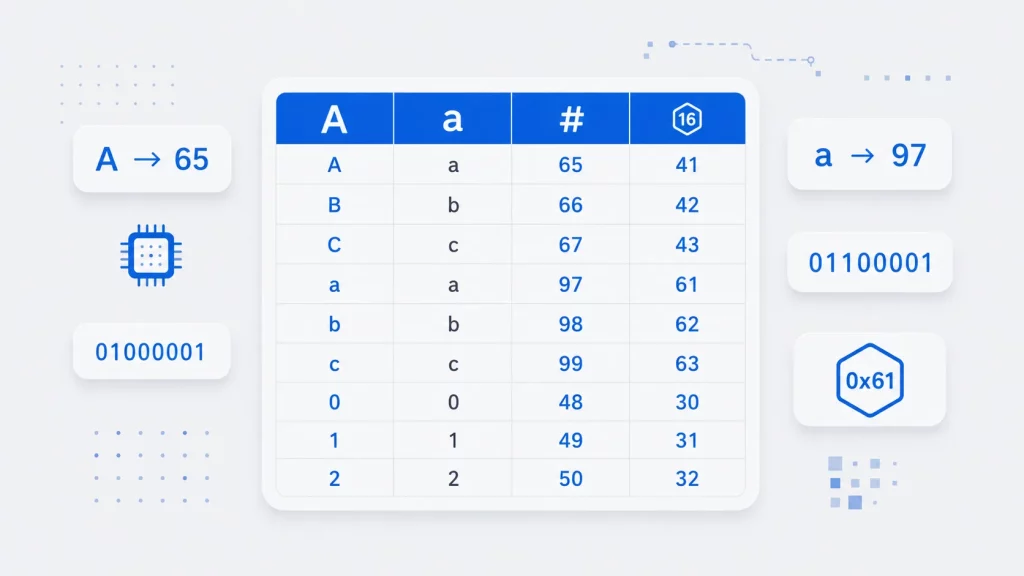
ASCII stands for the American Standard Code for Information Interchange. It was first published in 1963 by the American Standards Association (now ANSI) and revised in 1967 and 1986; the original character assignments are preserved in RFC 20, still the canonical reference for the 7-bit set. Despite being over 60 years old, ASCII is far from obsolete: the first 128 code points of UTF-8 — the dominant text encoding on the modern web — are identical to ASCII, which is why plain ASCII text is also valid UTF-8.
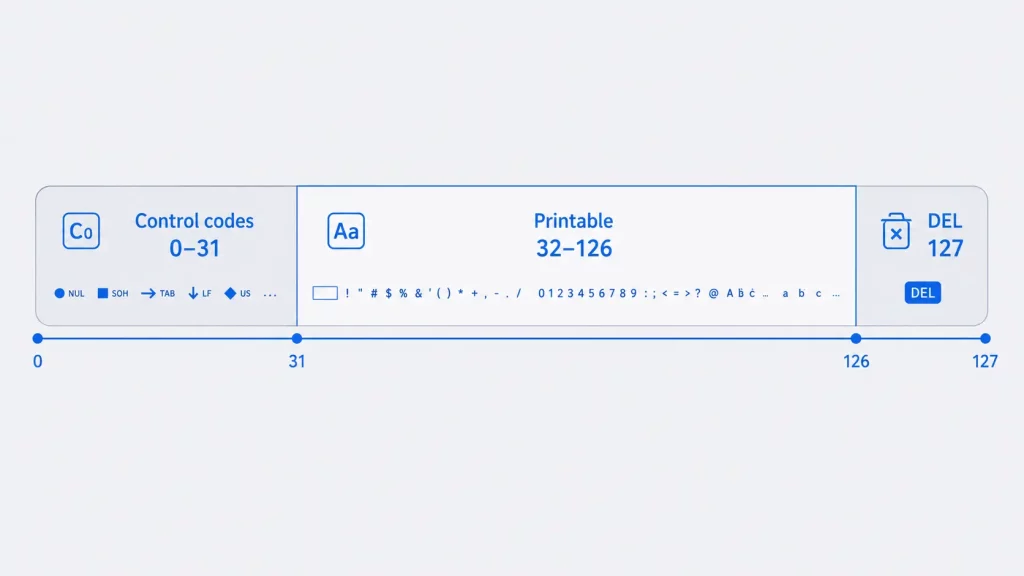
ASCII is a 7-bit character code, so each character is represented by a unique combination of 7 bits. That gives 2⁷ = 128 possible codes (0–127). Of these, 33 are non-printable control codes (0–31 and 127, DEL) originally designed to control hardware such as printers and teletypes, and the remaining 95 are printable characters — letters, digits, punctuation and the space.
List of all ASCII Characters and Description
| Decimal Number | OCT Number | HEX Number | BIN Number | Symbol | Description |
|---|---|---|---|---|---|
| 0 | 000 | 00 | 0000000 | NUL | Null character |
| 1 | 001 | 01 | 0000001 | SOH | Start of Heading |
| 2 | 002 | 02 | 0000010 | STX | Start of Text |
| 3 | 003 | 03 | 0000011 | ETX | End of Text |
| 4 | 004 | 04 | 0000100 | EOT | End of Transmission |
| 5 | 005 | 05 | 0000101 | ENQ | Enquiry |
| 6 | 006 | 06 | 0000110 | ACK | Acknowledge |
| 7 | 007 | 07 | 0000111 | BEL | Bell, Alert |
| 8 | 010 | 08 | 0001000 | BS | Backspace |
| 9 | 011 | 09 | 0001001 | HT | Horizontal Tab |
| 10 | 012 | 0A | 0001010 | LF | Line Feed |
| 11 | 013 | 0B | 0001011 | VT | Vertical Tabulation |
| 12 | 014 | 0C | 0001100 | FF | Form Feed |
| 13 | 015 | 0D | 0001101 | CR | Carriage Return |
| 14 | 016 | 0E | 0001110 | SO | Shift Out |
| 15 | 017 | 0F | 0001111 | SI | Shift In |
| 16 | 020 | 10 | 0010000 | DLE | Data Link Escape |
| 17 | 021 | 11 | 0010001 | DC1 | Device Control One (XON) |
| 18 | 022 | 12 | 0010010 | DC2 | Device Control Two |
| 19 | 023 | 13 | 0010011 | DC3 | Device Control Three (XOFF) |
| 20 | 024 | 14 | 0010100 | DC4 | Device Control Four |
| 21 | 025 | 15 | 0010101 | NAK | Negative Acknowledge |
| 22 | 026 | 16 | 0010110 | SYN | Synchronous Idle |
| 23 | 027 | 17 | 0010111 | ETB | End of Transmission Block |
| 24 | 030 | 18 | 0011000 | CAN | Cancel |
| 25 | 031 | 19 | 0011001 | EM | End of medium |
| 26 | 032 | 1A | 0011010 | SUB | Substitute |
| 27 | 033 | 1B | 0011011 | ESC | Escape |
| 28 | 034 | 1C | 0011100 | FS | File Separator |
| 29 | 035 | 1D | 0011101 | GS | Group Separator |
| 30 | 036 | 1E | 0011110 | RS | Record Separator |
| 31 | 037 | 1F | 0011111 | US | Unit Separator |
| 32 | 040 | 20 | 0100000 | SP | Space character |
| 33 | 041 | 21 | 0100001 | ! | exclamation mark |
| 34 | 042 | 22 | 0100010 | “ | quotation mark |
| 35 | 043 | 23 | 0100011 | # | number sign |
| 36 | 044 | 24 | 0100100 | $ | dollar currency sign |
| 37 | 045 | 25 | 0100101 | % | percent sign |
| 38 | 046 | 26 | 0100110 | & | Ampersand (also used as and) |
| 39 | 047 | 27 | 0100111 | ‘ | Apostrophe (also known as single quote) |
| 40 | 050 | 28 | 0101000 | ( | left parenthesis |
| 41 | 051 | 29 | 0101001 | ) | right parenthesis |
| 42 | 052 | 2A | 0101010 | * | asterisk |
| 43 | 053 | 2B | 0101011 | + | plus sign |
| 44 | 054 | 2C | 0101100 | , | comma |
| 45 | 055 | 2D | 0101101 | – | hyphen |
| 46 | 056 | 2E | 0101110 | . | period |
| 47 | 057 | 2F | 0101111 | / | slash |
| 48 | 060 | 30 | 0110000 | 0 | number 0 |
| 49 | 061 | 31 | 0110001 | 1 | number 1 |
| 50 | 062 | 32 | 0110010 | 2 | number 2 |
| 51 | 063 | 33 | 0110011 | 3 | number 3 |
| 52 | 064 | 34 | 0110100 | 4 | number 4 |
| 53 | 065 | 35 | 0110101 | 5 | number 5 |
| 54 | 066 | 36 | 0110110 | 6 | number 6 |
| 55 | 067 | 37 | 0110111 | 7 | number 7 |
| 56 | 070 | 38 | 0111000 | 8 | number 8 |
| 57 | 071 | 39 | 0111001 | 9 | number 9 |
| 58 | 072 | 3A | 0111010 | : | colon |
| 59 | 073 | 3B | 0111011 | ; | semicolon |
| 60 | 074 | 3C | 0111100 | < | less-than |
| 61 | 075 | 3D | 0111101 | = | equals-to |
| 62 | 076 | 3E | 0111110 | > | greater-than |
| 63 | 077 | 3F | 0111111 | ? | question mark |
| 64 | 100 | 40 | 1000000 | @ | at sign |
| 65 | 101 | 41 | 1000001 | A | uppercase letter A |
| 66 | 102 | 42 | 1000010 | B | uppercase letter B |
| 67 | 103 | 43 | 1000011 | C | uppercase letter C |
| 68 | 104 | 44 | 1000100 | D | uppercase letter D |
| 69 | 105 | 45 | 1000101 | E | uppercase letter E |
| 70 | 106 | 46 | 1000110 | F | uppercase letter F |
| 71 | 107 | 47 | 1000111 | G | uppercase letter G |
| 72 | 110 | 48 | 1001000 | H | uppercase letter H |
| 73 | 111 | 49 | 1001001 | I | uppercase letter I |
| 74 | 112 | 4A | 1001010 | J | uppercase letter J |
| 75 | 113 | 4B | 1001011 | K | uppercase letter K |
| 76 | 114 | 4C | 1001100 | L | uppercase letter L |
| 77 | 115 | 4D | 1001101 | M | uppercase letter M |
| 78 | 116 | 4E | 1001110 | N | uppercase letter N |
| 79 | 117 | 4F | 1001111 | O | uppercase letter O |
| 80 | 120 | 50 | 1010000 | P | uppercase letter P |
| 81 | 121 | 51 | 1010001 | Q | uppercase letter Q |
| 82 | 122 | 52 | 1010010 | R | uppercase letter R |
| 83 | 123 | 53 | 1010011 | S | uppercase letter S |
| 84 | 124 | 54 | 1010100 | T | uppercase letter T |
| 85 | 125 | 55 | 1010101 | U | uppercase letter U |
| 86 | 126 | 56 | 1010110 | V | uppercase letter V |
| 87 | 127 | 57 | 1010111 | W | uppercase letter W |
| 88 | 130 | 58 | 1011000 | X | uppercase letter X |
| 89 | 131 | 59 | 1011001 | Y | uppercase letter Y |
| 90 | 132 | 5A | 1011010 | Z | uppercase letter Z |
| 91 | 133 | 5B | 1011011 | [ | left square bracket |
| 92 | 134 | 5C | 1011100 | \ | backslash |
| 93 | 135 | 5D | 1011101 | ] | right square bracket |
| 94 | 136 | 5E | 1011110 | ^ | caret |
| 95 | 137 | 5F | 1011111 | _ | underscore |
| 96 | 140 | 60 | 1100000 | ` | grave accent |
| 97 | 141 | 61 | 1100001 | a | lowercase letter a |
| 98 | 142 | 62 | 1100010 | b | lowercase letter b |
| 99 | 143 | 63 | 1100011 | c | lowercase letter c |
| 100 | 144 | 64 | 1100100 | d | lowercase letter d |
| 101 | 145 | 65 | 1100101 | e | lowercase letter e |
| 102 | 146 | 66 | 1100110 | f | lowercase letter f |
| 103 | 147 | 67 | 1100111 | g | lowercase letter g |
| 104 | 150 | 68 | 1101000 | h | lowercase letter h |
| 105 | 151 | 69 | 1101001 | i | lowercase letter i |
| 106 | 152 | 6A | 1101010 | j | lowercase letter j |
| 107 | 153 | 6B | 1101011 | k | lowercase letter k |
| 108 | 154 | 6C | 1101100 | l | lowercase letter l |
| 109 | 155 | 6D | 1101101 | m | lowercase letter m |
| 110 | 156 | 6E | 1101110 | n | lowercase letter n |
| 111 | 157 | 6F | 1101111 | o | lowercase letter o |
| 112 | 160 | 70 | 1110000 | p | lowercase letter p |
| 113 | 161 | 71 | 1110001 | q | lowercase letter q |
| 114 | 162 | 72 | 1110010 | r | lowercase letter r |
| 115 | 163 | 73 | 1110011 | s | lowercase letter s |
| 116 | 164 | 74 | 1110100 | t | lowercase letter t |
| 117 | 165 | 75 | 1110101 | u | lowercase letter u |
| 118 | 166 | 76 | 1110110 | v | lowercase letter v |
| 119 | 167 | 77 | 1110111 | w | lowercase letter w |
| 120 | 170 | 78 | 1111000 | x | lowercase letter x |
| 121 | 171 | 79 | 1111001 | y | lowercase letter y |
| 122 | 172 | 7A | 1111010 | z | lowercase letter z |
| 123 | 173 | 7B | 1111011 | { | left curly brace |
| 124 | 174 | 7C | 1111100 | | | vertical bar (also known as pipe sign) |
| 125 | 175 | 7D | 1111101 | } | right curly brace |
| 126 | 176 | 7E | 1111110 | ~ | Tilde sign |
| 127 | 177 | 7F | 1111111 | DEL | Delete |
Printable vs Non-Printable Characters
ASCII characters fall into two groups:
- Control characters (0–31 and 127): non-printable codes that signal actions rather than display a glyph — for example carriage return (13), line feed (10), tab (9), escape (27) and delete (127).
- Printable characters (32–126): the space, digits, uppercase and lowercase letters, and punctuation you can actually see on screen.
This is why the programs below substitute a blank space for any value below 32 or equal to 127 — those codes have no printable glyph.
Extended ASCII (128–255)
Standard ASCII only defines codes 0–127. Values 128–255 are often called “extended ASCII,” but there is no single extended-ASCII standard — what a value such as 200 displays depends entirely on the active code page. Common encodings include ISO-8859-1 (Latin-1) and Windows-1252. This ambiguity is the classic cause of mojibake — the garbled “é” characters you see when a file saved in one code page is opened as another. For anything beyond code 127, prefer a defined encoding such as UTF-8.
How to Use the ASCII Table
- Character ↔ code conversion: look up a character’s decimal value (e.g.
A= 65) when comparing or sorting characters in code. - Escape sequences: common control codes appear in code as escapes —
\nis line feed (10),\tis tab (9),\0is null (0). - Case conversion: uppercase and lowercase letters are exactly 32 apart (
A=65,a=97), so flipping case is a single arithmetic operation. - Alt codes (Windows): hold Alt and type the decimal code on the numeric keypad to insert a character — e.g. Alt+64 =
@, Alt+169 = ©.
Typing ASCII Characters with Alt Codes (Windows)
On Windows, you can type any character by holding the Alt key and entering its decimal code on the numeric keypad (Num Lock on), then releasing Alt. This is useful for symbols that aren’t printed on your keyboard.
| Character | Alt code | Name |
|---|---|---|
| @ | Alt + 64 | At sign |
| # | Alt + 35 | Number sign |
| & | Alt + 38 | Ampersand |
| © | Alt + 0169 | Copyright (Windows-1252) |
| ® | Alt + 0174 | Registered trademark |
| ° | Alt + 0176 | Degree |
| € | Alt + 0128 | Euro |
Codes 0–127 use plain Alt + number. Codes prefixed with 0 (e.g. Alt + 0169) tell Windows to use the Windows-1252 code page, which is how you reach characters above 127 such as ©, ® and €.
C Program to Print ASCII Characters
This program prints the ASCII character table. The program displays each character’s Decimal, Octal, Hexadecimal, Binary, and Symbol representation. It uses a loop to iterate through all 128 ASCII values (0 to 127) and formats the output into neatly aligned columns. If you are new to the language, our C programming tutorials walk through the fundamentals from the ground up.
The program also replaces non-printable ASCII characters (values 0–31 and 127) with a blank space (' ') to avoid displaying unprintable symbols.
#include <stdio.h>
void printBinary(int num, char *binStr) {
    for (int i = 7; i >= 0; i--) {
        binStr[7 - i] = (num & (1 << i)) ? '1' : '0';
    }
    binStr[8] = '\0'; // Null-terminate the string
}
int main() {
    printf("Decimal Number\tOCT Number\tHEX Number\tBIN Number\tSymbol\n");
    for (int i = 0; i < 128; i++) {
        char bin[9]; // Array to hold the binary string (8 bits + null terminator)
        printBinary(i, bin);
        // Replace non-printable characters with a blank space
        char symbol = (i >= 32 && i <= 126) ? i : ' ';
        printf("%d\t\t%03o\t\t%02X\t\t%s\t\t%c\n", i, i, i, bin, symbol);
    }
    return 0;
}
Notice the program splits the binary conversion into its own reusable routine — see our guide to functions in C for how and why to structure code this way.
A subtle trap in C: char may be signed, so casting values above 127 to char can produce negative numbers. Use unsigned char when working with the 128–255 range.
C++ Program to Print ASCII Characters
This C++ program generates and displays the ASCII character table in a structured format. It lists each ASCII character’s Decimal, Octal, Hexadecimal, Binary, and Symbol representations. The program is designed to iterate through all 128 ASCII values (from 0 to 127) and outputs the information in aligned columns for readability.
This example uses C++20’s std::format, so compile with -std=c++20 (GCC 13+, Clang 17+, or MSVC 2022).
#include <iostream>
#include <bitset>
#include <format>
#include <string>

int main() {
    std::cout << std::format("{:<15}{:<15}{:<15}{:<20}{:<10}\n",
                              "Decimal", "OCT Number", "HEX Number", "BIN Number", "Symbol");

    for (int i = 0; i < 128; ++i) {
        std::string binary = std::bitset<8>(i).to_string();

        char symbol = (i >= 32 && i <= 126)
                      ? static_cast<char>(i)
                      : ' ';

        std::cout << std::format("{:<15}{:<15o}{:<15X}{:<20}{:<10}\n",
                                 i, i, i, binary, std::string(1, symbol));
    }

    return 0;
}
The C++ version above uses std::bitset and the C++20 std::format library; if you want a refresher on the language itself, see our complete guide to C++ programming.
Python Program to Print ASCII Characters
The program uses Python’s format function to convert each ASCII value into an 8-bit binary representation.
# Function to generate an 8-bit binary representation
def to_binary(num):
    return format(num, '08b')

# Print the header
print(f"{'Decimal Number':<15}{'OCT Number':<12}{'HEX Number':<12}{'BIN Number':<12}{'Symbol':<10}")

# Iterate through all 128 ASCII characters
for i in range(128):
    decimal = i  # Decimal representation
    octal = format(i, '03o')  # Octal representation
    hexadecimal = format(i, '02X')  # Hexadecimal representation in uppercase
    binary = to_binary(i)  # Binary representation
    symbol = chr(i) if 32 <= i <= 126 else ' '  # Display symbol or blank for non-printable characters

    # Print the row
    print(f"{decimal:<15}{octal:<12}{hexadecimal:<12}{binary:<12}{symbol:<10}")
C# Program to Print ASCII Characters
using System;

class AsciiTable
{
    // Method to convert an integer to 8-bit binary string
    public static string ToBinary(int num)
    {
        return Convert.ToString(num, 2).PadLeft(8, '0');
    }

    public static void Main()
    {
        // Print the header
        Console.WriteLine("{0,-15}{1,-12}{2,-12}{3,-12}{4,-10}",
                          "Decimal Number", "OCT Number", "HEX Number", "BIN Number", "Symbol");

        // Iterate through all 128 ASCII characters
        for (int i = 0; i < 128; i++)
        {
            int decimalValue = i;  // Decimal representation
            string octal = Convert.ToString(i, 8);  // Octal representation
            string hexadecimal = Convert.ToString(i, 16).ToUpper();  // Hexadecimal representation in uppercase
            string binary = ToBinary(i);  // Binary representation
            // Display symbol or blank for non-printable characters
            string symbol = (i >= 32 && i <= 126) ? ((char)i).ToString() : " ";

            // Print the row with proper formatting
            Console.WriteLine("{0,-15}{1,-12}{2,-12}{3,-12}{4,-10}",
                              decimalValue, octal, hexadecimal, binary, symbol);
        }
    }
}
In practice, the single most common encoding bug I see is treating bytes 128–255 as ‘ASCII’ — a file written as Windows-1252 and read as Latin-1 will silently corrupt curly quotes, em-dashes and accented letters.