A 34-line OpenCV program that finds the edges in an image depends on 135 shared libraries, by ldd‘s count. A 51-line libcurl program depends on 36, and a 29-line Eigen program that solves two small linear systems depends on only the six a plain C++ program needs, yet takes 7.8 seconds to compile. Those numbers say more about what it is like to use each library than its feature list does.
This guide covers ten C++ libraries worth knowing as a student: the standard library, Boost, Qt, Eigen, libcurl, oneTBB, OpenCV, Catch2, POCO and {fmt}. For each one it shows a short, complete program, the output that program printed, and how to build it. It then compares what each costs to compile and link, and suggests which to learn first for different goals. Every program was compiled and run for this article on Ubuntu 24.04 (x86-64) with GCC 13.3 and Clang 18.1.3 under -std=c++20 with -Wall -Wextra -pedantic -Werror and no warnings, against the library versions Ubuntu 24.04 packages, and all ten run clean under AddressSanitizer and UndefinedBehaviorSanitizer. Every output block is captured verbatim. The code is in a GitHub repository whose workflow repeats these builds and tests on each commit.
Which C++ Libraries Should a Student Learn?
Learn the C++ standard library first: its containers, algorithms, strings, smart pointers and, since C++20, ranges and std::format. Add a unit-testing framework such as Catch2 early, because it changes how you write everything else. Then choose libraries by project: Qt for desktop interfaces, Eigen for linear algebra, OpenCV for images, libcurl for network transfers, oneTBB for parallel loops, Boost for what the standard library lacks.
| Library | What it is for | How a program uses it | Licence (version tested) | Version tested |
|---|---|---|---|---|
| C++ standard library | Containers, algorithms, strings, I/O | Ships with the compiler | Part of the toolchain | libstdc++ 13 |
| Boost | Many libraries the standard lacks | Mostly header-only; some parts linked | BSL-1.0 | 1.83 |
| Qt | Desktop and mobile user interfaces | Linked; a CMake or qmake project | LGPL-3 or GPL, or commercial | 6.4 |
| Eigen | Matrices, vectors, linear algebra | Header-only | MPL-2.0 | 3.4 |
| libcurl | Transferring data by URL: HTTP, FTP and more | Linked C library | curl (MIT-style) | 8.5 |
| oneTBB | Parallel loops, parallel algorithms, tasks | Linked | Apache-2.0 | 2021.11 |
| OpenCV | Image processing and computer vision | Linked, one library per module | Apache-2.0 | 4.6 |
| Catch2 | Unit tests | Linked (v3); provides main | BSL-1.0 | 3.4 |
| POCO | Networking, JSON, XML, data access | Linked, one library per component | BSL-1.0 | 1.11 |
| {fmt} | Type-safe text formatting | Linked (or header-only mode) | MIT with an exception | 9.1 |
The licences come from the Debian copyright files of the installed packages and apply to the versions tested. Ubuntu’s packages trail upstream releases: Ubuntu 24.04 ships Boost 1.83 and POCO 1.11, while Boost 1.91 and POCO 1.15.4 are out. The examples use long-standing APIs of each library, but newer releases add features this guide does not cover.
How to Install and Link the Libraries
On Ubuntu 24.04 all ten come from the system package manager:
sudo apt-get install libboost-dev libfmt-dev catch2 libeigen3-dev libcurl4-openssl-dev \
                     libtbb-dev libopencv-dev libpoco-dev qt6-base-dev
On Windows and macOS, the vcpkg package manager and Homebrew provide the same libraries; the repository’s CI tests only the Ubuntu route. Each library installs a CMake package, so one CMakeLists.txt finds and links all ten. This is the part of the repository’s build that matters:
find_package(Boost 1.74 REQUIRED)
find_package(Qt6 REQUIRED COMPONENTS Widgets)
find_package(Eigen3 3.3 REQUIRED NO_MODULE)
find_package(CURL REQUIRED)
find_package(TBB REQUIRED)
find_package(OpenCV REQUIRED COMPONENTS core imgproc imgcodecs)
find_package(Catch2 3 REQUIRED)
find_package(Poco REQUIRED COMPONENTS Foundation JSON)
find_package(fmt REQUIRED)

add_executable(eigen_solve src/eigen_solve.cpp)
target_link_libraries(eigen_solve PRIVATE Eigen3::Eigen)
Linking the imported target (Eigen3::Eigen, Qt6::Widgets, fmt::fmt) brings in the include paths, compile definitions and dependent libraries together, which is why it is preferable to adding -I and -l flags by hand. CMake also treats the include directories of imported targets as system headers, so -Werror on your own code does not fail on warnings inside a library’s headers.
1. The C++ Standard Library
The standard library is the one a C++ program already has. Its containers, algorithms and iterators are often called the STL, after the library they grew from. This program counts words with std::map, ranks them with std::ranges::sort, and filters them with a C++20 view pipeline:
// stl_ranges.cpp - the standard library: count words with std::map, then
// rank them with std::ranges::sort and a view pipeline. Needs C++20.
#include <algorithm>
#include <cctype>
#include <iostream>
#include <map>
#include <ranges>
#include <string>
#include <utility>
#include <vector>

int main()
{
    const std::string text =
        "the vector grows, the map sorts, the set rejects duplicates and "
        "the algorithm header works with all of them";

    std::map<std::string, int> counts;            // ordered by key
    std::string word;
    for (char c : text + ' ') {
        if (std::isalpha(static_cast<unsigned char>(c))) {
            word += c;
        } else if (!word.empty()) {
            ++counts[word];
            word.clear();
        }
    }

    std::vector<std::pair<std::string, int>> ranked(counts.begin(), counts.end());
    std::ranges::sort(ranked, [](const auto& a, const auto& b) {
        return a.second != b.second ? a.second > b.second : a.first < b.first;
    });

    std::cout << counts.size() << " distinct words\n";
    for (const auto& [w, n] : ranked | std::views::take(3))
        std::cout << w << ' ' << n << '\n';

    auto long_words = counts | std::views::keys
                             | std::views::filter([](const std::string& w) { return w.size() > 6; });
    std::cout << "longer than 6 letters:";
    for (const auto& w : long_words)
        std::cout << ' ' << w;
    std::cout << '\n';
}
Output:
16 distinct words
the 4
algorithm 1
all 1
longer than 6 letters: algorithm duplicates rejects
std::map keeps its keys in order, which is why the filtered words print alphabetically, and std::views::filter evaluates lazily: no second container is built. The MYCPLUS guides to the C++ Standard Template Library, choosing an STL container and std::vector go further.
2. Boost
Boost is a collection of peer-reviewed libraries. Several of the standard library’s own components began there: std::shared_ptr and std::regex arrived in C++11, and std::filesystem, std::optional, std::variant and std::any in C++17, each modelled on a Boost library. For smart pointers and the rest, prefer the standard versions today. Boost remains useful for what the standard still lacks, such as integers wider than 64 bits:
// boost_multiprecision.cpp - integers wider than any built-in type with
// Boost.Multiprecision, which has no equivalent in the C++ standard library.
// Header-only: no Boost library needs to be linked.
#include <boost/multiprecision/cpp_int.hpp>
#include <cstdint>
#include <iostream>
#include <limits>

int main()
{
    using boost::multiprecision::cpp_int;

    cpp_int factorial = 1;
    for (int i = 2; i <= 30; ++i)
        factorial *= i;
    std::cout << "30! = " << factorial << '\n';

    std::cout << "largest uint64_t = " << std::numeric_limits<std::uint64_t>::max() << '\n';
    cpp_int two_128 = cpp_int(1) << 128;
    std::cout << "2^128 = " << two_128 << '\n';
    std::cout << "2^128 needs " << msb(two_128) + 1 << " bits\n";
}
Output:
30! = 265252859812191058636308480000000
largest uint64_t = 18446744073709551615
2^128 = 340282366920938463463374607431768211456
2^128 needs 129 bits
2^128 needs 129 bits: 65 more than std::uint64_t holds, and one more than GCC’s 128-bit integer extension. Most of Boost, including Multiprecision, is header-only, so the program links nothing beyond the standard runtime. A few components, such as Boost.Filesystem and Boost.Program_options, are compiled libraries and need linking.
3. Qt
Qt is a cross-platform framework for applications with graphical interfaces, and much more: networking, JSON, threads and its own containers. Its central idea is signals and slots: an object emits a signal, and any function connected to it runs. Here a button’s clicked signal is connected to a lambda that updates a label:
// qt_widgets.cpp - a small Qt 6 window with a signal connected to a lambda.
// The test runs it with QT_QPA_PLATFORM=offscreen, clicks the button from
// code and saves what the window looks like to a PNG.
#include <QApplication>
#include <QLabel>
#include <QLineEdit>
#include <QPushButton>
#include <QVBoxLayout>
#include <QWidget>

#include <cstdio>

int main(int argc, char** argv)
{
    QApplication app(argc, argv);

    QWidget window;
    window.setWindowTitle("Greeter");
    auto* name = new QLineEdit("Ada");
    auto* button = new QPushButton("Greet");
    auto* label = new QLabel("Press the button");
    auto* layout = new QVBoxLayout(&window);   // the layout owns the widgets
    layout->addWidget(name);
    layout->addWidget(button);
    layout->addWidget(label);

    QObject::connect(button, &QPushButton::clicked, label, [name, label] {
        label->setText("Hello, " + name->text() + "!");
    });

    window.resize(240, 120);
    window.show();
    button->click();                            // emits clicked()
    std::printf("label after click: %s\n", label->text().toUtf8().constData());

    if (argc > 1) {                             // e.g. qt_widgets window.png
        const bool saved = window.grab().save(QString::fromLocal8Bit(argv[1]));
        std::printf("saved %s: %s\n", argv[1], saved ? "yes" : "no");
    }
    return 0;                                   // app.exec() would start the event loop
}
Output:
label after click: Hello, Ada!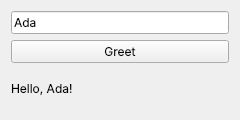
qt_widgets saved it, after button->click() emitted the signal.The test runs the program with QT_QPA_PLATFORM=offscreen, which needs no display, and button->click() emits the signal from code. In a real application app.exec() would start the event loop and wait for the user instead. Connecting to a lambda needs no extra build step; a class that declares its own signals with Q_OBJECT needs Qt’s meta-object compiler, which CMake runs when CMAKE_AUTOMOC is on. The layout takes ownership of the three widgets, so the program does not delete them. Qt’s open-source editions are available under the LGPL-3 or the GPL; read the LGPL’s conditions on linking and distribution before shipping a closed-source application.
4. Eigen
Eigen provides matrices, vectors and the standard decompositions. It is header-only, and its expression templates let a coefficient-wise expression such as 2 * u + v compile to a single loop with no temporary vectors:
// eigen_solve.cpp - linear algebra with Eigen: solve Ax = b, then fit a
// straight line to noisy points by least squares. Header-only.
#include <Eigen/Dense>
#include <iomanip>
#include <iostream>

int main()
{
    Eigen::Matrix3d A;
    A << 2, 1, -1,
        -3, -1, 2,
        -2, 1, 2;
    Eigen::Vector3d b(8, -11, -3);
    Eigen::Vector3d x = A.partialPivLu().solve(b);
    std::cout << std::fixed << std::setprecision(6);
    std::cout << "x = " << x.transpose() << '\n';
    std::cout << "residual |Ax - b| = " << (A * x - b).norm() << '\n';

    // Least squares: y = m t + c through five points.
    Eigen::VectorXd t(5), y(5);
    t << 0, 1, 2, 3, 4;
    y << 1.1, 2.9, 5.2, 7.1, 8.8;
    Eigen::MatrixXd M(5, 2);
    M.col(0) = t;
    M.col(1).setOnes();
    Eigen::Vector2d mc = M.colPivHouseholderQr().solve(y);
    std::cout << std::setprecision(3)
              << "best fit: y = " << mc(0) << " t + " << mc(1) << '\n';
}
Output:
x =  2.000000  3.000000 -1.000000
residual |Ax - b| = 0.000000
best fit: y = 1.960 t + 1.100
The solution is exact for this system, so the residual prints as zero to six decimal places. The line fit agrees with the closed-form least-squares formula: slope 19.6 / 10 = 1.96 and intercept 5.02 − 1.96 × 2 = 1.10. Choose the decomposition for the matrix you have: partialPivLu for a square invertible matrix, colPivHouseholderQr for an overdetermined system like the fit, and the Cholesky decompositions when the matrix is symmetric positive definite. The price of header-only templates is compile time, measured later in this guide.
5. libcurl
libcurl is the C library behind the curl command-line tool, and it transfers data over HTTP, HTTPS, FTP and many other protocols through one interface. This program uses the file:// scheme so that it needs no network; an https:// URL goes through exactly the same calls:
// curl_fetch.cpp - transferring data with libcurl's easy interface. It reads
// a file:// URL so the example needs no network; an http:// or https:// URL
// goes through the same calls.
#include <curl/curl.h>

#include <cstdio>
#include <filesystem>
#include <fstream>
#include <string>

static std::size_t append(char* data, std::size_t size, std::size_t count, void* out)
{
    static_cast<std::string*>(out)->append(data, size * count);
    return size * count;                         // anything else aborts the transfer
}

static CURLcode fetch(const std::string& url, std::string& body)
{
    CURL* curl = curl_easy_init();
    if (curl == nullptr)
        return CURLE_FAILED_INIT;
    curl_easy_setopt(curl, CURLOPT_URL, url.c_str());
    curl_easy_setopt(curl, CURLOPT_WRITEFUNCTION, append);
    curl_easy_setopt(curl, CURLOPT_WRITEDATA, &body);
    CURLcode rc = curl_easy_perform(curl);
    curl_easy_cleanup(curl);
    return rc;
}

int main()
{
    if (curl_global_init(CURL_GLOBAL_DEFAULT) != CURLE_OK)
        return 1;

    const char* path = "curl_fetch_input.txt";
    std::ofstream(path) << "line one\nline two\n";

    std::string body;
    // A file:// URL needs an absolute path: file:///home/... on POSIX systems.
    const std::string url = "file://" + std::filesystem::absolute(path).generic_string();
    CURLcode rc = fetch(url, body);
    std::printf("fetch existing file: %s, %zu bytes\n", curl_easy_strerror(rc), body.size());

    body.clear();
    rc = fetch("file:///no/such/file.txt", body);
    std::printf("fetch missing file: %s\n", curl_easy_strerror(rc));

    std::remove(path);
    curl_global_cleanup();
    return 0;
}
Output:
fetch existing file: No error, 18 bytes
fetch missing file: Couldn't read a file:// file
Three details matter in every libcurl program. curl_global_init runs once, before any other call. The write callback must return the number of bytes it was given; returning anything else makes libcurl abort the transfer with an error. And curl_easy_perform reports failure through its return code, which curl_easy_strerror turns into the message shown for the missing file. For HTTP, also check the response code with curl_easy_getinfo(curl, CURLINFO_RESPONSE_CODE, &code), because a 404 page is a successful transfer as far as libcurl is concerned.
6. oneTBB (Threading Building Blocks)
Intel’s Threading Building Blocks, now called oneTBB and maintained under the UXL Foundation, provides parallel loops, parallel algorithms and a task scheduler that sizes itself to the machine. This program checks a parallel sum and a parallel sort against the standard library’s serial versions:
// tbb_parallel.cpp - oneTBB's parallel_reduce and parallel_sort, checked
// against the serial standard library result. Pass --time to also print
// how long each sort took on this machine.
#include <oneapi/tbb/blocked_range.h>
#include <oneapi/tbb/info.h>
#include <oneapi/tbb/parallel_reduce.h>
#include <oneapi/tbb/parallel_sort.h>

#include <algorithm>
#include <chrono>
#include <cstdint>
#include <cstring>
#include <functional>
#include <iostream>
#include <numeric>
#include <random>
#include <vector>

int main(int argc, char** argv)
{
    const bool show_time = argc > 1 && std::strcmp(argv[1], "--time") == 0;
    const std::size_t n = 10'000'000;

    std::vector<std::uint32_t> data(n);
    std::mt19937 rng(42);                              // fixed seed: same data every run
    for (auto& v : data)
        v = rng();

    const std::uint64_t serial = std::accumulate(data.begin(), data.end(), std::uint64_t{0});
    const std::uint64_t parallel = tbb::parallel_reduce(
        tbb::blocked_range<std::size_t>(0, n), std::uint64_t{0},
        [&](const tbb::blocked_range<std::size_t>& r, std::uint64_t sum) {
            for (std::size_t i = r.begin(); i != r.end(); ++i)
                sum += data[i];
            return sum;
        },
        std::plus<>());
    std::cout << "sum matches std::accumulate: " << std::boolalpha << (serial == parallel) << '\n';

    auto a = data, b = data;
    auto t0 = std::chrono::steady_clock::now();
    std::sort(a.begin(), a.end());
    auto t1 = std::chrono::steady_clock::now();
    tbb::parallel_sort(b.begin(), b.end());
    auto t2 = std::chrono::steady_clock::now();
    std::cout << "parallel_sort matches std::sort: " << (a == b) << '\n';

    if (show_time) {
        using ms = std::chrono::duration<double, std::milli>;
        std::cout << "threads available: " << tbb::info::default_concurrency() << '\n'
                  << "std::sort      " << ms(t1 - t0).count() << " ms\n"
                  << "parallel_sort  " << ms(t2 - t1).count() << " ms\n";
    }
}
Output:
sum matches std::accumulate: true
parallel_sort matches std::sort: true
With --time, on the 2-vCPU test machine and a Release build, std::sort took 835 to 883 ms over three runs for ten million integers and tbb::parallel_sort 469 to 512 ms, a speed-up of 1.6 to 1.9 times with two hardware threads. The point of comparing results first is that a parallel version that is fast and wrong is easy to write. parallel_reduce sums each chunk separately and combines the partial sums with std::plus<>, so no two threads write the same variable.
7. OpenCV
OpenCV is a library for image processing and computer vision, from filtering and edge detection to camera calibration and neural-network inference. This program draws a rectangle and a circle, finds their edges with the Canny detector and counts the shapes:
// opencv_edges.cpp - draw a test image, find its edges with the Canny
// detector and count the shapes with findContours. Pass a file name to save
// the edge image.
#include <opencv2/core.hpp>
#include <opencv2/imgcodecs.hpp>
#include <opencv2/imgproc.hpp>

#include <iostream>
#include <vector>

int main(int argc, char** argv)
{
    cv::Mat image(200, 300, CV_8UC1, cv::Scalar(0));                 // black, 8-bit grey
    cv::rectangle(image, {30, 40}, {120, 160}, cv::Scalar(255), cv::FILLED);
    cv::circle(image, {210, 100}, 50, cv::Scalar(180), cv::FILLED);

    cv::Mat edges;
    cv::Canny(image, edges, 50, 150);

    std::vector<std::vector<cv::Point>> contours;
    cv::findContours(edges, contours, cv::RETR_EXTERNAL, cv::CHAIN_APPROX_SIMPLE);

    std::cout << "image " << image.cols << "x" << image.rows
              << ", edge pixels " << cv::countNonZero(edges)
              << ", outer contours " << contours.size() << '\n';
    for (const auto& c : contours) {
        cv::Rect box = cv::boundingRect(c);
        std::cout << "  shape at x=" << box.x << " y=" << box.y
                  << " size " << box.width << "x" << box.height << '\n';
    }
    if (argc > 1)
        std::cout << "saved " << argv[1] << ": " << std::boolalpha
                  << cv::imwrite(argv[1], edges) << '\n';
}
Output:
image 300x200, edge pixels 748, outer contours 2
  shape at x=160 y=50 size 101x101
  shape at x=29 y=39 size 92x122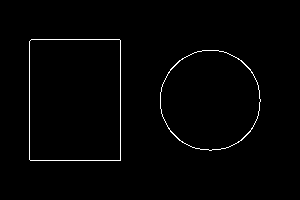
cv::Canny found: 748 white pixels, two outer contours.cv::Mat is a reference-counted image: copying one shares the pixels, and clone() makes an independent copy. OpenCV is split into modules (core, imgproc, imgcodecs here), and each is a separate library to link. Those modules depend on image codecs and other system libraries, which is where the 135 shared libraries ldd reported come from.
8. Catch2
Catch2 is a unit-testing framework. Tests are functions declared with TEST_CASE, assertions are ordinary C++ expressions inside REQUIRE or CHECK, and SECTION runs the setup of a test once per section:
// catch2_tests.cpp - unit tests with Catch2 v3. Linking Catch2::Catch2WithMain
// supplies main(); the file holds only the code under test and the tests.
#include <catch2/catch_test_macros.hpp>

#include <charconv>
#include <optional>
#include <string_view>

// Code under test: parse a whole string as a non-negative int.
std::optional<int> parse_count(std::string_view text)
{
    int value = 0;
    auto [end, ec] = std::from_chars(text.data(), text.data() + text.size(), value);
    if (ec != std::errc{} || end != text.data() + text.size() || value < 0)
        return std::nullopt;
    return value;
}

TEST_CASE("valid counts parse", "[parse]")
{
    REQUIRE(parse_count("0") == 0);
    REQUIRE(parse_count("42") == 42);
    REQUIRE(parse_count("2147483647") == 2147483647);
}

TEST_CASE("invalid counts are rejected", "[parse]")
{
    SECTION("empty") { CHECK_FALSE(parse_count("").has_value()); }
    SECTION("trailing text") { CHECK_FALSE(parse_count("12abc").has_value()); }
    SECTION("negative") { CHECK_FALSE(parse_count("-5").has_value()); }
    SECTION("too large for int") { CHECK_FALSE(parse_count("2147483648").has_value()); }
}
Output:
Randomness seeded to: 253241519
===============================================================================
All tests passed (7 assertions in 2 test cases)
What a test framework adds is the report when something fails. With the value < 0 check removed from parse_count, the same tests printed:
-------------------------------------------------------------------------------
invalid counts are rejected
  negative
-------------------------------------------------------------------------------
catch2_tests.cpp:30
...............................................................................

catch2_tests.cpp:30: FAILED:
  CHECK_FALSE( parse_count("-5").has_value() )
with expansion:
  !true

===============================================================================
test cases: 2 | 1 passed | 1 failed
assertions: 7 | 6 passed | 1 failed
The report names the section, the line and the expression. Catch2 v3 is a compiled library rather than the single header of v2, so a v2 tutorial’s #define CATCH_CONFIG_MAIN and #include "catch.hpp" do not apply; link Catch2::Catch2WithMain instead. The random seed line is there because Catch2 can run tests in random order to expose hidden dependencies between them.
9. POCO
The POCO C++ Libraries cover the application plumbing the standard library leaves out: HTTP clients and servers, JSON and XML, database access, logging and configuration. This program parses JSON and splits a URL:
// poco_json.cpp - parse and query JSON with Poco::JSON, and split a URL with
// Poco::URI. Links PocoJSON and PocoFoundation.
#include <Poco/Dynamic/Var.h>
#include <Poco/JSON/Object.h>
#include <Poco/JSON/Parser.h>
#include <Poco/URI.h>

#include <iostream>

int main()
{
    const std::string json = R"({"course":"C++","students":[{"name":"Ada","score":91},)"
                             R"({"name":"Linus","score":78}],"open":true})";

    Poco::JSON::Parser parser;
    Poco::Dynamic::Var parsed = parser.parse(json);
    auto root = parsed.extract<Poco::JSON::Object::Ptr>();

    std::cout << "course: " << root->getValue<std::string>("course") << '\n';
    std::cout << "open: " << std::boolalpha << root->getValue<bool>("open") << '\n';
    auto students = root->getArray("students");
    for (std::size_t i = 0; i < students->size(); ++i) {
        auto s = students->getObject(static_cast<unsigned>(i));
        std::cout << s->getValue<std::string>("name") << ' ' << s->getValue<int>("score") << '\n';
    }

    Poco::URI uri("https://www.example.com:8443/search?q=c%2B%2B&page=2");
    std::cout << "host " << uri.getHost() << ", port " << uri.getPort()
              << ", path " << uri.getPath() << ", query " << uri.getQuery() << '\n';
}
Output:
course: C++
open: true
Ada 91
Linus 78
host www.example.com, port 8443, path /search, query q=c++&page=2
getValue<T> converts the stored value and throws if it cannot, so a missing or mistyped field surfaces as an exception, not as a default value. Poco::URI::getQuery returns the decoded query, which is why c%2B%2B printed as c++; use getRawQuery when you need the encoded form. Each POCO component (Foundation, JSON, Net, Data) is a separate library to link.
10. {fmt}
{fmt} formats text with Python-style format strings, checked against the argument types. C++20’s std::format was standardised from it, and the two produce the same output for the same format string:
// fmt_format.cpp - type-safe formatting with {fmt}, next to the same format
// string in C++20 std::format, which was standardised from {fmt}.
#include <fmt/core.h>
#include <fmt/format.h>

#include <format>
#include <iostream>
#include <string>

int main()
{
    const double pi = 3.14159265358979;
    const int count = 1234567;

    fmt::print("{:<10}|{:>10}|\n", "left", "right");
    fmt::print("{:^21}\n", "centred");
    fmt::print("pi to 3 places: {:.3f}, hex: {:#x}, binary: {:#b}, padded: {:>9}\n", pi, 255, 10, count);

    const std::string a = fmt::format("{:>8.2f}|{:08d}", pi, 42);
    const std::string b = std::format("{:>8.2f}|{:08d}", pi, 42);
    std::cout << a << '\n' << b << '\n'
              << "fmt and std::format agree: " << std::boolalpha << (a == b) << '\n';

    // A mismatched argument is rejected at compile time by both libraries:
    // fmt::format("{:d}", "text");   // error: invalid format specifier
}
Output:
left      |     right|
       centred
pi to 3 places: 3.142, hex: 0xff, binary: 0b1010, padded:   1234567
    3.14|00000042
    3.14|00000042
fmt and std::format agree: true
With GCC 13, std::format is available but C++23’s std::print is not: #include <print> failed with fatal error: print: No such file or directory under both g++ 13.3 and clang++ 18.1.3 using libstdc++ 13. That gap is one reason {fmt} is still worth knowing: fmt::print works on today’s default toolchains, and code written with it moves to std::format and std::print with little more than a namespace change.
What Each Library Costs to Build
How This Was Measured
| Setting | Value |
|---|---|
| Date tested | 7 October 2026 |
| Hardware | Cloud VM, 2 vCPUs, Intel Xeon @ 2.10 GHz |
| Operating system | Ubuntu 24.04.5 LTS, x86-64 |
| Compiler and flags | GCC 13.3.0, CMake Release build (-O3 -DNDEBUG), C++20 |
| Compile time | The compile step only (no link) for each example, median of 3 runs |
| Preprocessed lines | Non-blank lines after g++ -E, excluding line markers: how much header code each example pulls in |
| Executable size | The Release executable, not stripped |
| Shared libraries | Lines reported by ldd; a C++ program that uses only the standard library shows 6 |
| Example | Compile time | Preprocessed lines | Executable | Shared libraries |
|---|---|---|---|---|
Standard library (stl_ranges) | 1.52 s | 51,135 | 43.4 KiB | 6 |
| Boost.Multiprecision | 3.23 s | 154,949 | 71.4 KiB | 6 |
| Qt Widgets | 2.14 s | 116,614 | 22.6 KiB | 49 |
| Eigen | 7.77 s | 107,747 | 58.5 KiB | 6 |
| libcurl | 0.71 s | 45,674 | 26.0 KiB | 36 |
| oneTBB | 2.58 s | 145,565 | 40.4 KiB | 7 |
| OpenCV | 1.07 s | 79,985 | 22.0 KiB | 135 |
| Catch2 | 1.15 s | 61,510 | 1,025.0 KiB | 6 |
| POCO | 1.74 s | 86,694 | 33.6 KiB | 10 |
{fmt} (with std::format too) | 3.25 s | 60,411 | 114.6 KiB | 7 |
These are single measurements of small programs on one machine, so read them as orders of magnitude, not rankings. Three patterns hold up:
- Header-only does not mean cheap to compile. Eigen pulled in fewer lines than Boost.Multiprecision or oneTBB but took the longest to compile, because its cost is template instantiation, not header size. In a larger project the same headers are compiled in every file that includes them.
- A small executable can carry a large dependency tree. The OpenCV and Qt executables were the two smallest here, and they depend on 135 and 49 shared libraries. Those libraries have to be present, at compatible versions, on every machine that runs the program.
- Catch2’s 1 MiB executable is the test framework itself, linked statically from its
Catch2WithMainlibrary. It does not ship in your application.
The {fmt} row includes <format> as well, because the example compares the two; the measurement does not separate them.
Which Library to Learn First
- For every course and every project: the standard library, then Catch2. Writing tests for your own data structures and algorithms is the habit that pays off fastest.
- For a desktop application with a user interface: Qt.
- For numerical work, simulations or graphics mathematics: Eigen.
- For image processing or a computer-vision project: OpenCV.
- For a program that talks to web services: libcurl for the transfers, or POCO when you also need JSON, a server or a database.
- For making a loop use every core: oneTBB, after you have made the serial version correct.
- For formatted output on a toolchain without
std::print: {fmt}. - For machine learning in C++: none of these on its own; see the MYCPLUS guide to machine learning with C++, which covers LibTorch and ONNX Runtime.
Key Takeaways
- Master the standard library before adding others. The other C++ libraries here pass data through its strings, containers and smart pointers.
- Prefer the standard version of anything Boost contributed, such as
std::shared_ptrorstd::filesystem, and use Boost for what the standard still lacks, such ascpp_int. - Link libraries through their CMake targets, which carry include paths and dependencies with them.
- Header-only libraries can be the slowest to compile: the Eigen example took 7.8 s, the longest of the ten.
- Count the dependencies, not just the executable: a 22 KiB OpenCV program depended on 135 shared libraries.
- Check a parallel result against the serial one before timing it; oneTBB’s sort was 1.6 to 1.9 times faster on two hardware threads.
- Learn a test framework early. Catch2’s failure report names the section, the line and the failing expression.
Frequently Asked Questions
Conclusion
A library is a set of decisions someone else made, and the useful skill is reading those decisions quickly: what the library owns and what you own, whether errors arrive as return codes or exceptions, what it costs to build and what it brings along at run time. The ten programs here are deliberately small so that those decisions show: libcurl’s write callback that must return its byte count, OpenCV’s reference-counted images, Qt’s layout that owns its widgets, POCO’s throwing accessors.
Start with the standard library and a test framework, add one library when a project needs it, and write a twenty-line program with it before building on it. The C++ section covers the language features these libraries are built from.
Source Code and Tests
All the code on this page is in mycplus/cpp-examples › libraries/ten-cpp-libraries directory of the MYCPLUS C++ examples repository:

cmake -S . -B build
cmake --build build
ctest --test-dir build --output-on-failure
What a green badge means, exactly:
- Compiles with g++ and clang++ on Ubuntu 24.04 under C++20 with
-Wall -Wextra -pedantic -Werror, against the Ubuntu packages of all ten libraries. - Every program prints the output shown on this page, byte for byte; the Qt program runs with the offscreen platform plugin.
- The Catch2 tests pass.
- Everything runs clean under AddressSanitizer and UndefinedBehaviorSanitizer.
- Not checked: Windows and macOS builds, other library versions, and the timings, which came from one machine.