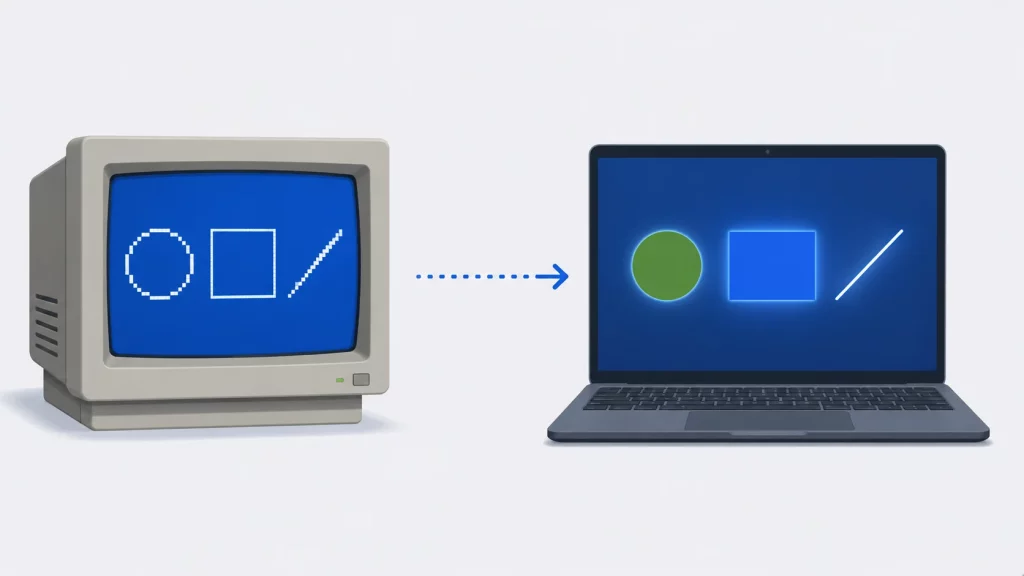
Drawing your first circle on screen is a rite of passage in C programming — and for millions of students, that moment happens through graphics.h, the Borland Graphics Interface (BGI) that shipped with Turbo C in the late 1980s. It is still taught in universities today, which raises the obvious question: how do you actually run this code on a modern computer, and what should you use instead when you outgrow it?
This guide covers both. You will learn how initgraph() works, the core BGI drawing functions, colors, text, and animation — and then the modern C graphics libraries (SDL2, raylib, OpenGL) that professional code uses. Every BGI, SDL2, and raylib example in this article was compiled with gcc -std=c11 -Wall -Wextra and run to completion — the BGI code via the SDL_bgi library on Linux, so none of it is copy-paste folklore.
What Is graphics.h in C?
graphics.h is the header file of the Borland Graphics Interface (BGI), a graphics library that shipped with Borland’s Turbo C and Turbo C++ compilers for MS-DOS. It provides simple functions — initgraph(), line(), circle(), putpixel() and around a hundred others — for drawing 2D shapes, text, and colors on a 640×480 VGA screen.
Two things about it surprise newcomers:
- It is not part of standard C. You will not find
graphics.hin the C standard library, in GCC, or in Visual Studio. It was a Borland product, which is why modern compilers reportgraphics.h: No such file or directoryout of the box. - It is very much alive in education. Its API is so simple that introductory courses across South Asia and elsewhere still use it, and modern libraries like raylib openly cite BGI as an inspiration.
If you are just starting with C itself, our C programming tutorials cover the language fundamentals this guide assumes.
How to Run graphics.h Code Today
The original BGI targeted 16-bit MS-DOS. On a modern 64-bit machine you have three realistic options:
| Option | What it is | Best for |
|---|---|---|
| SDL_bgi | A modern reimplementation of graphics.h on top of SDL2/SDL3; runs on Windows, Linux, and macOS | Running BGI code natively with GCC on any current OS |
| WinBGIm | A Windows port of BGI for MinGW/Code::Blocks | Windows-only classrooms standardized on Code::Blocks |
| Turbo C in DOSBox | The original compiler inside a DOS emulator | Matching an exam environment exactly |
The most practical route is SDL_bgi: your #include <graphics.h> programs compile with an ordinary GCC command — gcc program.c -lSDL_bgi -lSDL2 -lm — and open in a real window. It is functionally compatible with the BGI in Turbo C, and that is exactly how every BGI example in this article was verified. If your course requires the authentic Turbo C environment, our guide to the Turbo C compiler on Windows 10/11 walks through the DOSBox setup step by step.
One habit to drop from old tutorials: #include <conio.h> and #include <dos.h> are Borland-specific too. SDL_bgi provides getch() and delay() itself, so BGI programs don’t need either header.
initgraph() Explained: Initializing Graphics Mode in C
Every BGI program starts the same way: the screen is in text mode, and initgraph() switches it into graphics mode. Its prototype (modern form — the far keywords in old books are 16-bit DOS relics):
void initgraph(int *graphdriver, int *graphmode, char *pathtodriver);The three parameters:
| Parameter | What it does | What to pass |
|---|---|---|
graphdriver | Selects the graphics driver. The constant DETECT (value 0) asks BGI to auto-detect the best one | DETECT in virtually all code |
graphmode | Selects the resolution/mode. With DETECT, initgraph fills it in with the highest mode available | An uninitialized int you pass by address |
pathtodriver | Directory containing the Borland .BGI driver files | "" — SDL_bgi and WinBGIm ignore it; only real Turbo C needs the path (e.g. "C:\\TC\\BGI") |
After calling initgraph(), always check graphresult(). It returns grOk (0) on success or a negative error code you can turn into a message with grapherrormsg(). Here is the canonical first program:
#include <graphics.h>
#include <stdio.h>

int main(void)
{
    int gd = DETECT;   /* auto-detect the graphics driver */
    int gm;            /* graphics mode, set by initgraph  */

    initgraph(&gd, &gm, "");

    int errorcode = graphresult();
    if (errorcode != grOk) {
        printf("Graphics error: %s\n", grapherrormsg(errorcode));
        return 1;
    }

    /* draw a diagonal line across the whole window */
    line(0, 0, getmaxx(), getmaxy());

    getch();        /* wait for a key press */
    closegraph();   /* return to text mode  */
    return 0;
}
Three functions doing the housekeeping:
getmaxx()/getmaxy()return the largest valid x and y coordinates — 639 and 479 in the default VGA mode. Using them instead of hard-coded numbers makes the program work at any resolution.getch()pauses until a key is pressed — without it, the window closes before you see anything.closegraph()shuts the graphics system down and returns to text mode. Call it beforemain()returns, always.
The BGI coordinate system
Before drawing anything else, internalize this: the origin (0,0) is the top-left corner, x grows to the right, and y grows downward — the opposite of the y-axis you learned in math class. Forgetting this is the number one reason beginners’ shapes appear “upside down.”
Drawing Shapes: line, circle, rectangle, arc and putpixel
The core BGI drawing functions all take screen coordinates in pixels:
| Function | Signature | Draws |
|---|---|---|
line | line(x1, y1, x2, y2) | Straight line between two points |
circle | circle(x, y, radius) | Circle centered at (x, y) |
rectangle | rectangle(left, top, right, bottom) | Rectangle outline from two corners |
arc | arc(x, y, startangle, endangle, radius) | Circular arc, angles in degrees counter-clockwise |
ellipse | ellipse(x, y, start, end, xrad, yrad) | Elliptical arc with separate x and y radii |
putpixel | putpixel(x, y, color) | A single pixel in the given color |
getpixel | getpixel(x, y) | Returns the color of the pixel at (x, y) |
One program exercising most of them:
#include <graphics.h>

int main(void)
{
    int gd = DETECT, gm;
    initgraph(&gd, &gm, "");

    circle(150, 150, 100);              /* center (150,150), radius 100  */
    rectangle(300, 60, 500, 240);       /* left, top, right, bottom      */
    line(60, 300, 580, 300);            /* from (60,300) to (580,300)    */
    arc(400, 380, 0, 180, 60);          /* half-circle: 0 to 180 degrees */
    putpixel(320, 400, WHITE);          /* a single white pixel          */

    getch();
    closegraph();
    return 0;
}
Note that circle(150, 150, 100) takes the center point first, then the radius — x is the horizontal coordinate and y the vertical one, matching every other BGI function. This guide covers the core drawing set; for the complete function-by-function catalog — every fill, viewport, palette, and text routine with full prototypes and examples — see the BGI documentation maintained at the University of Colorado.
Colors and Text in BGI
BGI works with a 16-color VGA palette, numbered 0–15, with named constants in graphics.h: BLACK (0), BLUE, GREEN, CYAN, RED, MAGENTA, BROWN, LIGHTGRAY, DARKGRAY, LIGHTBLUE, LIGHTGREEN, LIGHTCYAN, LIGHTRED, LIGHTMAGENTA, YELLOW, and WHITE (15).
Three functions control how color is applied, and one pair handles text:
setcolor(c)— sets the drawing (foreground) color for lines, circles, and text.setbkcolor(c)— sets the background color; follow it withcleardevice()to repaint the screen.setfillstyle(pattern, c)— sets the pattern (SOLID_FILL,LINE_FILL,HATCH_FILL, …) and color used by filled shapes likebar()andfillellipse().outtextxy(x, y, string)— prints text at a position;settextstyle(font, direction, size)changes font, orientation (HORIZ_DIR/VERT_DIR), and scale first.
c
#include <graphics.h>

int main(void)
{
    int gd = DETECT, gm;
    initgraph(&gd, &gm, "");

    setbkcolor(BLUE);                    /* background color        */
    cleardevice();                       /* repaint with new bg     */

    setcolor(YELLOW);                    /* drawing (foreground)    */
    circle(200, 150, 80);

    setfillstyle(SOLID_FILL, LIGHTRED);  /* fill pattern + color    */
    bar(350, 100, 500, 250);             /* filled rectangle        */

    setcolor(WHITE);
    settextstyle(DEFAULT_FONT, HORIZ_DIR, 2);
    outtextxy(180, 300, "16 BGI colors: 0 (BLACK) to 15 (WHITE)");

    getch();
    closegraph();
    return 0;
}
A Practical Example: Drawing a Bar Chart
bar(left, top, right, bottom) draws a filled rectangle using the current fill style — the classic building block for visual statistics. Remember that y grows downward, so a taller bar has a smaller top coordinate:
#include <graphics.h>

int main(void)
{
    int gd = DETECT, gm;
    initgraph(&gd, &gm, "");

    /* axes */
    line(80, 50, 80, 400);          /* Y axis */
    line(80, 400, 560, 400);        /* X axis */
    outtextxy(500, 410, "Month");

    /* one bar per value; bar(left, top, right, bottom) */
    int sales[5] = { 120, 210, 160, 300, 250 };
    for (int i = 0; i < 5; i++) {
        setfillstyle(SOLID_FILL, i + 9);           /* light colors 9-13 */
        bar(110 + i * 90, 400 - sales[i], 160 + i * 90, 400);
    }

    getch();
    closegraph();
    return 0;
}
The expression 400 - sales[i] converts a data value into a top coordinate: the bigger the value, the closer the bar’s top gets to the top of the screen.
Animation Basics: The cleardevice() Loop
Every animation — in BGI, SDL, or a AAA game engine — is the same four-step loop: erase, draw, update, wait. In BGI that means cleardevice(), your drawing calls, position updates, and delay():
#include <graphics.h>

int main(void)
{
    int gd = DETECT, gm;
    initgraph(&gd, &gm, "");

    int x = 100, y = 100;       /* ball position       */
    int dx = 4, dy = 3;         /* velocity per frame  */

    for (int frame = 0; frame < 600; frame++) {
        cleardevice();                        /* 1. erase last frame */
        setfillstyle(SOLID_FILL, LIGHTGREEN);
        fillellipse(x, y, 20, 20);            /* 2. draw this frame  */

        x += dx;                              /* 3. update position  */
        y += dy;
        if (x <= 20 || x >= getmaxx() - 20) dx = -dx;   /* bounce */
        if (y <= 20 || y >= getmaxy() - 20) dy = -dy;

        delay(16);                            /* 4. ~60 frames/sec   */
    }

    closegraph();
    return 0;
}
delay(16) sleeps about 16 milliseconds, giving roughly 60 frames per second (1000 ms ÷ 60 ≈ 16.7). This erase-draw-update-wait pattern is the exact mental model you will reuse in every modern library below — only the function names change.
Beyond BGI: Modern Graphics Libraries for C
BGI is a fine teaching tool, but it is a 16-color, single-window, software-only API frozen in 1989. When you want hardware acceleration, real color, input handling, sound, or something you can ship, these are the C libraries that matter today:
| Library | Level | Strengths | Learning curve |
|---|---|---|---|
| raylib | Beginner-friendly framework | Games and visual programs; one-call drawing functions; openly BGI-inspired; v6.0 (2026) even adds a CPU-only software renderer | Gentle |
| SDL2 / SDL3 | Low-level multimedia layer | Windows, input, audio, 2D rendering; powers countless shipped games; SDL3 is the current major version | Moderate |
| OpenGL (+ freeglut or GLFW) | GPU graphics API | Real 3D, shaders, maximum control | Steep |
(A note on SFML, which often appears in these lists: SFML itself is a C++ library — C programs use its official C binding, CSFML.)
A minimal SDL2 program
SDL makes the window, the renderer, and the frame loop explicit — the same erase-draw-update-wait cycle, spelled out:
#include <SDL2/SDL.h>

int main(void)
{
    SDL_Init(SDL_INIT_VIDEO);

    SDL_Window *win = SDL_CreateWindow("SDL2 Demo",
        SDL_WINDOWPOS_CENTERED, SDL_WINDOWPOS_CENTERED, 640, 480, 0);
    SDL_Renderer *ren = SDL_CreateRenderer(win, -1, SDL_RENDERER_ACCELERATED);

    int running = 1;
    int frames = 0;
    while (running) {
        SDL_Event e;
        while (SDL_PollEvent(&e)) {
            if (e.type == SDL_QUIT) running = 0;   /* close button */
        }

        SDL_SetRenderDrawColor(ren, 20, 20, 40, 255);   /* dark blue  */
        SDL_RenderClear(ren);                           /* erase      */

        SDL_SetRenderDrawColor(ren, 255, 200, 0, 255);  /* amber      */
        SDL_Rect box = { 220 + frames % 200, 190, 100, 100 };
        SDL_RenderFillRect(ren, &box);                  /* draw       */

        SDL_RenderPresent(ren);                         /* show frame */
        SDL_Delay(16);                                  /* ~60 FPS    */
        if (++frames >= 100) running = 0;  /* remove this line in real use */
    }

    SDL_DestroyRenderer(ren);
    SDL_DestroyWindow(win);
    SDL_Quit();
    return 0;
}
Compile on Linux with gcc program.c $(sdl2-config --cflags --libs); on Windows, link -lSDL2main -lSDL2.
The same idea in raylib
raylib compresses the boilerplate down to almost BGI levels of simplicity — which is no accident, since its author cites the Borland BGI as a direct inspiration:
#include "raylib.h"

int main(void)
{
    InitWindow(800, 450, "raylib Demo");
    SetTargetFPS(60);

    int ballX = 400;
    int frames = 0;

    while (!WindowShouldClose()) {    /* ESC or close button exits */
        ballX = 400 + (frames % 120) - 60;

        BeginDrawing();
            ClearBackground(RAYWHITE);
            DrawCircle(ballX, 225, 40, MAROON);
            DrawRectangle(100, 300, 200, 60, DARKBLUE);
            DrawText("Graphics in C with raylib", 240, 60, 24, DARKGRAY);
        EndDrawing();

        if (++frames >= 90) break;  /* remove this line in real use */
    }

    CloseWindow();
    return 0;
}
InitWindow() plays the role of initgraph(), ClearBackground() is cleardevice(), and DrawCircle() is circle() with a color parameter. If you can write BGI programs, you can write raylib programs the same afternoon.
Key Takeaways
graphics.his the Borland Graphics Interface (BGI) from Turbo C — a DOS-era library, not part of standard C, which is why modern compilers don’t ship it.- To run BGI code today, use SDL_bgi (any OS, plain GCC), WinBGIm (Windows/Code::Blocks), or the original Turbo C inside DOSBox.
initgraph(&gd, &gm, "")withgd = DETECTswitches into graphics mode; always checkgraphresult()and end withclosegraph().- The origin (0,0) is the top-left corner and y grows downward — max coordinates come from
getmaxx()andgetmaxy(). - Core drawing set:
line,circle,rectangle,arc,putpixel,bar, plussetcolor,setbkcolor,setfillstyle, andouttextxyfor the 16-color palette and text. - Animation is the universal erase → draw → update → wait loop:
cleardevice()+ drawing +delay(16)for ~60 FPS. - For anything beyond coursework, graduate to raylib (easiest), SDL2/SDL3 (most widely deployed), or OpenGL (full GPU control).
Frequently Asked Questions
Conclusion
BGI has outlived the operating system it was written for by three decades, and the reason is worth noticing: it made the distance between an idea and pixels on screen as short as possible. That is still the right metric for choosing a graphics library. Whether the call is circle(150, 150, 100) or DrawCircle(150, 150, 100, MAROON), the concepts you practiced here — coordinates, color state, the frame loop — transfer without modification.
So treat graphics.h as a first rung, not a dead end. Get comfortable drawing and animating with it, then port one of your own programs to raylib or SDL2 and watch how familiar it feels. When you are ready to go deeper into the language underneath, our C programming tutorials continue from here.