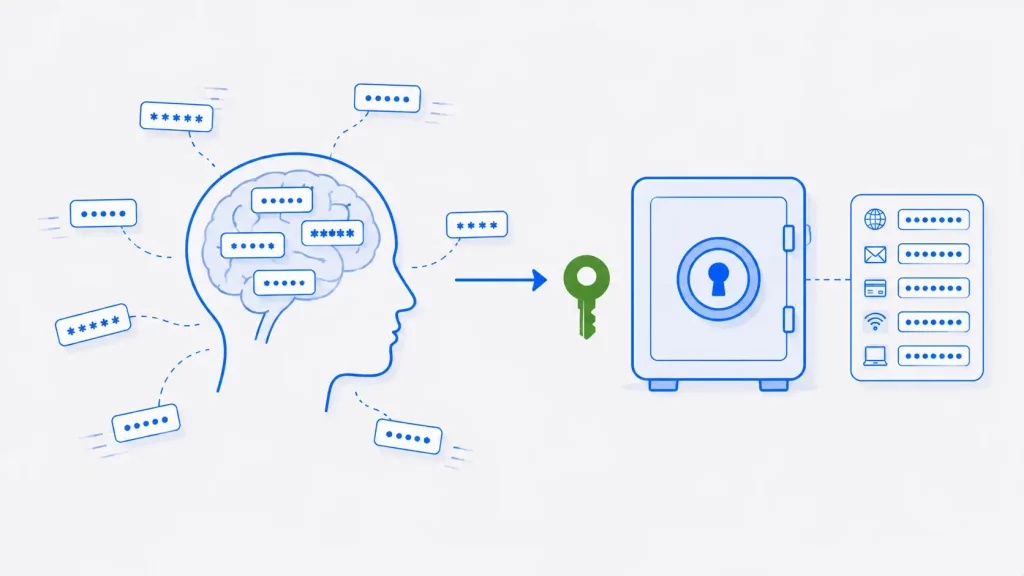
You might have noticed that sometimes when you try to login into any app or website after a long time, you often forget passwords you’ve used, and will have to reset them. Today we will discuss why we often forget passwords and what we can do to avoid this.
Introduction
According to ExpressVPN’s research, an average user spends about four minutes resetting their passwords each time they forget passwords. What would you want to do if you had four minutes? Of all the things you might be thinking, resetting your account password might not be on the list. With the average person now juggling over 100 passwords, forgetting a few is inevitable.
Almost all modern accounts use a password to access your information. Passwords remain the most common way to secure an account — though biometric methods and passkeys are now rapidly overtaking them. You’ll find more on protecting your accounts in our security articles and guides. So why do people forget their passwords so often? Let’s look at the reasons.
Why We Forget Passwords: 5 Common Reasons
There are several reasons why you forget passwords to your accounts.
Very Long and Complicated Passwords
While most websites only focus on telling users how strong their password is, they do nothing to help users remember that password, like giving an option for a password hint, for example. It’s recommended by most websites to use a text-based password that is 12-17 letters long and uses a mixture of upper case, lower case, numeric value, and special characters.
Most users try to use passwords that are easy to remember and that they are familiar with. But the problem is, they are insecure and are easy to crack. Modern websites prefer complex passwords to make the accounts more secure, and users end up using passwords that are very hard for them to remember. This tension — secure but forgettable versus memorable but weak — is exactly the problem password managers solve.
Not Using a Password Often Enough
Human memory strengthens with repetition — the more often you use something, the better you remember it. Most people forget passwords for sites they rarely visit, simply because the memory fades without regular use. And because reusing the same password across sites is a security risk, people are forced to remember many different ones, which makes forgetting even more likely.
Even a password you once used regularly can slip away. Often that’s because you never really committed it to memory in the first place — your browser or muscle memory filled it in, so your conscious mind never had to learn it.
Your Memory Isn’t Built for Random Strings
Human memory evolved to remember meaningful information — faces, stories, places — not random strings of characters. Cognitive scientists call passwords a poor fit for how memory works: a strong password like 7k$Rm9!qWz has no meaning to anchor it, no story, no pattern your brain can latch onto. This is why you can remember a song from twenty years ago but not the password you created last week. The problem isn’t your memory failing — it’s that passwords ask memory to do something it was never designed for.
Biometric Logins Make Us Lazy
Most people now log in using biometrics — fingerprint or face recognition. These are designed to make signing in effortless, but because they’re so convenient, many people rarely type their actual password and gradually forget it. It’s worth entering your password manually now and then, just to keep it fresh and avoid being locked out if biometrics ever fail.
Juggling Too Many Different Passwords
Security best practice is to use a unique password for every account — which is exactly why remembering them all is so hard. The answer isn’t to reuse passwords or create slight variations of one (which attackers can guess together if one leaks). The real fix, covered below, is to stop relying on memory altogether and let a password manager handle it.
Banking Passwords Are Reset the Most
According to ExpressVPN’s report, banking apps see the most password resets — and the timing is always inconvenient. Picture standing at a store checkout, trying to make a quick payment, only to realize you’ve forgotten your banking app’s password. It’s been a while since you last logged in, and now you’re stuck resetting it on the spot.
More than 30% of people say they regularly forget their online banking passwords. The same report found that having to reset a password — and then being told “the new password can’t be the same as the old one” — ranks among people’s most frustrating everyday tech moments, second only to slow internet.
How to Stop Forgetting Passwords
The real solution isn’t trying harder to remember — it’s not relying on memory at all.
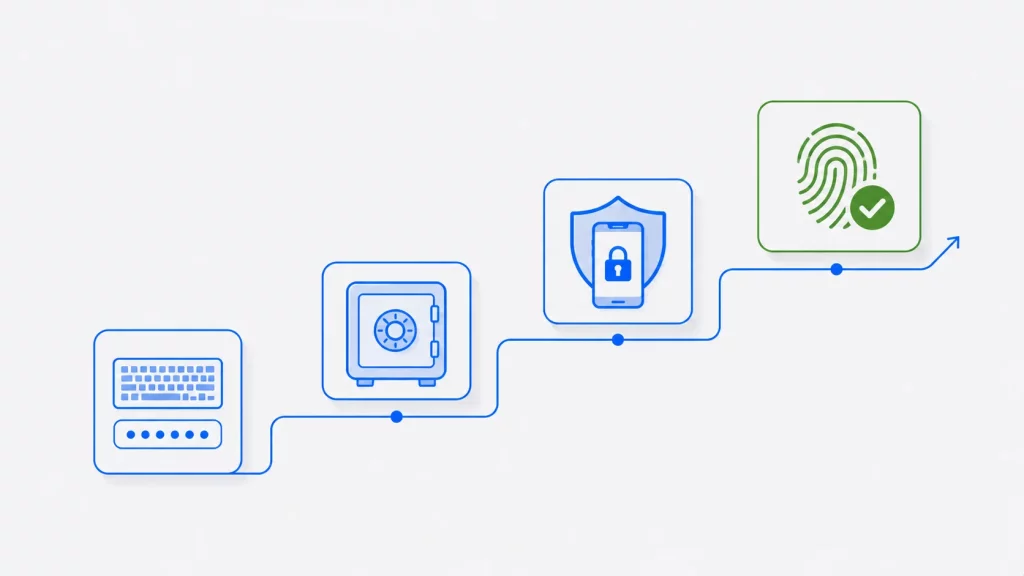
Use a password manager. This is the single most effective fix. A password manager (like Bitwarden, 1Password, or the one built into your browser) generates strong, unique passwords for every account and remembers them for you. You only need to remember one master password. As of 2026, only about a third of people use one, which means most people are still fighting a battle they don’t need to fight.
Switch to passkeys where available. Passkeys are the emerging replacement for passwords entirely — you log in with your fingerprint, face, or device PIN, and there’s no password to forget or steal. Major platforms including Google, Apple, Microsoft, and Amazon now support them, and the FIDO Alliance reports over 5 billion passkeys are now in use. Where a site offers a passkey, it’s both easier and more secure than a password.
Turn on two-factor authentication (2FA). 2FA won’t stop you forgetting a password, but it protects the account if your password is ever weak or stolen — and reduces the panic of a forgotten password being your only line of defense.
For developers building login systems, supporting passkeys and 2FA is now a baseline expectation — see our software development best practices for more.
If you must create a memorable password, use a passphrase. A random four-word phrase like correct-horse-battery-staple is both easier to remember and harder to crack than a short complex string. Never use your name, birthday, or common words alone.
How Many Passwords Does the Average Person Have?
The scale of the problem explains why forgetting is inevitable. As of 2026, the average person manages over 100 passwords across their accounts. Studies find that around 59% of people reuse passwords across multiple sites, and a striking 94% of leaked passwords analyzed in one 19-billion-password study were reused or duplicated. Meanwhile, “123456” remains the most common password in the world. When you’re expected to remember 100+ unique, complex strings, forgetting isn’t a personal failing — it’s a mathematical certainty.
Frequently Asked Questions
Conclusion
Text-based passwords are hard to remember, which is why so many people fall back on simple, insecure ones. The average person spends around four minutes resetting a password every time they forget it — time better spent on almost anything else. And because memory strengthens with repetition, the passwords you use rarely are exactly the ones you’re most likely to forget.
The catch is that the advice to use strong, complex passwords works against memory: the harder a password is to crack, the harder it is to recall. That’s the real reason we recommend a password manager — it generates and stores strong, unique passwords for every account, so you only ever need to remember one. Better still, where passkeys are available, you can skip passwords altogether. The goal isn’t to remember your passwords better; it’s to stop having to remember them at all.