
Shrink a smooth 65,536-color gradient into a LibGD palette image and 256 colors survive. Shrink the same gradient into a true-color image and 16,384 survive. LibGD can do both, and its oldest examples use the palette kind. That one choice decides whether a generated chart or thumbnail looks clean or banded, and it is only one of a handful of details that separate a working LibGD program from one that leaks memory, crashes on a bad upload or writes broken files on Windows.
This guide shows how to create images in C with LibGD: install it on Linux, macOS and Windows, draw a first image, and save it as PNG and JPEG. It then builds three real tools, a bar chart for a report, a thumbnail maker for uploads that rejects oversized images before decoding them, and a default avatar (identicon) generator. Then it covers the mistakes that break LibGD programs in practice. Every program was compiled and tested with GCC and Clang on Ubuntu and with MSVC on Windows, and every output on this page is the program’s real output.
What Is LibGD?
LibGD (the GD Graphics Library) is an open-source C library for creating and editing images from code. A program creates an image in memory, draws lines, shapes and text on it, copies and resizes other images into it, and saves the result as PNG, JPEG, GIF, WebP or another format. It is used to generate charts, thumbnails and other images on the fly.
LibGD was written by Thomas Boutell and is maintained today as an open-source project at libgd.github.io. Language bindings exist for Perl, PHP and others, so the functions below look familiar to anyone who has used PHP’s imagecreatetruecolor() or imagepng(). The current release is 2.3.3, from September 2021; it is what Ubuntu 24.04 and vcpkg ship, and what this article was tested with.
| Task | LibGD functions |
|---|---|
| Create an image | gdImageCreateTrueColor(), gdImageCreate() (palette) |
| Load an image | gdImageCreateFromFile(), gdImageCreateFromPng(), gdImageCreateFromJpeg() |
| Draw | gdImageLine(), gdImageFilledRectangle(), gdImageFilledEllipse(), gdImageFilledPolygon(), gdImageSetThickness() |
| Text | gdImageString() (built-in fonts), gdImageStringFT() (TrueType, through FreeType) |
| Resize and copy | gdImageCopyResampled(), gdImageCopyResized(), gdImageScale() |
| Save | gdImagePng(), gdImageJpeg(), gdImageFile(), or gdImagePngPtr() for a buffer in memory |
| Free | gdImageDestroy() for images, gdFree() for buffers LibGD returns |
Each file format comes from a separate library: libpng and zlib for PNG, libjpeg for JPEG, FreeType for TrueType text. A LibGD build supports a format only if it was built with that library, which matters on Windows, where you choose the features when you install it.
How to Install LibGD and Compile a Program
| System | Install | Compile |
|---|---|---|
| Ubuntu, Debian | sudo apt install libgd-dev | cc prog.c $(pkg-config --cflags --libs gdlib) |
| Fedora | sudo dnf install gd-devel | the same |
| macOS (Homebrew) | brew install gd | the same |
| Windows (vcpkg, MSVC) | vcpkg install "libgd[core,png,jpeg,freetype]:x64-windows" | CMake with vcpkg’s toolchain file |
On Linux, pkg-config supplies the include path and -lgd; the order matters, so put the libraries after the source file. On Windows, [core,png,jpeg,freetype] selects only the formats used here. A plain vcpkg install libgd also builds AVIF, TIFF, WebP and Fontconfig support, which takes much longer. The companion repository’s CMakeLists.txt finds LibGD both ways: through pkg-config where it exists, and through find_path() and find_library() with vcpkg’s toolchain file on Windows.
Your First Image in C with LibGD
To create an image with LibGD, call gdImageCreateTrueColor(width, height), draw on the image, open a file with fopen(path, "wb"), write it with gdImagePng() or gdImageJpeg(), close the file, and free the image with gdImageDestroy(). Here is a complete program:
/* first_image: the smallest useful LibGD program. It draws on a 320 x 200
   true-color image and saves it as PNG and as JPEG.

   Build:  cc first_image.c -lgd -o first_image */
#include <gd.h>
#include <gdfontl.h>
#include <stdio.h>

static int save(gdImagePtr im, const char *path, int is_png)
{
    FILE *out = fopen(path, "wb");             /* binary mode, always */
    if (out == NULL) {
        perror(path);
        return -1;
    }
    if (is_png)
        gdImagePng(im, out);
    else
        gdImageJpeg(im, out, 85);              /* quality 0-100 */
    return fclose(out) == 0 ? 0 : -1;
}

int main(void)
{
    gdImagePtr im = gdImageCreateTrueColor(320, 200);
    if (im == NULL) {
        fprintf(stderr, "out of memory\n");
        return 1;
    }

    /* In a true-color image a color is just a packed RGB value. */
    int sky = gdTrueColor(0xDC, 0xEB, 0xF7);
    int blue = gdTrueColor(0x1A, 0x6F, 0xD4);
    int green = gdTrueColor(0x46, 0x7F, 0x40);
    int dark = gdTrueColor(0x1F, 0x29, 0x37);

    gdImageFilledRectangle(im, 0, 0, 319, 199, sky);          /* background */
    gdImageFilledRectangle(im, 0, 150, 319, 199, green);      /* ground */
    gdImageFilledEllipse(im, 260, 50, 60, 60, gdTrueColor(0xF2, 0xC1, 0x4E));
    gdImageFilledRectangle(im, 40, 90, 140, 150, blue);       /* a house */
    gdPoint roof[3] = {{30, 90}, {90, 50}, {150, 90}};
    gdImageFilledPolygon(im, roof, 3, dark);
    gdImageSetThickness(im, 3);
    gdImageLine(im, 180, 150, 300, 110, dark);                /* a thick line */
    gdImageSetThickness(im, 1);
    gdImageString(im, gdFontGetLarge(), 10, 10, (unsigned char *)"Made with LibGD", dark);

    int rc = save(im, "first.png", 1) == 0 && save(im, "first.jpg", 0) == 0 ? 0 : 1;
    gdImageDestroy(im);                        /* free the pixels */
    if (rc == 0)
        printf("wrote first.png and first.jpg (%d x %d)\n", 320, 200);
    return rc;
}
Output of first_image:
wrote first.png and first.jpg (320 x 200)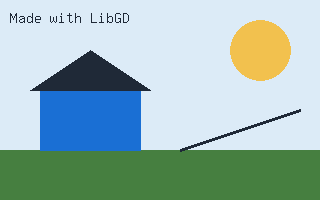
A few rules from this program apply to every LibGD program:
- Coordinates start at the top-left corner, with y growing downward, and the bottom-right pixel of a 320 × 200 image is (319, 199).
gdImageCreateTrueColor()can returnNULL, for example when the image is too large for the memory available. Check it.- In a true-color image a color is a packed RGB value.
gdTrueColor(r, g, b)builds it, and you can pass it straight to any drawing function. - Open image files in binary mode,
"wb". Mistake 1 below shows what"w"does on Windows. - Every image needs
gdImageDestroy(), or its pixels leak.
The test suite reads the files back to check them. imgcheck reports the format from the file’s first bytes, the size, and the colors of chosen pixels, here the sky, the house and the ground:
Output of imgcheck:
first.png: PNG 320x200
  (0, 0) #DCEBF7
  (90, 120) #1A6FD4
  (300, 180) #467F40
PNG is lossless, so the colors come back exactly. JPEG is lossy, and the same three pixels in first.jpg are each off by one in one or two color channels:
Output of imgcheck:
first.jpg: JPEG 320x200
  (0, 0) #DDEBF8
  (90, 120) #196FD4
  (300, 180) #477F40
The difference is invisible here, but JPEG also blurs sharp edges such as the roof and the text. Use PNG for charts, diagrams and anything with text, and JPEG for photographs.
Palette or True Color?
LibGD has two kinds of image, and choosing the wrong one is the most common cause of poor-looking output.
| Property | Palette image | True-color image |
|---|---|---|
| Created with | gdImageCreate() | gdImageCreateTrueColor() |
| Colors | At most 256, in a table | Any of 16.7 million, stored per pixel |
| A color value is | An index into the table, from gdImageColorAllocate() | A packed RGB value, from gdTrueColor() |
| Background | The first color allocated | Black, until you fill it |
| Memory per pixel | 1 byte | 4 bytes |
| Good for | Small icons, GIFs, images with few flat colors | Photos, thumbnails, gradients, antialiased drawing |
This program shows both limits. It tries to allocate 300 colors in a palette image, then shrinks a smooth 512 × 512 gradient into a 128 × 128 image of each kind:
int main(void)
{
    /* 1. A palette image holds 256 colors; the 257th allocation fails. */
    gdImagePtr pal = gdImageCreate(16, 16);
    if (pal == NULL)
        return 1;
    int ok = 0, failed = 0;
    for (int i = 0; i < 300; i++) {
        int c = gdImageColorAllocate(pal, i % 256, i / 256 * 100, 50);
        if (c == -1)
            failed++;
        else
            ok++;
    }
    printf("palette image: %d colors allocated, %d allocations returned -1\n", ok, failed);
    gdImageDestroy(pal);

    /* 2. Shrink a smooth 512 x 512 gradient into each kind of image. */
    gdImagePtr src = gdImageCreateTrueColor(512, 512);
    if (src == NULL)
        return 1;
    for (int y = 0; y < 512; y++)
        for (int x = 0; x < 512; x++)
            gdImageSetPixel(src, x, y, gdTrueColor(x / 2, y / 2, 128));
    printf("source gradient: %ld colors\n", count_colors(src));

    gdImagePtr to_tc = gdImageCreateTrueColor(128, 128);
    gdImagePtr to_pal = gdImageCreate(128, 128);
    if (to_tc == NULL || to_pal == NULL)
        return 1;
    gdImageCopyResampled(to_tc, src, 0, 0, 0, 0, 128, 128, 512, 512);
    gdImageCopyResampled(to_pal, src, 0, 0, 0, 0, 128, 128, 512, 512);
    printf("resampled into a true-color image: %ld colors\n", count_colors(to_tc));
    printf("resampled into a palette image:    %ld colors\n", count_colors(to_pal));
    gdImageDestroy(src);
    gdImageDestroy(to_tc);
    gdImageDestroy(to_pal);
    return 0;
}
Output of pitfall_palette_limits:
palette image: 256 colors allocated, 44 allocations returned -1
source gradient: 65536 colors
resampled into a true-color image: 16384 colors
resampled into a palette image:    256 colors
The palette image stopped accepting colors at 256, and gdImageColorAllocate() returned −1 for the other 44, which a program that does not check would then use as a color. The resampled gradient kept 16,384 colors in the true-color image and only 256 in the palette image, which shows up as visible bands. Use true-color images unless you have a reason not to. Memory is the one cost: a 4,000 × 3,000 photo takes about 48 MB as a true-color image.
Real-Life Example: Generating a Chart Image
Dashboards, nightly reports and monitoring emails need charts as image files, often generated on a server with no display. This program reads monthly download counts and draws a bar chart as a PNG. The data file:
# month downloads
Jan 1200
Feb 1850
Mar 2400
Apr 2100
May 3150
Jun 2900
The drawing function computes each bar’s height in pixels, draws grid lines and labels with LibGD’s built-in fonts, and uses a TrueType font for the title when one is available:
int bar_height_px(long value, long max, int plot_h)
{
    if (max <= 0)
        return 0;
    return (int)((value * plot_h + max / 2) / max);
}
gdImagePtr draw_bar_chart(const bar *bars, int n, int width, int height,
const char *title, const char *font_path, int *used_freetype)
{
if (n < 1 || width < CHART_LEFT + CHART_RIGHT + n || height < CHART_TOP + CHART_BOTTOM + 10)
return NULL;
gdImagePtr im = gdImageCreateTrueColor(width, height);
if (im == NULL)
return NULL;
int white = gdTrueColor(255, 255, 255), dark = gdTrueColor(0x1F, 0x29, 0x37);
int grey = gdTrueColor(0x6B, 0x72, 0x80), grid = gdTrueColor(0xE5, 0xE7, 0xEB);
int blue = gdTrueColor(CHART_BAR_COLOR >> 16, CHART_BAR_COLOR >> 8 & 0xFF, CHART_BAR_COLOR & 0xFF);
gdImageFilledRectangle(im, 0, 0, width - 1, height - 1, white);
int x0 = CHART_LEFT, x1 = width - CHART_RIGHT, base = height - CHART_BOTTOM;
int plot_h = base - CHART_TOP;
long max = 0;
for (int i = 0; i < n; i++)
if (bars[i].value > max)
max = bars[i].value;
/* Grid lines and their values at 0, 1/4, 1/2, 3/4 and the maximum. */
char text[32];
for (int k = 0; k <= 4; k++) {
int y = base - plot_h * k / 4;
if (k > 0)
gdImageLine(im, x0 + 1, y, x1, y, grid);
snprintf(text, sizeof text, "%ld", max * k / 4);
gdFontPtr f = gdFontGetSmall();
gdImageString(im, f, x0 - 6 - (int)strlen(text) * f->w, y - f->h / 2, (unsigned char *)text, grey);
}
int slot = (x1 - x0) / n, bw = slot * 3 / 5;
for (int i = 0; i < n; i++) {
int bh = bar_height_px(bars[i].value, max, plot_h);
int bx = x0 + i * slot + (slot - bw) / 2, cx = bx + bw / 2;
if (bh > 0)
gdImageFilledRectangle(im, bx, base - bh, bx + bw - 1, base - 1, blue);
snprintf(text, sizeof text, "%ld", bars[i].value);
centered_string(im, gdFontGetTiny(), cx, base - bh - 12, text, dark);
centered_string(im, gdFontGetSmall(), cx, base + 8, bars[i].label, dark);
}
gdImageLine(im, x0, CHART_TOP, x0, base, dark); /* axes */
gdImageLine(im, x0, base, x1, base, dark);
int ft = 0;
if (title != NULL && font_path != NULL) {
int box[8];
char *err = gdImageStringFT(NULL, box, dark, (char *)font_path, 14.0, 0.0, 0, 0, (char *)title);
if (err == NULL) { /* measured: now draw it centered */
int tw = box[2] - box[0];
err = gdImageStringFT(im, box, dark, (char *)font_path, 14.0, 0.0, (width - tw) / 2, 26, (char *)title);
ft = err == NULL;
}
}
if (title != NULL && !ft)
centered_string(im, gdFontGetLarge(), width / 2, 12, title, dark);
if (used_freetype != NULL)
*used_freetype = ft;
return im;
}/* chart: draws a bar chart as a PNG file from "label value" lines, the
kind of image a web dashboard or a nightly report generates on the fly.
usage: chart DATA OUT.png [FONT.ttf]
With a TrueType font (and LibGD built with FreeType) the title uses it. */
#include "imgtools.h"
#include <stdio.h>
int main(int argc, char **argv)
{
if (argc < 3 || argc > 4) {
fprintf(stderr, "usage: chart DATA OUT.png [FONT.ttf]\n");
return 2;
}
bar bars[24];
int n = read_bars(argv[1], bars, 24);
if (n <= 0) {
fprintf(stderr, "chart: no data in %s\n", argv[1]);
return 2;
}
int freetype;
gdImagePtr im = draw_bar_chart(bars, n, 480, 300, "Downloads per month",
argc == 4 ? argv[3] : NULL, &freetype);
if (im == NULL) {
fprintf(stderr, "chart: cannot draw the chart\n");
return 1;
}
int rc = save_image(im, argv[2], -1);
gdImageDestroy(im);
if (rc != 0) {
fprintf(stderr, "chart: cannot write %s\n", argv[2]);
return 1;
}
printf("%s: %d bars, title in %s\n", argv[2], n,
freetype ? "a TrueType font" : "LibGD's built-in font");
return 0;
}Output of chart data/downloads.txt chart.png DejaVuSans.ttf:
chart.png: 6 bars, title in a TrueType font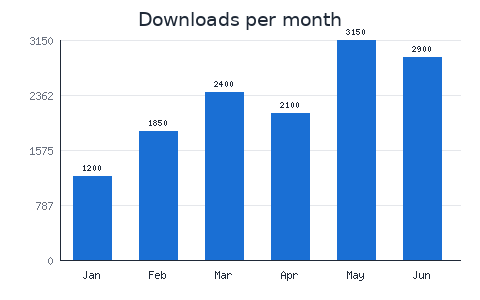
Two details matter more than they look. Bar heights are rounded, not truncated: (value * plot_h + max / 2) / max makes June’s 2,900 downloads 203 pixels tall (202.5 rounded up), where truncation would give 202 and make every bar look slightly short. And gdImageStringFT() returns an error message rather than a status code: NULL means success. It is called once with a NULL image to measure the text, which is how the title is centered, and if it fails (no font file, or a LibGD built without FreeType), the chart falls back to the built-in font instead of drawing nothing. On Windows, C:\Windows\Fonts\arial.ttf works as the font.
Real-Life Example: Thumbnails for Uploaded Images
Any site that accepts photo uploads needs thumbnails. A thumbnail must fit in a box, keep the photo’s proportions and never be enlarged:
void fit_within(int w, int h, int max_side, int *out_w, int *out_h)
{
    if (w <= max_side && h <= max_side) {
        *out_w = w;
        *out_h = h;
        return;
    }
    long long a = w >= h ? w : h, b = w >= h ? h : w;
    int small_side = (int)((b * max_side + a / 2) / a);   /* round to nearest */
    if (small_side < 1)
        small_side = 1;
    *out_w = w >= h ? max_side : small_side;
    *out_h = w >= h ? small_side : max_side;
}
gdImagePtr make_thumbnail(gdImagePtr src, int max_side)
{
int tw, th;
fit_within(gdImageSX(src), gdImageSY(src), max_side, &tw, &th);
gdImagePtr dst = gdImageCreateTrueColor(tw, th);
if (dst == NULL)
return NULL;
gdImageAlphaBlending(dst, 0); /* keep transparency in PNGs */
gdImageSaveAlpha(dst, 1);
gdImageCopyResampled(dst, src, 0, 0, 0, 0, tw, th, gdImageSX(src), gdImageSY(src));
return dst;
}gdImageCopyResampled() averages the source pixels that fall into each destination pixel, which gives a smooth result. gdImageCopyResized(), its older sibling, picks one source pixel for each destination pixel and gives jagged edges. The destination must be a true-color image, for the reasons in the previous section.
Uploads are untrusted input, so the program checks the file before LibGD decodes it. A PNG file stores its width and height in its first 24 bytes, and a JPEG in its start-of-frame marker, so image_header() can read the size without decoding any pixels:
/* thumbnail: makes a thumbnail of a PNG or JPEG that fits in a square box,
   keeping the aspect ratio, the way an upload handler does.

   usage: thumbnail IN OUT MAX_SIDE      (OUT ends in .png, .jpg or .jpeg)

   The size is read from the file header first, so a huge or malformed
   image is rejected before LibGD decodes it. */
#include "imgtools.h"

#include <stdio.h>
#include <stdlib.h>

#define MAX_PIXELS 40000000L                   /* 40 megapixels */

int main(int argc, char **argv)
{
    if (argc != 4) {
        fprintf(stderr, "usage: thumbnail IN OUT MAX_SIDE\n");
        return 2;
    }
    int max_side = atoi(argv[3]);
    if (max_side < 1 || max_side > 4096 || format_from_name(argv[2]) == IMG_UNKNOWN) {
        fprintf(stderr, "thumbnail: MAX_SIDE must be 1-4096 and OUT a .png or .jpg name\n");
        return 2;
    }

    img_format fmt;
    int w, h;
    if (image_header(argv[1], &fmt, &w, &h) != 0) {
        fprintf(stderr, "thumbnail: %s is not a PNG or JPEG file\n", argv[1]);
        return 1;
    }
    if ((long)w * h > MAX_PIXELS) {
        fprintf(stderr, "thumbnail: %s is %d x %d, larger than allowed\n", argv[1], w, h);
        return 1;
    }

    gdImagePtr src = gdImageCreateFromFile(argv[1]);
    if (src == NULL) {
        fprintf(stderr, "thumbnail: cannot decode %s\n", argv[1]);
        return 1;
    }
    gdImagePtr thumb = make_thumbnail(src, max_side);
    int rc = thumb != NULL && save_image(thumb, argv[2], 85) == 0 ? 0 : 1;
    if (rc == 0)
        printf("%s %dx%d -> %s %dx%d\n", argv[1], gdImageSX(src), gdImageSY(src),
               argv[2], gdImageSX(thumb), gdImageSY(thumb));
    else
        fprintf(stderr, "thumbnail: cannot write %s\n", argv[2]);
    if (thumb != NULL)
        gdImageDestroy(thumb);
    gdImageDestroy(src);
    return rc;
}
Output of thumbnail first.jpg thumb.jpg 100:
first.jpg 320x200 -> thumb.jpg 100x63Output of thumbnail huge.png thumb.jpg 100:
thumbnail: tests/files/huge.png is 20000 x 20000, larger than allowedThe second file is a 33-byte PNG header that claims 20,000 × 20,000 pixels. Decoding it into a true-color image would need 1.6 GB before the program found out whether the rest of the file even existed. Checking the header first turns that into an immediate refusal. The same check rejects files whose extension lies: a text file renamed to photo.png fails the signature check.
Real-Life Example: Default Avatars (Identicons)
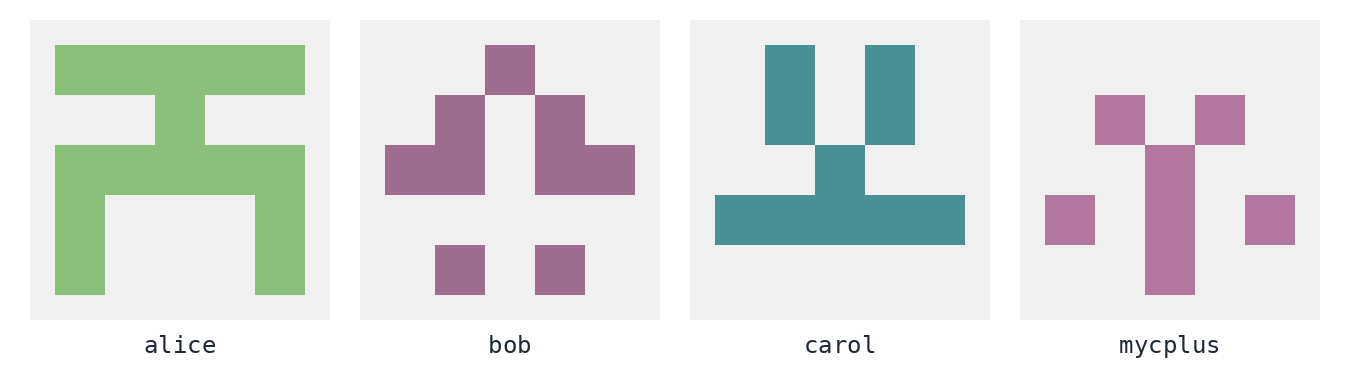
Many sites give a new account a generated picture until the user uploads one. An identicon is a common choice: a hash of the user name decides which cells of a 5 × 5 grid are filled and in which color, and mirroring the left half onto the right makes it look designed rather than random. The same name always produces the same picture, so nothing has to be stored.
uint32_t fnv1a32(const char *s)
{
    uint32_t h = 2166136261u;
    for (; *s != '\0'; s++) {
        h ^= (unsigned char)*s;
        h *= 16777619u;
    }
    return h;
}
/* Bits 0-14 of the hash fill the left three columns; columns 3 and 4
mirror columns 1 and 0. The color comes from a second mix of the hash. */
void identicon_cells(const char *name, int cells[5][5], int *r, int *g, int *b)
{
uint32_t h = fnv1a32(name);
for (int row = 0; row < 5; row++)
for (int col = 0; col < 3; col++) {
int on = (int)(h >> (row * 3 + col) & 1u);
cells[row][col] = on;
cells[row][4 - col] = on;
}
uint32_t c = h * 2654435761u;
*r = 40 + (int)(c >> 24 & 0xFF) % 160;
*g = 40 + (int)(c >> 16 & 0xFF) % 160;
*b = 40 + (int)(c >> 8 & 0xFF) % 160;
}/* identicon: draws a default avatar from a user name, the way sites give
new accounts a picture. The same name always gives the same image.
usage: identicon NAME OUT.png */
#include "imgtools.h"
#include <stdio.h>
int main(int argc, char **argv)
{
if (argc != 3) {
fprintf(stderr, "usage: identicon NAME OUT.png\n");
return 2;
}
int cells[5][5], r, g, b;
identicon_cells(argv[1], cells, &r, &g, &b);
printf("%s: hash %08lx, color #%02X%02X%02X\n", argv[1],
(unsigned long)fnv1a32(argv[1]), r, g, b);
for (int row = 0; row < 5; row++) { /* the same grid, as text */
for (int col = 0; col < 5; col++)
putchar(cells[row][col] ? '#' : '.');
putchar('\n');
}
gdImagePtr im = draw_identicon(argv[1], 50);
if (im == NULL || save_image(im, argv[2], -1) != 0) {
fprintf(stderr, "identicon: cannot write %s\n", argv[2]);
if (im != NULL)
gdImageDestroy(im);
return 1;
}
gdImageDestroy(im);
return 0;
}Output of identicon alice alice.png:
alice: hash 872213e7, color #8AC079
#####
..#..
#####
#...#
#...#
The hash is 32-bit FNV-1a, which is fast and spreads similar names well; the tests check it against the published test vectors. It is not a cryptographic hash, which is fine for avatars and wrong for anything that must not be guessed.
Sending an Image Without Writing a File
A web server or a CGI program usually sends the image in the response instead of saving it. gdImagePngPtr() and gdImageJpegPtr() encode the image into a memory buffer and return its size. The buffer belongs to you, and LibGD allocated it, so it must be released with gdFree(), not with free() and not with gdImageDestroy():
int main(int argc, char **argv)
{
    int leak = argc > 1 && strcmp(argv[1], "leak") == 0;
    gdImagePtr im = gdImageCreateTrueColor(100, 100);
    if (im == NULL)
        return 1;
    gdImageFilledRectangle(im, 0, 0, 99, 99, gdTrueColor(0x46, 0x7F, 0x40));

    int size = 0;
    void *png = gdImagePngPtr(im, &size);      /* the PNG file, in memory */
    gdImageDestroy(im);
    if (png == NULL)
        return 1;
    /* ... here a server would send the size bytes at png to the client ... */
    printf("encoded a PNG in memory%s\n", leak ? " (buffer not freed)" : " and freed it");
    if (!leak)
        gdFree(png);
    return 0;
}
Mistake 3 below shows what happens when the gdFree() call is missing.
Common Mistakes with LibGD
Each mistake below is a small program in the repository’s pitfalls directory, and the output is that program’s real output. Sanitizer reports are summarized to the error and the source line.
1. Opening the image file in text mode
Every PNG file begins with the same eight bytes: 89 50 4E 47 0D 0A 1A 0A. The PNG specification’s rationale explains why: the carriage return and line feed (0D 0A) and the lone line feed (0A) are there so that a file damaged by newline conversion, in either direction, is detected at once. Opening the output file with fopen(path, "w") is exactly such a transfer on Windows: in text mode, the C library writes every 0A byte as 0D 0A. On Linux and macOS, text mode and binary mode are the same thing, so the bug never shows up there.
This program writes the same image twice, once with "wb" and once with "w", and prints each file’s first eight bytes and whether LibGD can read it back:
/* Pitfall: opening an image file in text mode. A PNG file starts with the
   bytes 89 50 4E 47 0D 0A 1A 0A. Its designers put a CR LF and an LF in
   that signature on purpose, so that a text-mode transfer damages it
   visibly. With fopen(..., "w") on Windows, every 0A byte written becomes
   0D 0A, and the file is no longer a PNG. On Linux and macOS "w" and "wb"
   are the same, so code with this bug works there and fails on Windows. */
#include <gd.h>
#include <stdio.h>

static void try_mode(const char *mode)
{
    const char *path = "mode-test.png";
    gdImagePtr im = gdImageCreateTrueColor(64, 64);
    if (im == NULL)
        return;
    gdImageFilledRectangle(im, 0, 0, 63, 63, gdTrueColor(0x1A, 0x6F, 0xD4));
    FILE *out = fopen(path, mode);
    if (out == NULL) {
        gdImageDestroy(im);
        return;
    }
    gdImagePng(im, out);
    fclose(out);
    gdImageDestroy(im);

    unsigned char sig[8] = {0};
    FILE *in = fopen(path, "rb");
    size_t got = in != NULL ? fread(sig, 1, sizeof sig, in) : 0;
    if (in != NULL)
        fclose(in);
    printf("fopen mode \"%s\":%s first bytes", mode, mode[1] == '\0' ? " " : "");
    for (size_t i = 0; i < got; i++)
        printf(" %02X", sig[i]);

    gdImagePtr back = gdImageCreateFromFile(path);
    printf("\n  read back: %s\n", back != NULL ? "a valid 64x64 PNG" : "not a valid PNG");
    if (back != NULL)
        gdImageDestroy(back);
    remove(path);
}

int main(void)
{
    try_mode("wb");
    try_mode("w");
    return 0;
}
Output on Ubuntu 24.04:
fopen mode "wb": first bytes 89 50 4E 47 0D 0A 1A 0A
  read back: a valid 64x64 PNG
fopen mode "w":  first bytes 89 50 4E 47 0D 0A 1A 0A
  read back: a valid 64x64 PNG
Output on Windows 11 (MSVC):
fopen mode "wb": first bytes 89 50 4E 47 0D 0A 1A 0A
  read back: a valid 64x64 PNG
fopen mode "w":  first bytes 89 50 4E 47 0D 0D 0A 1A
  read back: not a valid PNG
On Linux the two files are identical. On Windows the "w" file has an extra 0D in the signature: the line feed at byte 6 was written as a carriage return and line feed, every later byte moved one place, and LibGD refused the file. The same expansion happens to every 0A byte in the compressed image data after it, so the damage is not limited to the header. The repository’s Windows test expects exactly this output.
The fix is one character, and it belongs in every fopen() call for image data: "wb" to write and "rb" to read. Code that is only ever tested on Linux will not catch it, which is why this article’s tests also run on Windows.
2. Using an image without checking that it loaded
gdImageCreateFromFile() and the format-specific load functions return NULL for a missing, truncated or corrupt file. LibGD also prints a warning to standard error, which is easy to miss in a server log. Code that goes on to call gdImageSX(im) reads through a null pointer:
int main(int argc, char **argv)
{
    if (argc < 2)
        return 2;
    gdImagePtr im = gdImageCreateFromFile(argv[1]);
    if (argc > 2 && strcmp(argv[2], "unchecked") == 0) {
        printf("size: %d x %d\n", gdImageSX(im), gdImageSY(im));   /* crashes if im is NULL */
        return 0;
    }
    if (im == NULL) {
        printf("cannot load the file as an image\n");
        return 1;
    }
    printf("size: %d x %d\n", gdImageSX(im), gdImageSY(im));
    gdImageDestroy(im);
    return 0;
}
Given the truncated PNG from the thumbnail example, the checked path reports the problem and exits with status 1:
Output of unchecked_load huge.png:
GD Warning: gd-png: fatal libpng error: Read Error: truncated data
GD Warning: gd-png error: setjmp returns error condition 1
cannot load the file as an image
The unchecked path crashes with a segmentation fault. Built with UndefinedBehaviorSanitizer, the report names the line:
GD Warning: gd-png: fatal libpng error: Read Error: truncated data
unchecked_load.c:16:9: runtime error: member access within null pointer of type 'struct gdImage'
3. Leaking the buffer from gdImagePngPtr()
Without the gdFree() call, every image the server sends leaks its whole encoded size. AddressSanitizer’s leak checker reports it at exit (summarized):
Direct leak of 313 byte(s) in 1 object(s), allocated at png_buffer_leak.c:20 (gdImagePngPtr)313 bytes is the size of that small green PNG. For a real chart or photo the leak is tens or hundreds of kilobytes per request, which is how a long-running image server runs out of memory.
4. Drawing photos and gradients in a palette image
A palette image holds 256 colors, as the palette section above showed: resampling a gradient into one kept 256 of its colors where a true-color image kept 16,384. The same limit makes antialiased lines and JPEG photos look posterized. Create the image with gdImageCreateTrueColor(), and if you load a palette PNG and want to draw smoothly on it, convert it with gdImagePaletteToTrueColor() first.
5. Decoding untrusted images without limits
An image file says how big it is, and a decoder allocates what it says. Check the dimensions from the header before decoding, as the thumbnail program does, and set a limit that suits your application. Also keep LibGD and the libraries under it (libpng, libjpeg, zlib) updated through your package manager: the project’s own release notes list security fixes in 2.2.x and 2.3.0, and image parsers are a common target because they read files from strangers.
LibGD Compared with Other C Image Libraries
LibGD is not the only choice, and for some jobs it is not the best one:
| Library | Best for | Notes |
|---|---|---|
| LibGD | Generating charts, thumbnails and simple graphics; code that mirrors PHP’s GD functions | Small C API; many formats through optional libraries; no new release since 2021 |
| stb_image and stb_image_write | Loading and saving images with no dependencies | Single header files you copy into a project; no drawing functions |
| Cairo | High-quality vector drawing: antialiased shapes, text, PDF and SVG output | The better choice for polished charts |
| libvips | Resizing and converting large images fast, with little memory | Streams images instead of loading them whole; the better choice for a busy thumbnail service |
| ImageMagick (MagickWand) | Format conversion and effects across a very wide range of formats | Large dependency; configure its security policy for untrusted input |
For the jobs in this article, LibGD is enough, and its small API makes it a good way to learn how image generation works.
How the Code Is Tested
Image code is hard to check by eye, so the tests read the images back:
- Unit tests (6,779 checks) cover format detection from file names and headers, PNG and JPEG headers read without decoding, truncated and fake files, lossless PNG round trips, the thumbnail size for dozens of shapes (including rounding and thin images), FNV-1a against its published test vectors, the mirroring and colors of identicons, and every bar of the chart: its top and bottom rows, its width, and that exactly six bars exist.
- The programs’ files are read back by
imgcheck, which checks the format, size and chosen pixel colors of every image the programs write. - The pitfall programs must print exactly the output shown here, including the Windows-only result of mistake 1.
- Deliberate mistakes.
tests/mutations.pyputs twelve plausible bugs into the helper library one at a time and confirms that the unit tests fail for each:
| Deliberate mistake | Check that failed |
|---|---|
| thumbnail size truncated, not rounded | w == cases[i][3] && h == cases[i][4] |
| small images enlarged to the box | w == cases[i][3] && h == cases[i][4] |
| thin images get a zero-pixel side | w == cases[i][3] && h == cases[i][4] |
| PNG header width and height swapped | image_header("t-image.png", &f, &w, &h) == 0 && f == IMG_PNG && w == 37 && h == 23 |
| JPEG header width and height swapped | image_header("t-image.jpg", &f, &w, &h) == 0 && f == IMG_JPEG && w == 37 && h == 23 |
| wrong FNV prime | fnv1a32("a") == 0xe40c292cu |
| identicon mirrored onto the wrong column | memcmp(cells, again, sizeof cells) == 0 && r == r2 && g == g2 && b == b2 |
| identicon reads the wrong hash bits | cells[row][col] == (int)(h >> (row * 3 + src) & 1u) |
| bar heights truncated, not rounded | bar_height_px(2900, 3150, 220) == 203 |
| bars one pixel too tall | !is_rgb(im, cx, base - bh - 1, CHART_BAR_COLOR) |
| bars one pixel too wide | !is_rgb(im, bx - 1, base - 1, CHART_BAR_COLOR) && !is_rgb(im, bx + bw, base - 1, CHART_BAR_COLOR) |
| unknown extension saved as JPEG | save_image(im, "t-image.gif", -1) == -1 |
Key Takeaways
- LibGD creates PNG, JPEG and other images from C: create an image, draw, save with
gdImagePng()orgdImageJpeg(), then free it withgdImageDestroy(). - Use true-color images (
gdImageCreateTrueColor()); a palette image holds only 256 colors. - Always open image files with
"wb". On Windows,"w"corrupts the PNG signature. - Check every create and load call for
NULL, and free buffers fromgdImagePngPtr()withgdFree(). - Resize with
gdImageCopyResampled()into a true-color image, keep the aspect ratio, and round the sizes. - Treat uploaded images as untrusted: read the size from the header and reject oversized files before decoding them.
gdImageStringFT()returns an error string,NULLon success; fall back to a built-in font when it fails.
Conclusion
Most of the work in image generation is not the drawing. It is the decisions around it: which kind of image to create, how to size it, how to write it so that it survives on every system, and how to refuse a file that would exhaust memory. LibGD keeps the drawing part small, which leaves those decisions in plain sight in a few dozen lines of C.
From here, try sending a chart straight from a small web server with gdImagePngPtr(), or add antialiased lines with gdImageSetAntiAliased(). For more C programming, see the C programming section.
Source Code and Tests

All programs on this page are in the graphics/libgd directory of the MYCPLUS C examples repository.
Build, test and run (Linux and macOS; on Windows add -DCMAKE_TOOLCHAIN_FILE=<vcpkg>/scripts/buildsystems/vcpkg.cmake to the first command):
cmake -S . -B build
cmake --build build
ctest --test-dir build --output-on-failure
cd build && ./chart ../data/downloads.txt chart.png
What the build checks.
- Compilers: GCC and Clang under C11 and C17 with
-Wall -Wextra -pedantic -Werroron Linux, and MSVC under/W4 /WXwith LibGD from vcpkg on Windows. - Images: every image the programs write is read back and its format, size and pixels checked.
- Sanitizers and mutations: the tests run clean under AddressSanitizer and UndefinedBehaviorSanitizer, the leak and the null-pointer pitfalls are reported, and all twelve deliberate mistakes are caught.
What I Verified
The Ubuntu column was run for this article on Ubuntu 24.04 (x86-64, GCC 13.3, Clang 18, CMake 3.28, LibGD 2.3.3 from Ubuntu, Valgrind). The Windows column comes from the repository’s run_all.ps1 on Windows 11 (MSVC 19.44 with CMake 4.4, and LibGD 2.3.3 from vcpkg with PNG, JPEG and FreeType).
| Check | Ubuntu 24.04 | Windows 11 |
|---|---|---|
Builds with warnings as errors: GCC and Clang (C11 and C17) on Ubuntu, MSVC /W4 /WX (C11 and C17) on Windows | Passed | MSVC /W4 /WX, C11 and C17: built |
| CTest: unit tests, images read back, program outputs, TrueType title | 20 of 20 in all four configurations | 20 of 20 in C11 and in C17 |
| Unit-test checks | 6,779 passed | 6,779 passed |
"w" versus "wb" (mistake 1) | Both files valid | "w" file rejected, signature 89 50 4E 47 0D 0D 0A 1A |
| Palette limits (256 colors; 16,384 against 256 after resampling) | Same numbers | Same numbers |
| AddressSanitizer and UndefinedBehaviorSanitizer, every test | 20 of 20, clean | Not applicable |
The leaked PNG buffer and the unchecked NULL image are reported | Yes (LeakSanitizer, UBSan) | Not applicable |
Valgrind memcheck: unit tests, chart, thumbnail | No errors, no leaks | Not applicable |
| 12 deliberate mistakes injected into the helper library | 12 of 12 caught | Not run |
Not covered: macOS, LibGD versions other than 2.3.3, 32-bit builds, and formats other than PNG and JPEG (GIF, WebP, AVIF and TIFF were not tested).