
Days till date
This little JavaScript will take an event or date in the future and compare it to the current date, then […]
This little JavaScript will take an event or date in the future and compare it to the current date, then […]

Here is a really simple JavaScript calculator – with just 5 functions! (Add, subtract, multiply, divide, and power) This example
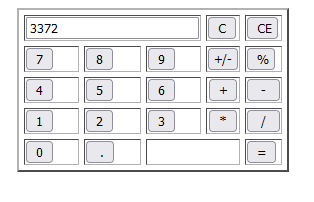
This is a very nice JavaScript calculator program to demonstrate simple operations such as addition, multiplication and division. Although the source code can get quite confusing, it works.
This useful JavaScript calculator will tell you the degrees, Nautical Miles, Statute Miles, and Kilometers between your originating and destination
Use JavaScript to find out just how much that new house or car is going to cost you each month.
The periodic table is a tabular arrangement of the chemical elements, ordered by their atomic number, electron configuration, and recurring
Does it ever bother you how much a long-distance phone call is going to cost, after you hung up? With
It’s often necessary to make a script only accessible to the newer browsers (that can support the script without error)

This source code shows you how to connect to Oracle Database 11g and execute queries using the PHP. First of all it sets the ORACLE_HOME and ORACLE_SID Environment variables using the putenv() method. Note that to run this code, you will need PHP OCI8 extension enable in php.ini file.

The following PHP source code shows that how to print random numbers within a range using. It uses rand() function to return the random numbers within a predefined range. The srand() function is used to provide the seed or arbitrary int number.

This is simple PHP script to show the contents of an XML file on html page. The script uses PHP XML parser to traverse through the xml file and print it’s contents. This extension requires the libxml PHP extension to be enabled.
To use SFTP within your PHP application, a series of fundamental steps need to be executed. First and foremost, you must establish a connection to the SFTP server by utilizing the ssh2 extension, which facilitates secure communication. Subsequently, authentication is crucial to ensure the identity of the connecting entity. This is achieved by providing valid credentials, including a username and password, to the SFTP server. Once authenticated, your PHP script gains access to the server and enables file-related operations such as listing directory contents, downloading files to the local environment, and uploading files to the remote server.